💾
Legacy
Legacy
ブリッジドックの壁紙 Plus
Bridge Dock Plus
iOS 13–15
iPhone 8 Plus/7 Plus/6s Plus
iPhone 8 Plus/7 Plus/6s Plus
架け橋のようなドック。
Dock like a bridge.
Dock like a bridge.
2592×2592
5.5″ Wallpaper
5.5″ Wallpaper
ご注意
視差効果: オフ
視差効果: オフ
設定時にタップ
設定中は「視差効果を減らす」をオフ。
「透明度を下げる」オフ。
(「ダークモードで壁紙を暗くする」オフ)
「透明度を下げる」オフ。
(「ダークモードで壁紙を暗くする」オフ)
ホーム画面用壁紙について


ライト ダーク
Notes
Perspective Zoom: Off
Perspective Zoom: Off
Tap it in setting
Reduce Motion: Off during setting.
Reduce Transparency: Off
(Dark Appearance Dims Wallpaper: Off)
Reduce Transparency: Off
(Dark Appearance Dims Wallpaper: Off)
For Home Screen wallpaper
Light Dark
Choose according to the mode.
(Lock screen wallpaper works in both modes)
▶︎ Explanation of Light Mode/Dark Mode
(Lock screen wallpaper works in both modes)
▶︎ Explanation of Light Mode/Dark Mode
Type Light Mode
ライトモードタイプ
ライトモードタイプ
Light Mode

Home Screen

Lock Screen
Light Mode

Home Screen

Lock Screen
Light Mode

Home Screen

Lock Screen
Light Mode

Home Screen

Lock Screen
Type Dark Mode
ダークモードタイプ
ダークモードタイプ
Dark Mode

Home Screen

Lock Screen
注意事項補足
- ホームボタンモデルではドックの上のヘアラインは消せず、ダークモードではそれが見えます。
- 色の調整はiOS 13.4で行っています。
- 設定中に壁紙をスワイプすると、視差効果をオフにする時にポジションが戻ったように見えても実際はずれています。動かしてしまった場合は一度キャンセルして最初からやり直してください。
- 普段「視差効果を減らす」をオンでお使いの方は設定時だけオフにしてください。(設定 > アクセシビリティ > 動作 > 視差効果を減らす)
- 「透明度を下げる」がオンになっているとドックとボタンの色は合いません。デフォルトではオフですがオンになっている場合は 設定 > アクセシビリティ > 画面表示と明るさ > 「透明度を下げる」をオフにしてください。
- ダークモードにしている場合に「ダークモードで壁紙を暗くする」がオンになっていると背景だけが暗くなります。デフォルトではオフですがオンになっている場合は 設定 > 壁紙 > 「ダークモードで壁紙を暗くする」をオフにしてください。
- 「透明度を下げる」をオンにしていた場合、オフにした後でドックやフォルダの色がおかしくなることがあります。そのときは一度ダークモードのオンオフを切り替えると修正されます。
- ダウンロードに時間がかかった場合、読み込み終了前に画像を保存すると描写が壊れることがあります。読み込みが完了するまで待ってください。
Notes Supplement
- The hairline above Dock is not erased on Home button models, and you can see it on Dark Mode.
- The colors were made in iOS 13.4.
- If you swipe the wallpaper in the setting, even if it looks like the position back when turning Off Perspective Zoom, it is actually dislocated. If it has moved, cancel it once and start over.
- If you usually use Reduce Motion On, turn it Off only during setup. (Settings > Accessibility > Motion > Reduce Motion)
- If Reduce Transparency is turned On, the colors of Dock and buttons do not match. It is Off by default, but if it is On, turn Off Settings > Accesibility > Display and Blightness > Reduce Transparency.
- f you are in Dark Mode and Dark Appearance Dims Wallpaper is On, only the background will be dark. It is Off by default, but if it is On, turn Off Settings > Wallpaper > Dark Appearance Dims Wallpaper.
- If Reduce Transparency was On, the color of Dock or folders may be strange after it was turned Off. In that case, it will be fixed once Dark Mode is switched On and Off.
- If it takes time to download, the image may be damaged if you save it before loading. Please wait until loading is complete.
解説
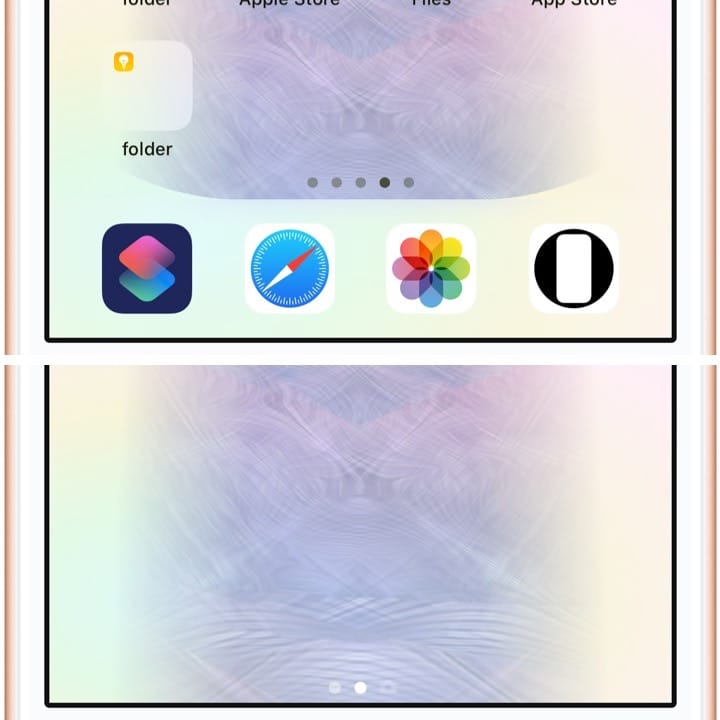
ドックが左右の背景に溶け込むデザインの壁紙です。ドックと背景の一部を同じ色にして形を変えたように見せます。
ロック画面用にはトリックはありません。
iOS 13の5.5インチiPhoneのドックは他の画面サイズとはかなり異なるルールになっていて、使える色が限られます。
ドックが左右の背景に溶け込むデザインの壁紙です。ドックと背景の一部を同じ色にして形を変えたように見せます。
ロック画面用にはトリックはありません。
iOS 13の5.5インチiPhoneのドックは他の画面サイズとはかなり異なるルールになっていて、使える色が限られます。
Commentary
The wallpaper with a design where Dock blends into the background on the sides. Dock and part of the background is the same color to make it look like it has changed shape.
There are no tricks for Lock Screen.
The iOS 13 5.5-inch iPhone's Dock rules are quite different from other screen sizes, and the colors available are limited.
The wallpaper with a design where Dock blends into the background on the sides. Dock and part of the background is the same color to make it look like it has changed shape.
There are no tricks for Lock Screen.
The iOS 13 5.5-inch iPhone's Dock rules are quite different from other screen sizes, and the colors available are limited.
