猫ベゼルの壁紙
Cat Bezel
iOS 14–
iPhone Air/17 Pro Max/17 Pro/17/17e/
16 Pro Max/16 Pro/16 Plus/16/16e/
15 Pro Max/15 Pro/15 Plus/15/
14 Pro Max/14 Pro/14 Plus/14/
13 Pro Max/13 Pro/13/13 mini/
12 Pro Max/12 Pro/12/12 mini/
11 Pro Max/11 Pro/11/XS Max/XS/XR/X
・▲・ iPhone=?iOS=? ・▼・
iPhone Air/17 Pro Max/17 Pro/17/17e/
16 Pro Max/16 Pro/16 Plus/16/16e/
15 Pro Max/15 Pro/15 Plus/15/
14 Pro Max/14 Pro/14 Plus/14/
13 Pro Max/13 Pro/13/13 mini/
12 Pro Max/12 Pro/12/12 mini/
11 Pro Max/11 Pro/11/XS Max/XS/XR/X
・▲・ iPhone=?iOS=? ・▼・
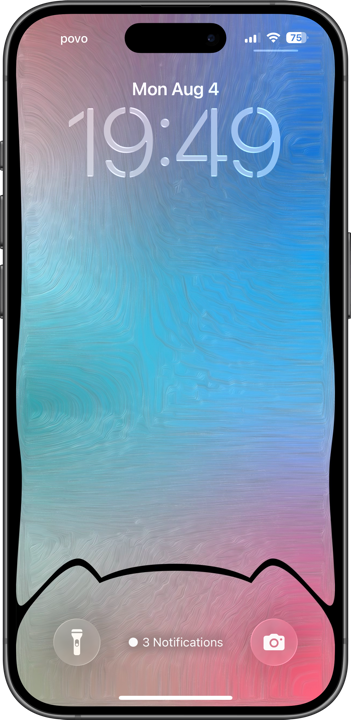
猫型ベゼルと毛並み風ヘアライン。
Cat-style bezels with fur-like hairlines.
Cat-style bezels with fur-like hairlines.

1320×3002
Universal Wallpaper
Universal Wallpaper
How to Set
・▲・
・▲・
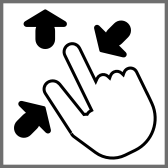

そっと少し、つまんで上げて、放す
自然光/白黒
ホーム画面:ぼかしオフ・明暗お好み
───────────────
Gently pinch up a little, then release
Natural/Black & White
Home: Blur off; light/dark to taste
───────────────
⚙︎ Help ⚙︎
自然光/白黒
ホーム画面:ぼかしオフ・明暗お好み
───────────────
Gently pinch up a little, then release
Natural/Black & White
Home: Blur off; light/dark to taste
───────────────
⚙︎ Help ⚙︎
・▼・
タップ → 表示 → 長押し保存
Tap → View → Hold to save
タップ → 表示 → 長押し保存
Tap → View → Hold to save


★
- そっと少しピンチイン ▶︎ 少し上に上げて ▶︎ 指を放すと、自動的に左右いっぱい下ゾロエの位置に戻ってきます。とくにiOS 27以降のApple Intelligence対応機種ではピンチインし過ぎると「拡張」がはたらくので、その手前で止めてください。「拡張」に入ってしまったらキャンセルしてやり直す必要があります。
- 画像形式をWebPにして高品質軽量化を図っています。iOS 14以降で表示できます。
- iOS 16以降のiPhoneでは壁紙を設定する時の表示位置がまちまちです。さらにiOS 17–26では壁紙を動かすと自動補完で上部がぼかされることがあります。これらをかいくぐって全画面表示にするため、超縦長壁紙を上にスワイプして設定する仕様にしました(iOSのバージョン、機種、絵柄の相性によってはぼかしを避けられないこともあるかもしれませんが、iOS 27で自動補完は廃止されました)。壁紙上部はカットされ、表示位置はすべての機種で下ゾロエになります。
- iPhone SE 3/2のホーム画面に使用すると、猫耳の下のカーブがドックに少し切られます。また猫耳はアイコンの最下段に隠れます。
- Gently pinch in a little ▶︎ lift up a little ▶︎ release your fingers, and it’ll automatically snap back to the bottom-aligned, full-width position. On iOS 27+ Apple Intelligence–compatible devices especially, pinching in too far triggers “Extend,” so stop just short of that point. If you do trigger “Extend,” you’ll need to cancel and start over.
- The image format is WebP to make it high quality and lightweight. iOS 14 or later can display it.
- On iPhone running iOS 16 or later, the wallpaper’s display position varies when you set it. In addition, on iOS 17–26, moving the wallpaper can trigger Auto-Extend, which blurs the top area. To work around this and achieve a full-screen display, this wallpaper is designed as an extra-tall image that you swipe upward to set (depending on the iOS version, device model, and image composition, the blur may not always be avoidable — though Auto-Extend is removed in iOS 27). The top of the wallpaper will be cropped, and the display position will be bottom-aligned on all devices.
- Using this on an iPhone SE 3/2 home screen may clip the curves under the cat ears and hide them behind the bottom row of icons.
Face ID iPhoneのベゼルと一体化する猫耳でドックスペースを区切る壁紙です。接合部は複合カーブでiPhoneと自然に馴染みます。サイドには猫をイメージした曲線、背景はメッシュグラデーションに毛並みをモチーフにしたヘアラインをあしらっています。
This wallpaper features cat ears that divide the dock space, designed to integrate with the bezels of Face ID iPhones. The joints use compound curves that blend naturally into the device, and cat-inspired curves run along the sides. The background is a mesh gradient with hairline textures resembling fur.
This wallpaper features cat ears that divide the dock space, designed to integrate with the bezels of Face ID iPhones. The joints use compound curves that blend naturally into the device, and cat-inspired curves run along the sides. The background is a mesh gradient with hairline textures resembling fur.
