💾
Legacy
Legacy
流行色の壁紙 2017年春
Color Trends for iOS
Spring 2017
PANTONE®発表の流行色2017年春版。
iOSで色を生かす壁紙です。
Color trends Spring 2017 by PANTONE®
It doesn't disturb the color on iOS.
iOSで色を生かす壁紙です。
Color trends Spring 2017 by PANTONE®
It doesn't disturb the color on iOS.
iPhone 7/6(s)/Plus/SE1/5(s/c)/4s
iPod touch 6/5/iPad (Pro/mini)?
[Mac OS X/macOS/Apple Watch]
iOS 8.3–10.3/11.1–
iPod touch 6/5/iPad (Pro/mini)?
[Mac OS X/macOS/Apple Watch]
iOS 8.3–10.3/11.1–
1×16
Universal Wallpaper
Universal Wallpaper
機能とご注意
- iOS 11.1ではほんの少しだけドックとフォルダを地味にします。背景は暗くなりません。(iOS 11では設定できません)。
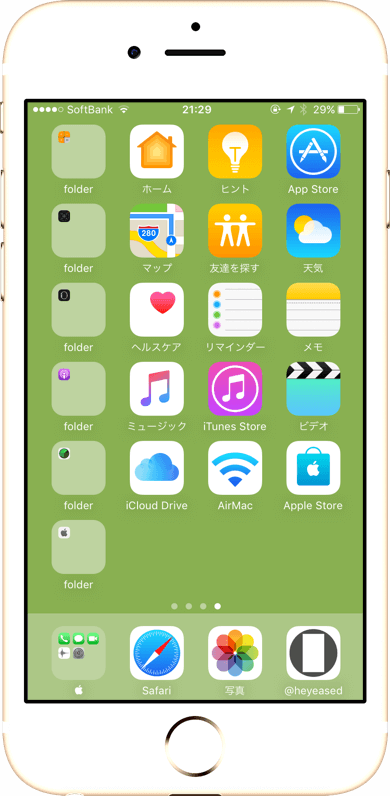
- iOS 10.2〜ではドックとフォルダを薄い色にして背景の色を生かします。背景は暗くなりません。
- iOS 10.2〜では機種により設定時に背景が黒くなることがあります。その場合成功するまで再設定してください。
- iOS 10〜10.1では背景は暗くなり、ドックとフォルダが流行色本来の色になります。場合によりフォルダが丸くなります。「透明度を下げる」はオフのままご使用ください。
- iOS 8.3〜9.3では背景は暗くならず、ドックはダークグレーに、フォルダはライトグレーになります。
- 通常の流行色壁紙としてMacやApple Watchでも使えます。iOS 10〜のiPadでは正しい色が出ないかもしれません。
画像を直接長押し保存してください
細長い画像が保存されます。
細長い画像が保存されます。
Function and Notes
- On iOS 11.1, Dock and folders become modest just a little. The background is never darkened. (It can not be set on iOS 11.)
- In iOS 10.2- Dock and folders are lightened to make the best use of the background color trends. The background is never darkened.
- In iOS 10.2- Depending on the device, the background may be black at setting. In that case retry until it succeeds.
- In iOS 10-10.1 the background becomes darker, but Dock and folders become the original color. Folders are rounded in in some cases. keep Off "Reduce Transparency".
- In iOS 8.3-9.3 the background does not become dark, Dock becomes dark gray, folders become light gray.
- You can use these a normal color trends wallpaper on Mac or Apple Watch. Correct color may not appear on iOS 10- iPad.
Tap and hold to save the below image.
Elongated image is preserved.
Elongated image is preserved.


なぜ?
iOS 11.1ではおそらく小さ過ぎる画像のわずかな劣化により、ドックとフォルダはほんの少し地味になります。
iOS 11では設定しようとするとiPhoneが落ちます。
iOS 10.2〜では完全な単色背景はどんなサイズでも暗くされることはありませんが、ある程度小さな壁紙を設定するとドックとフォルダの色が薄くなります。
iOS 10〜10.1では幅または高さ1ピクセルの壁紙を使うと、ドックとフォルダの色は元の画像そのままになります(背景は暗くなります)。また、ロック画面は小さ過ぎる壁紙だと単色では暗くなりません。
iOS 8.3〜9.3では小さ過ぎる壁紙は絶対に暗くなりません。ドックはダークグレー、フォルダは薄いグレーになります。
高さが16ピクセルあるのはiOS 8.3のカメラロール一覧でも色が見えるように。面積が小さすぎるとどんな色も薄い灰色でしか表示されませんでした。
iOS 11.1ではおそらく小さ過ぎる画像のわずかな劣化により、ドックとフォルダはほんの少し地味になります。
iOS 11では設定しようとするとiPhoneが落ちます。
iOS 10.2〜では完全な単色背景はどんなサイズでも暗くされることはありませんが、ある程度小さな壁紙を設定するとドックとフォルダの色が薄くなります。
iOS 10〜10.1では幅または高さ1ピクセルの壁紙を使うと、ドックとフォルダの色は元の画像そのままになります(背景は暗くなります)。また、ロック画面は小さ過ぎる壁紙だと単色では暗くなりません。
iOS 8.3〜9.3では小さ過ぎる壁紙は絶対に暗くなりません。ドックはダークグレー、フォルダは薄いグレーになります。
高さが16ピクセルあるのはiOS 8.3のカメラロール一覧でも色が見えるように。面積が小さすぎるとどんな色も薄い灰色でしか表示されませんでした。
Why?
In iOS 11.1, Dock and folders are just a little bit plain probably due to a slight degradation of the image which is too small.
In iOS 11, iPhone shuts down when trying to set up.
In iOS 10.2-, a perfect single color background is never darkened at any wallpaper size, but setting a small wallpaper to some extent diminishes the color of Dock and folders.
In iOS 10-10.1, using 1px width and/or height wallpaper, the color of Dock and folders are the same as the original image (The background is darkened). On Lock Screen, the solid color background is never darkened on a too small wallpaper.
In iOS 8.3-9.3, the background is never darkened on a too small wallpaper. Dock and folders never pick up the colors from background at 1px width wallpaper.
16px height to see the color even with iOS 8.3 iPhone Camera Roll thumbnail. If the area was insufficient, only the light gray color was displayed for any color.
In iOS 11.1, Dock and folders are just a little bit plain probably due to a slight degradation of the image which is too small.
In iOS 11, iPhone shuts down when trying to set up.
In iOS 10.2-, a perfect single color background is never darkened at any wallpaper size, but setting a small wallpaper to some extent diminishes the color of Dock and folders.
In iOS 10-10.1, using 1px width and/or height wallpaper, the color of Dock and folders are the same as the original image (The background is darkened). On Lock Screen, the solid color background is never darkened on a too small wallpaper.
In iOS 8.3-9.3, the background is never darkened on a too small wallpaper. Dock and folders never pick up the colors from background at 1px width wallpaper.
16px height to see the color even with iOS 8.3 iPhone Camera Roll thumbnail. If the area was insufficient, only the light gray color was displayed for any color.
