💾
Legacy
Legacy
完全な壁紙 X
Complete X
ジェスチャーガイド完全版。
設定したらPro/Xマスター。
ページ下部に説明があります。
Complete gestures guide.
If you set this you are Pro/X master.
There is expression at the bottom of the page.
設定したらPro/Xマスター。
ページ下部に説明があります。
Complete gestures guide.
If you set this you are Pro/X master.
There is expression at the bottom of the page.
iPhone 11 Pro/XS/X
iOS 12–13.1
iOS 12–13.1

1301×2820
5.8″ Wallpaper
5.8″ Wallpaper
ご注意
移動などせずそのまま設定。
設定中は「視差効果を減らす」をオフ。
移動などせずそのまま設定。
設定中は「視差効果を減らす」をオフ。
サムネイルをタップして表示、長押し保存
(部分拡大です)
(部分拡大です)
Notes
Set as it is without moving.
Reduce Motion: Off during setting.
Set as it is without moving.
Reduce Motion: Off during setting.
Tap the thumbnail to view & long press.
(They are close up.)
(They are close up.)
White

Home Screen

Lock Screen
Gold

Home Screen

Lock Screen
Gray

Home Screen

Lock Screen
Rainbow

Home Screen

Lock Screen
Gradient

Home Screen

Lock Screen
Red

Home Screen

Lock Screen
Orange

Home Screen

Lock Screen
Yellow

Home Screen

Lock Screen
Green

Home Screen

Lock Screen
Blue

Home Screen

Lock Screen
Violet

Home Screen

Lock Screen
Magenta

Home Screen

Lock Screen
Rose Pink

Home Screen

Lock Screen
Tangerine

Home Screen

Lock Screen
Lemon

Home Screen

Lock Screen
Lime

Home Screen

Lock Screen
Cyan

Home Screen

Lock Screen
Lilac

Home Screen

Lock Screen
Khaki

Home Screen

Lock Screen
Brown

Home Screen

Lock Screen
Bordeaux

Home Screen

Lock Screen
Taupe

Home Screen

Lock Screen
Aofuji

Home Screen

Lock Screen
Gold Leaf

Home Screen

Lock Screen
Stone

Home Screen

Lock Screen
Wood

Home Screen

Lock Screen
Kimono

Home Screen

Lock Screen
Wave
ホーム画面に戻る時に波打ちます。
It waves when back to Home Screen.
It waves when back to Home Screen.
Silver Wave

Home Screen

Lock Screen
Golden Wave

Home Screen

Lock Screen
注意事項補足
- ダウンロードに時間がかかった場合、読み込み終了前に画像を保存すると下の方が壊れます。全体が表示されるまで待ってください。
- 設定時に「視差効果」にすると壁紙が上に移動して、その後「静止画」に戻してもポジションは戻りません。壁紙を動かしてしまった場合は、一度キャンセルしてはじめからやり直す必要があります。
- 普段「視差効果を減らす」をオンでお使いの方は設定時だけオフにしてください。(iOS 13–:設定 > アクセシビリティ > 動作 > 視差効果を減らす iOS 12:設定 > 一般 > アクセシビリティ > 視差効果を減らす)
Notes Supplement
- If it takes time to download, if you save the image before loading finishes, the lower part breaks. Wait until the whole is displayed.
- If you change to Perspective in setting, the wallpaper will move up and the position will not return even if you return to Still. If you move the wallpaper, you need to cancel it and start over.
- If you normally use Reduce Motion on, turn it off only during setup. (iOS 13–: Settings > Accessibility > Motion > Reduce Motion iOS 12: Settings > General > Accessibility > Reduce Motion)
ジェスチャーの説明
(下に画像があります)
(下に画像があります)
Apple流に、壁紙にはシンプルなアイコンだけを置いています。
ボタン操作
① サイドボタンを押す:スリープ/スリープ解除(または手前に傾けるかタップしてスリープ解除)
② サイドボタンをダブルクリック:Apple Pay
③ サイドボタンを長押し:Siri
④ ボリューム大とサイドボタン同時押し:スクリーンショット
⑤ ボリューム大または小いずれかとサイドボタンを同時に長押し:電源オフ/メディカルID/緊急SOS
① サイドボタンを押す:スリープ/スリープ解除(または手前に傾けるかタップしてスリープ解除)
② サイドボタンをダブルクリック:Apple Pay
③ サイドボタンを長押し:Siri
④ ボリューム大とサイドボタン同時押し:スクリーンショット
⑤ ボリューム大または小いずれかとサイドボタンを同時に長押し:電源オフ/メディカルID/緊急SOS
ホーム画面/ロック画面/通知センター共通
⑥ 画面上部(ベゼルを含む)を2本指で下にスワイプ:画面を読み上げ(ホーム画面では使えないがウィジェットでは使える)
⑦ ノッチの右側を下にスワイプ:コントロールセンター
⑥ 画面上部(ベゼルを含む)を2本指で下にスワイプ:画面を読み上げ(ホーム画面では使えないがウィジェットでは使える)
⑦ ノッチの右側を下にスワイプ:コントロールセンター
ホーム画面
⑧ ノッチ(およびノッチの左側のベゼル)を下にスワイプ:通知センター
⑨ 画面を下にスワイプ:スポットライト検索
⑩ 画面下を上にスワイプ:アプリスイッチャー(右にスワイプでバックグラウンドのアプリに移動。下にスワイプで簡易アクセス:設定 > 一般 > アクセシビリティ > 簡易アクセス)
⑧ ノッチ(およびノッチの左側のベゼル)を下にスワイプ:通知センター
⑨ 画面を下にスワイプ:スポットライト検索
⑩ 画面下を上にスワイプ:アプリスイッチャー(右にスワイプでバックグラウンドのアプリに移動。下にスワイプで簡易アクセス:設定 > 一般 > アクセシビリティ > 簡易アクセス)
ロック画面/通知センター
⑪ 画面を上にスワイプ:過去の通知(壁紙のパーツを暗めに作っているので「過去の通知はありません」が出ると見えません)
⑫ 画面を左右スワイプ:ウィジェット/カメラ(パーツはiPhone 8までを再現)
⑪ 画面を上にスワイプ:過去の通知(壁紙のパーツを暗めに作っているので「過去の通知はありません」が出ると見えません)
⑫ 画面を左右スワイプ:ウィジェット/カメラ(パーツはiPhone 8までを再現)
もともとあるインジケーター
⓭ ロック画面/通知センターではコントロールセンターを引き下げる目印が表示されます。
⓮ ロック画面/通知センターからライトまたはカメラを起動するボタン。押して離します。
⓯ 上にスワイプしてロック解除(通知センターから戻る)
⓰ 画面を左右にスワイプしてページ移動は従来どおり。ホーム画面では0ページめがウィジェット。
⓭ ロック画面/通知センターではコントロールセンターを引き下げる目印が表示されます。
⓮ ロック画面/通知センターからライトまたはカメラを起動するボタン。押して離します。
⓯ 上にスワイプしてロック解除(通知センターから戻る)
⓰ 画面を左右にスワイプしてページ移動は従来どおり。ホーム画面では0ページめがウィジェット。
トラブル時の最後の手段、リカバリーモードについては壁紙にはありません。▶︎ iPhone、iPad、iPod touch をアップデート/復元できない場合(アップルサポート)
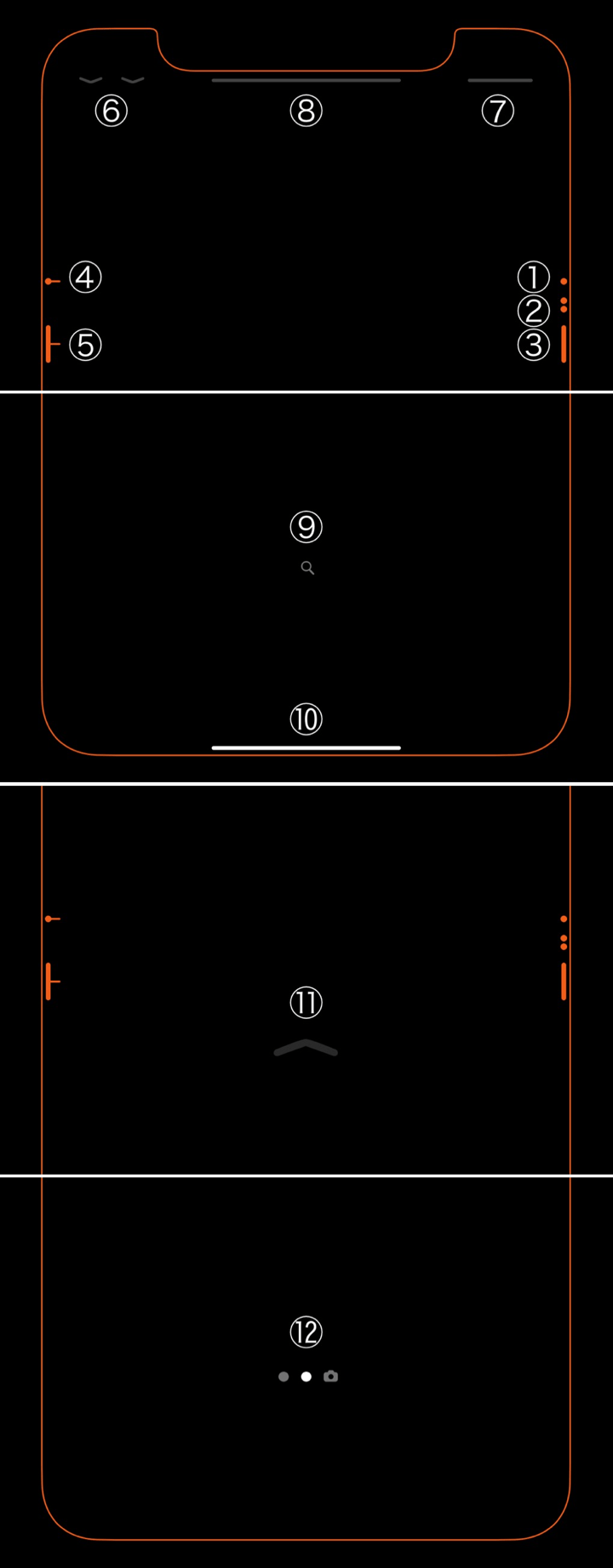
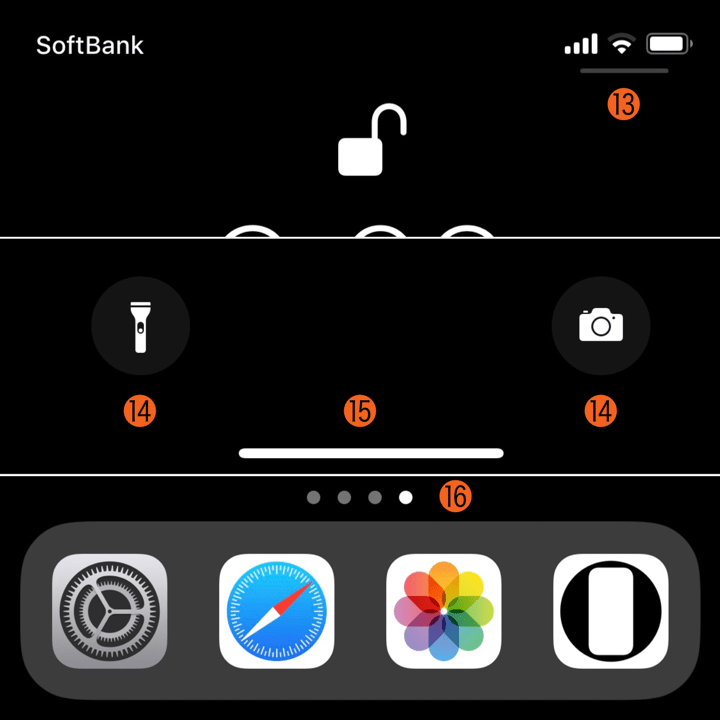
Gestures Expression
Apple style, this wallpaper has only simple icons.
Button operation
① Press the Side button: Sleep/Wake (Or raise or tap the screen to wake.)
② Double click the Side button: Apple Pay
③ Press and hold the Side button: Siri
④ Press the volume up and Side button at the same time: Screenshot
⑤ Press and hold either the volume up or down and the Side button at the same time: Power off/Medical ID/Emergency SOS
① Press the Side button: Sleep/Wake (Or raise or tap the screen to wake.)
② Double click the Side button: Apple Pay
③ Press and hold the Side button: Siri
④ Press the volume up and Side button at the same time: Screenshot
⑤ Press and hold either the volume up or down and the Side button at the same time: Power off/Medical ID/Emergency SOS
Common to Home Screen/Lock Screen/Notification Center
⑥ Swipe down at the top of the screen (including the bezel) with two fingers: Speech (Can not be used in Home Screen but can be used with widgets)
⑦ Swipe down the right side of the notch: Control Center
⑥ Swipe down at the top of the screen (including the bezel) with two fingers: Speech (Can not be used in Home Screen but can be used with widgets)
⑦ Swipe down the right side of the notch: Control Center
Home Screen
⑧ Swipe down the notch (and the bezel on the left side of the notch): Notification Center
⑨ Swipe down the screen: Spotlight
⑩ Swipe up at the bottom of the screen: App Switcher (Swipe right to go to background app. Swipe down to Reachability: Settings > General > Accessibility > Reachability)
⑧ Swipe down the notch (and the bezel on the left side of the notch): Notification Center
⑨ Swipe down the screen: Spotlight
⑩ Swipe up at the bottom of the screen: App Switcher (Swipe right to go to background app. Swipe down to Reachability: Settings > General > Accessibility > Reachability)
Lock Screen/Notification Center
⑪ Swipe up the screen: Old notifications (Because the part of wallpaper is made dark, it will not be seen if "No Older Notifications" overlap.)
⑫ Swipe left/right the screen: Widgets/Camera (The parts are reproduced up to iPhone 8.)
⑪ Swipe up the screen: Old notifications (Because the part of wallpaper is made dark, it will not be seen if "No Older Notifications" overlap.)
⑫ Swipe left/right the screen: Widgets/Camera (The parts are reproduced up to iPhone 8.)
Original Indicators
⓭ Lock Screen/Notification Center displays a mark that lowers Control Center.
⓮ Buttons to launch Light or Camera from Lock Screen/Notification Center. Push and release.
⓯ Swipe up to unlock (return from Notification Center)
⓰ Swipe the screen left or right and move the page as before. In Home Screen, page 0 is widgets.
⓭ Lock Screen/Notification Center displays a mark that lowers Control Center.
⓮ Buttons to launch Light or Camera from Lock Screen/Notification Center. Push and release.
⓯ Swipe up to unlock (return from Notification Center)
⓰ Swipe the screen left or right and move the page as before. In Home Screen, page 0 is widgets.
The final means at the time of trouble, the recovery mode is not on the wallpaper. ▶︎ If you can't update or restore your iPhone, iPad, or iPod touch (Apple Support)
解説
画面を縁どるフレームに加えて、すべてのジェスチャーのヒントを最小限の要素で散りばめました。
ベゼルレスiPhoneのインターフェイスは慣れると快適ですが、最初は結構戸惑います。Appleもロック画面のコントロールセンターやホームインジケーターなどでヒントを示してはいるものの、すべてを表示してはいません。そこでAppleの真似をしてヒントを補いました。デザインはもともとあるヒントと区別がつかないくらい寄せています。
さすがにボリュームボタン自体やサイレントスイッチの説明は省略しました。それでも上のとおりたくさんの操作があります。しかし壁紙は物足りないくらいスッキリ仕上がりました。Appleが操作を練りこんでいることの顕れでしょう。
共通仕様についてより詳しくはカテゴリーページ(下のボタンからX Style Wallpapersへ)下部のテクニカルノートをお読みください。
画面を縁どるフレームに加えて、すべてのジェスチャーのヒントを最小限の要素で散りばめました。
ベゼルレスiPhoneのインターフェイスは慣れると快適ですが、最初は結構戸惑います。Appleもロック画面のコントロールセンターやホームインジケーターなどでヒントを示してはいるものの、すべてを表示してはいません。そこでAppleの真似をしてヒントを補いました。デザインはもともとあるヒントと区別がつかないくらい寄せています。
さすがにボリュームボタン自体やサイレントスイッチの説明は省略しました。それでも上のとおりたくさんの操作があります。しかし壁紙は物足りないくらいスッキリ仕上がりました。Appleが操作を練りこんでいることの顕れでしょう。
共通仕様についてより詳しくはカテゴリーページ(下のボタンからX Style Wallpapersへ)下部のテクニカルノートをお読みください。
Commentary
In addition to the frame bordering the screen, I placed all the gesture hints with minimal elements.
The Bezel-less iPhone interface is comfortable once you get used to it, but at first it is quite puzzling. Although Apple shows hints on the Control Center and Home Indicator on Lock Screen etc., they don't display everything. So I imitated Apple and compensated for missing hints (I didn't made existing hints). The design resembles the original hint so that it can not be distinguished.
As expected, I omitted the explanation of volume buttons themselves and the silent switch. Nevertheless, as above, there are many operations. But the wallpaper was finished just too simple. I think that it is the manifestation that Apple has refined the operation.
For more information about basic specifications, please read the Technical Note at the bottom of the category page (go to X Style Wallpapers from the button below).
In addition to the frame bordering the screen, I placed all the gesture hints with minimal elements.
The Bezel-less iPhone interface is comfortable once you get used to it, but at first it is quite puzzling. Although Apple shows hints on the Control Center and Home Indicator on Lock Screen etc., they don't display everything. So I imitated Apple and compensated for missing hints (I didn't made existing hints). The design resembles the original hint so that it can not be distinguished.
As expected, I omitted the explanation of volume buttons themselves and the silent switch. Nevertheless, as above, there are many operations. But the wallpaper was finished just too simple. I think that it is the manifestation that Apple has refined the operation.
For more information about basic specifications, please read the Technical Note at the bottom of the category page (go to X Style Wallpapers from the button below).
