ネコハラ壁紙
#Nekohara
iOS 14–
iPhone Air/17 Pro Max/17 Pro/17/17e/
16 Pro Max/16 Pro/16 Plus/16/16e/
15 Pro Max/15 Pro/15 Plus/15/
14 Pro Max/14 Pro/14 Plus/14/
13 Pro Max/13 Pro/13/13 mini/
12 Pro Max/12 Pro/12/12 mini/
11 Pro Max/11 Pro/11/XS Max/XS/XR/X
iPhone Air/17 Pro Max/17 Pro/17/17e/
16 Pro Max/16 Pro/16 Plus/16/16e/
15 Pro Max/15 Pro/15 Plus/15/
14 Pro Max/14 Pro/14 Plus/14/
13 Pro Max/13 Pro/13/13 mini/
12 Pro Max/12 Pro/12/12 mini/
11 Pro Max/11 Pro/11/XS Max/XS/XR/X
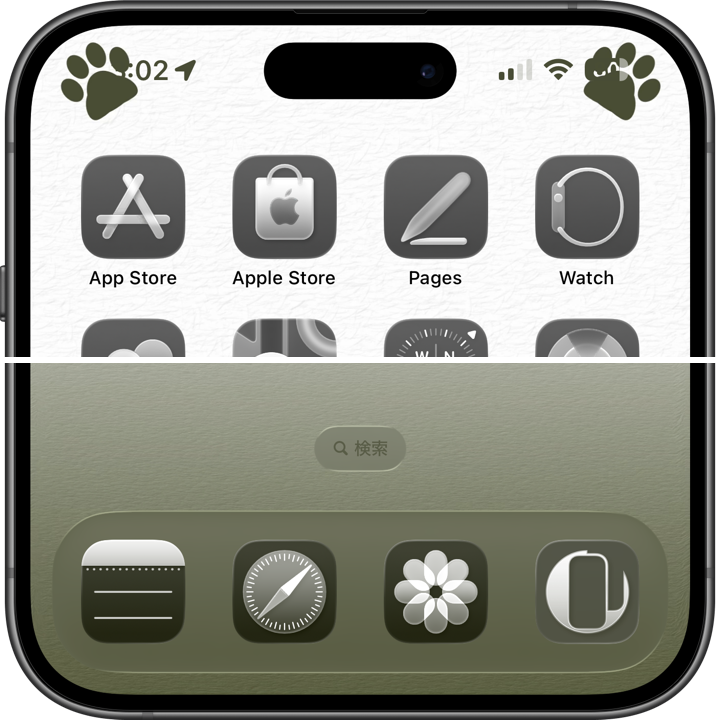
ステータスと同色の肉球。
Cat paws the same color as the status.
Cat paws the same color as the status.
1320×3002
Universal Wallpaper
Universal Wallpaper
How to Set
ピンチインして上に
ホーム画面:ぼかしオフ・背景明るく
───────────────
Pinch in then swipe up
Home: Blur off; Brighter background
───────────────
Help
ホーム画面:ぼかしオフ・背景明るく
───────────────
Pinch in then swipe up
Home: Blur off; Brighter background
───────────────
Help
▼
タップ → 表示 → 長押し保存
Tap → View → Hold to save
タップ → 表示 → 長押し保存
Tap → View → Hold to save

Sumi

Matcha

Hojicha

Azuki

Aizome
👀
ロック画面かホーム画面を下か右にスワイプすれば猫をどけられます。
Swipe down or right on the Lock or Home Screen to move the cat out of the way.
ロック画面かホーム画面を下か右にスワイプすれば猫をどけられます。
Swipe down or right on the Lock or Home Screen to move the cat out of the way.

★
- iOS 18以前ではロック画面の文字色は厳密には合いません。iOS 26のロック画面では、通知が少ないと(またはリキッドグラスを色合い調整に切り替えると)壁紙が明るくなって文字が見えます。
- ロック画面に設定したときは、一度ホーム画面に行くまで文字の色は変わりません。
- iPhoneの壁紙は表示位置がまちまちで動かすと上部がぼかされることがあるため、万が一のぼかし防止と、色々な画面サイズでの表示位置を特定するために、超縦長壁紙を上にスワイプして設定する仕様になっています。
- 画像形式をWebPにして高品質軽量化を図っています。iOS 14以降で表示できます。
- On iOS 18 and earlier, the Lock Screen text color won’t match exactly. On iOS 26, when notifications are few (or when you switch Liquid Glass to Tinted), the wallpaper brightens and the text becomes visible.
- When set as the Lock Screen, the text color won’t change until you navigate to the Home Screen.
- Because the display position of iPhone wallpapers varies and the top area can sometimes get blurred when moved, this wallpaper is designed to be set by swiping up a super-tall image. This prevents unwanted blur and ensures precise positioning across different screen sizes.
- The image format is WebP to make it high quality and lightweight. iOS 14 or later can display it.
iPhoneでは壁紙がかなり明るいとロック画面やホーム画面の文字が黒くなります。とはいえ真っ黒ではなくて、壁紙の色を反映した暗い色です。そのときの文字と同じ色で上の両角に肉球を置きました。ステータスが重なる部分は同化して見えなくなります。
変化が激しいiOSでもこの色はiOS 7以来変わっていません。
On iPhone, when the wallpaper is very bright, the text on the Lock Screen and Home Screen turns dark. It isn’t pure black—it’s a dark tone that reflects the wallpaper’s color. I placed paw prints in the top corners using that same color. Where the status elements overlap, they blend in and become invisible.
Even with the frequent changes in iOS, this color has remained the same since iOS 7.
変化が激しいiOSでもこの色はiOS 7以来変わっていません。
On iPhone, when the wallpaper is very bright, the text on the Lock Screen and Home Screen turns dark. It isn’t pure black—it’s a dark tone that reflects the wallpaper’s color. I placed paw prints in the top corners using that same color. Where the status elements overlap, they blend in and become invisible.
Even with the frequent changes in iOS, this color has remained the same since iOS 7.
