レトロフューチャーベゼルの壁紙
Retrofuture Bezel
iOS 14–
iPhone 17e/16 Plus/16/16e/
15 Pro Max/15 Pro/15 Plus/15/
14 Pro Max/14 Pro/14 Plus/14/
13 Pro Max/13 Pro/13/13 mini/
12 Pro Max/12 Pro/12/12 mini/
11 Pro Max/11 Pro/11/XS Max/XS/XR/X
iPhone 17e/16 Plus/16/16e/
15 Pro Max/15 Pro/15 Plus/15/
14 Pro Max/14 Pro/14 Plus/14/
13 Pro Max/13 Pro/13/13 mini/
12 Pro Max/12 Pro/12/12 mini/
11 Pro Max/11 Pro/11/XS Max/XS/XR/X
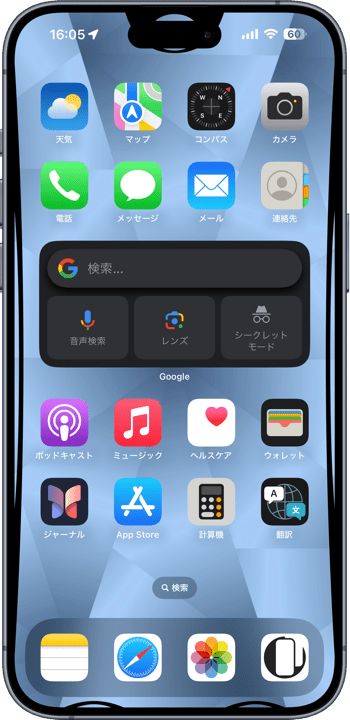
ベゼルをレトロフューチャーに飾ります。
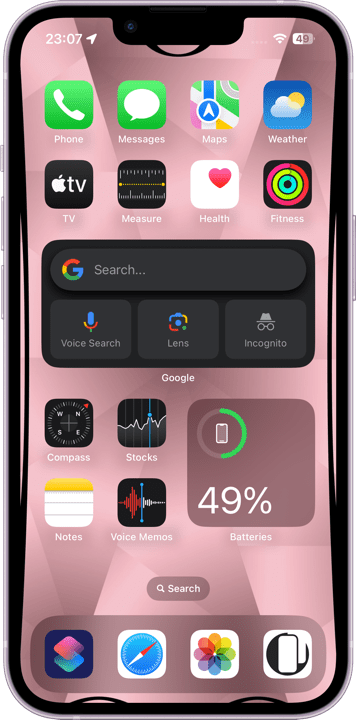
Bezel decorated with retrofuture.
Bezel decorated with retrofuture.
1290×2800
Universal Wallpaper
Universal Wallpaper
How to Set


ピンチインして上に
自然光/白黒
ホーム画面:ぼかしオフ・明暗お好み
───────────────
Pinch in then swipe up
Natural/Black & White
Home: Blur off; light/dark to taste
───────────────
Help
自然光/白黒
ホーム画面:ぼかしオフ・明暗お好み
───────────────
Pinch in then swipe up
Natural/Black & White
Home: Blur off; light/dark to taste
───────────────
Help
▼
タップ → 表示 → 長押し保存
Tap → View → Hold to save
タップ → 表示 → 長押し保存
Tap → View → Hold to save


★
- 設定するときにピンチインが必要ないこともあります。iOS 16以降の壁紙の表示位置は安定していません。
- 設定時にピンチがフリーズしてピンチインできないことがあります。そのときは数秒待つか、選択画面からやり直してみてください。
- 画像形式をWebPにして高品質軽量化を図っています。iOS 14以降で表示できます。
- Pinch-in may not be necessary when setting up. iOS 16 and later wallpaper display position is not stable.
- The pinch may freeze during setup and you may not be able to pinch in. If this happens, wait a few seconds or try starting over from the selection screen.
- The image format is WebP to make it high quality and lightweight. iOS 14 or later can display it.
画面の縁にレトロフューチャーな黒を配置してベゼルを飾る壁紙です。すべての機種で使えるように、同スケールで重なり合う場所を考えてパーツを置いています。
This wallpaper decorates the bezel by placing retrofuture black around the edges of the screen. The parts are placed with the same scale and overlapping locations in mind so that they can be used on all models.
This wallpaper decorates the bezel by placing retrofuture black around the edges of the screen. The parts are placed with the same scale and overlapping locations in mind so that they can be used on all models.
