💾
Legacy
Legacy
画面設計図の壁紙 2
-15 Pro Max/15 Plus/14 Pro Max-
Screen Blueprint 2
iOS 17–
iPhone 15 Pro Max/
15 Plus/14 Pro Max
iPhone 15 Pro Max/
15 Plus/14 Pro Max
画面の設計図壁紙。
Screen blueprint wallpaper.
Screen blueprint wallpaper.
1290×2796
6.7″ Wallpaper
6.7″ Wallpaper
How to Set

サムネイルをタップ、
表示された画像を長押し保存してください。
Tap the thumbnail.
Touch and hold the viewed image to save it.
表示された画像を長押し保存してください。
Tap the thumbnail.
Touch and hold the viewed image to save it.
White

Lock Screen

Home Screen
Gold

Lock Screen

Home Screen
Gray

Lock Screen

Home Screen
Pink

Lock Screen

Home Screen
Red

Lock Screen

Home Screen
Yellow

Lock Screen

Home Screen
Green

Lock Screen

Home Screen
Emerald

Lock Screen

Home Screen
Blue

Lock Screen

Home Screen
Purple

Lock Screen

Home Screen
Rainbow

Lock Screen

Home Screen
Anodizing

Lock Screen

Home Screen
Blueprint

Lock Screen

Home Screen
Blackboard

Lock Screen

Home Screen
Cyanotype

Lock Screen

Home Screen
Vintage LCD

Lock Screen

Home Screen
Parchment

Lock Screen

Home Screen
Metal

Lock Screen

Home Screen
注意点とチェック項目
Notes and Checklists
- 起動・再起動後はiPhoneを傾けるとアイコンとウィジェットが動きます。今日の表示(1ページ目の前)またはAppライブラリ(最終ページの次)に行ってホームに戻ると止まります。次に再起動するまでは動きません。
- 黒い背景の壁紙は、壁紙を設定後に再びカスタマイズを開始すると常時点灯時にボーダーの一部が欠けます。そうなった場合は一度他の壁紙で設定を完了させてから、改めて壁紙を戻してカスタマイズしてください。同じ壁紙のままでは何度やり直しても正しく表示されません。
- 設定するときにピンチインが必要ないこともあります。iOS 16以降の壁紙の表示位置は安定していません。
- 設定時にピンチがフリーズしてピンチインできないことがあります。そのときは数秒待つか、選択画面からやり直してみてください。
- 黒い背景の壁紙では、カラー調整で「白黒」を選択するとフレームの一部が欠けます。
- 設定アプリ > 画面表示と明るさ > 拡大表示:デフォルト
- 画像形式をWebPにして軽量化を図っています。iOS 14以降で表示できます。
Notes and Checklists
- After startup/restart, the icons and widgets move when the iPhone is tilted. They stop when you Go to Today View (Before the first page) or App Library (Next to the last page) and back to the Home. They will not move until the next reboot.
- With black background, if you start customizing again after setting the wallpaper, a part of the border will be missing in Always-On display. If this happens, please use a different wallpaper and then change the wallpaper back to the original one before customizing. If you keep the same wallpaper, the display will not be correct no matter how many times you try again.
- Pinch-in may not be necessary when setting up. iOS 16 and later wallpaper display position is not stable.
- The pinch may freeze during setup and you may not be able to pinch in. If this happens, wait a few seconds or try starting over from the selection screen.
- With black background, when BLACK & WHITE is selected in the color adjustment, a part of the frame is missing.
- Settings > Display & Brightness > Display Zoom: Default
- The image format is WebP to make it lightweight. iOS 14 or later can display it.
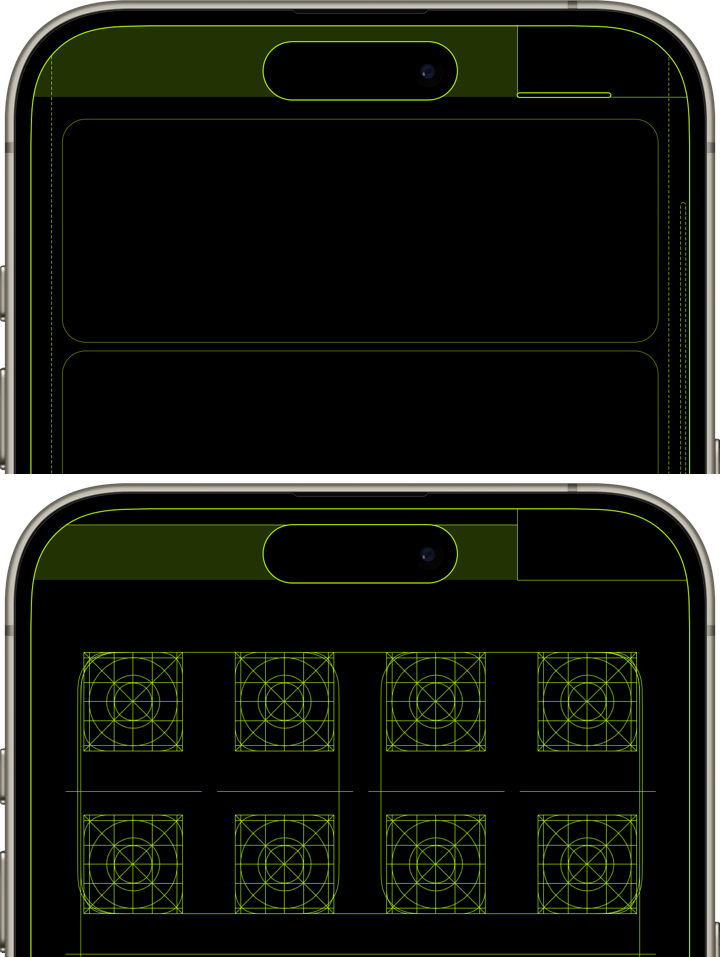
ロック画面とホーム画面の設計図デザインの壁紙。
画面フレームとダイナミックアイランドに加えて、
ロック画面
スワイプ無効エリア、コントロールセンター呼び出しエリア、コントロールセンター呼び出しインジケータ、日付時間エリア(高さが変わることがあるのでまとめています)、ウィジェットエリア、通知エリア、通知スクロールバー、ライトボタン、カメラボタン、ホーム画面オープンエリア、ホーム画面オープンインジケータ、MagSafe充電マーク
ホーム画面
通知センター呼び出しエリア、スワイプ無効エリア(上部)、コントロールセンター呼び出しエリア、ページスクロールエリア、アイコングリッド、ウィジェットフレーム、ラベルガイドライン、検索ボタン及びページコントロールの最大表示範囲(傾きで動く範囲込み)のガイドライン、ドック、スワイプ無効エリア(下部)、Appスイッチャーエリア
を描いています。
Lock Screen and Home Screen blueprint design wallpaper.
In addition to the screen frame and Dynamic Island, the following are drawn.
Lock Screen
Swipe disabled area, Control Center call area, Control Center call indicator, date and time area (grouped together as they may vary in height), widget area, notification area, notification scroll bar, light button, camera button, Home Screen open area, Home Screen open indicator, and MagSafe charging mark.
Home Screen
Notification Center call area, swipe disabled area (top), Control Center call area, page scrolling area, icon grid, widget frame, label guidelines, search button and page control maximum display range (including tilt range) guidelines, Dock, swipe disabled area (bottom), and App Switcher area.
画面フレームとダイナミックアイランドに加えて、
ロック画面
スワイプ無効エリア、コントロールセンター呼び出しエリア、コントロールセンター呼び出しインジケータ、日付時間エリア(高さが変わることがあるのでまとめています)、ウィジェットエリア、通知エリア、通知スクロールバー、ライトボタン、カメラボタン、ホーム画面オープンエリア、ホーム画面オープンインジケータ、MagSafe充電マーク
ホーム画面
通知センター呼び出しエリア、スワイプ無効エリア(上部)、コントロールセンター呼び出しエリア、ページスクロールエリア、アイコングリッド、ウィジェットフレーム、ラベルガイドライン、検索ボタン及びページコントロールの最大表示範囲(傾きで動く範囲込み)のガイドライン、ドック、スワイプ無効エリア(下部)、Appスイッチャーエリア
を描いています。
Lock Screen and Home Screen blueprint design wallpaper.
In addition to the screen frame and Dynamic Island, the following are drawn.
Lock Screen
Swipe disabled area, Control Center call area, Control Center call indicator, date and time area (grouped together as they may vary in height), widget area, notification area, notification scroll bar, light button, camera button, Home Screen open area, Home Screen open indicator, and MagSafe charging mark.
Home Screen
Notification Center call area, swipe disabled area (top), Control Center call area, page scrolling area, icon grid, widget frame, label guidelines, search button and page control maximum display range (including tilt range) guidelines, Dock, swipe disabled area (bottom), and App Switcher area.
