開錠の壁紙
-17 Pro Max/16 Pro Max-
Unlocking
iOS 18–
iPhone 17 Pro Max/16 Pro Max
iPhone 17 Pro Max/16 Pro Max
開いた鍵を残します。
Leave the open lock there.
Leave the open lock there.
1320×3002
6.9″ Wallpaper
6.9″ Wallpaper
How to Set
ピンチインして上に
自然光/白黒
ホーム画面:ぼかしオフ・明暗お好み
───────────────
Pinch in then swipe up
Natural/Black & White
Home: Blur off; light/dark to taste
───────────────
Help
自然光/白黒
ホーム画面:ぼかしオフ・明暗お好み
───────────────
Pinch in then swipe up
Natural/Black & White
Home: Blur off; light/dark to taste
───────────────
Help
▼
タップ → 表示 → 長押し保存
Tap → View → Hold to save
タップ → 表示 → 長押し保存
Tap → View → Hold to save


⬇︎ 黒い帯は画面に表示されません。
The black bar won’t appear on the screen.
The black bar won’t appear on the screen.


★
- 設定アプリ > 画面表示と明るさ > 拡大表示:デフォルト
- 画像形式をWebPにして高画質軽量化を図っています。iOS 14以降で表示できます。
- Settings > Display & Brightness > Display Zoom: Default
- The image format is WebP to make it high quality and lightweight. iOS 14 or later can display it.
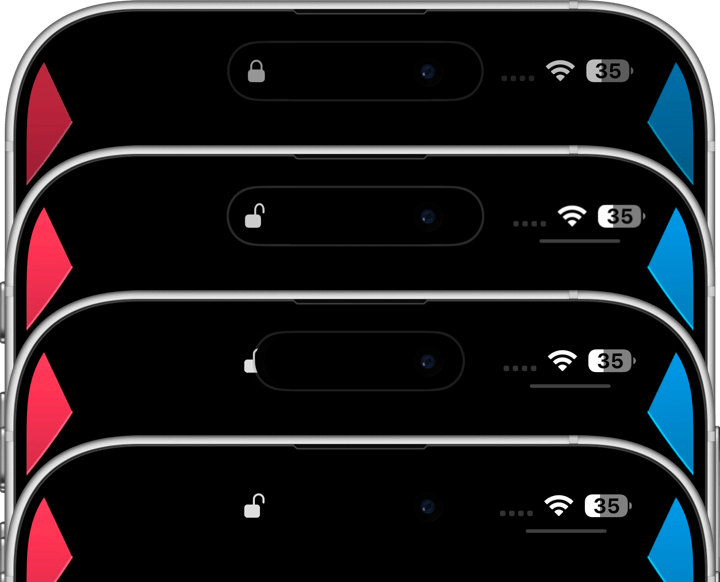
ロック解除の時にダイナミックアイランドに表示される開いた鍵が、ロック画面とホーム画面に残るように演出する壁紙です。ダイナミックアイランドの鍵とまったく同じ形の鍵をまったく同じ場所に描いています。
iPhoneでは壁紙を設定する時に位置の調整が必要なことがあります。画面サイズぴったりの壁紙がたまたまぴったりの位置に表示されればよいのですが、そうでない場合はピンチインではたらく自動調整機能により画面の上がぼかされてしまいます。しかし画面サイズよりも縦に長い壁紙ならこれを回避できます。そこで上に余白を作りました。自動調整をキャンセルするために上にスワイプするので上の方は切り取られます。
Wallpaper that expresses the open lock that appears on Dynamic Island when unlocked and remains on the Lock Screen and Home Screen. It depicts a lock of the exact same shape as the lock on Dynamic Island in the exact same position.
When setting a wallpaper on an iPhone, you may need to adjust its position. Ideally, the wallpaper should fit the screen perfectly, but if it doesn’t, the auto-adjustment feature that activates when pinching in can blur the top part of the image. However, if the wallpaper is longer than the screen, this can be avoided. That’s why I added extra space at the top. Swiping up cancels the auto-adjustment, and the upper portion of the wallpaper will be cropped.
iPhoneでは壁紙を設定する時に位置の調整が必要なことがあります。画面サイズぴったりの壁紙がたまたまぴったりの位置に表示されればよいのですが、そうでない場合はピンチインではたらく自動調整機能により画面の上がぼかされてしまいます。しかし画面サイズよりも縦に長い壁紙ならこれを回避できます。そこで上に余白を作りました。自動調整をキャンセルするために上にスワイプするので上の方は切り取られます。
Wallpaper that expresses the open lock that appears on Dynamic Island when unlocked and remains on the Lock Screen and Home Screen. It depicts a lock of the exact same shape as the lock on Dynamic Island in the exact same position.
When setting a wallpaper on an iPhone, you may need to adjust its position. Ideally, the wallpaper should fit the screen perfectly, but if it doesn’t, the auto-adjustment feature that activates when pinching in can blur the top part of the image. However, if the wallpaper is longer than the screen, this can be avoided. That’s why I added extra space at the top. Swiping up cancels the auto-adjustment, and the upper portion of the wallpaper will be cropped.
