💾
Legacy
Legacy
黒い猫耳ドックの壁紙
-Home button iPhone-
Black Cat Ears Dock
iOS 14–15/16–(18)
iPhone SE3/SE2/8 Plus/8/7 Plus/7/
6s Plus/6s/SE/iPod touch 7
iPhone SE3/SE2/8 Plus/8/7 Plus/7/
6s Plus/6s/SE/iPod touch 7
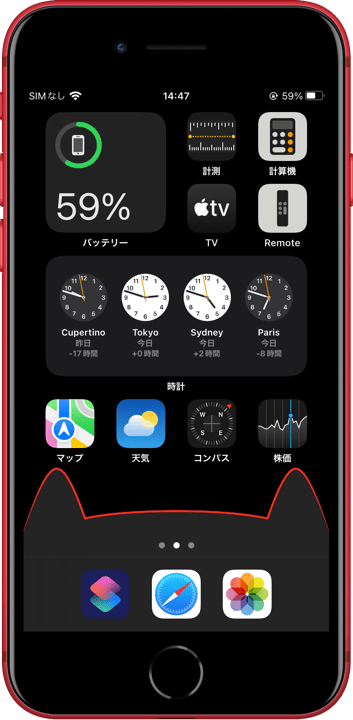
ダークモードでドックを猫耳にします。
下一列を空けたレイアウトにマッチ。
ドックの上には薄い線が見えます。
It forms the Dock into cat ears in Dark Mode.
Matches a layout with the bottom row empty.
Hairline is visible above the Dock.
下一列を空けたレイアウトにマッチ。
ドックの上には薄い線が見えます。
It forms the Dock into cat ears in Dark Mode.
Matches a layout with the bottom row empty.
Hairline is visible above the Dock.
1242×2208
Universal Wallpaper
Universal Wallpaper
How to Set
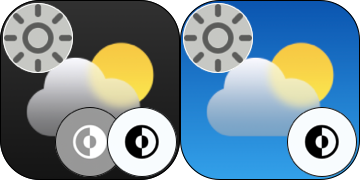


ダーク & 壁紙を明るく
Dark & Brighten wallpaper
ピンチインして上に・ぼかしオフ
「自然光」
Pinch in then swipe up and Blur off.
NATURAL
Help
Dark & Brighten wallpaper
ピンチインして上に・ぼかしオフ
「自然光」
Pinch in then swipe up and Blur off.
NATURAL
Help
サムネイルをタップ、
表示された画像を長押し保存してください。
Tap the thumbnail.
Touch and hold the viewed image to save it.
表示された画像を長押し保存してください。
Tap the thumbnail.
Touch and hold the viewed image to save it.


★
- 設定する時のスワイプアップはゆっくり確実に行ってください。壁紙が上から跳ね返ってくることがあります。
- 設定時にピンチがフリーズしてピンチインできないことがあります。そのときは数秒待つか、選択画面からやり直してみてください。
- 設定アプリ > アクセシビリティ > 画面表示とテキストサイズ > 透明度を下げる:オフ
- iOS14–15では、設定アプリ > 壁紙 > ダークモードで壁紙を暗くする:オフ
- 画像形式をWebPにして高品質軽量化を図っています。iOS 14以降で表示できます。
- Swipe up slowly and surely when setting up. The wallpaper may bounce off the top.
- The pinch may freeze during setup and you may not be able to pinch in. If this happens, wait a few seconds or try starting over from the selection screen.
- Settings > Accessibility > Display & Text Size > Reduce Transparency: Off
- In iOS14–15, Settings > Wallpaper > Dark Appearance Dims Wallpaper: Off
- The image format is WebP to make it high quality and lightweight. iOS 14 or later can display it.
iPhoneのダークモードではドックは基本的にその背景を暗くした色になりますが、一定以下の明るさだとドックの方が明るくなります。そしてその境界で背景と同じ色になるのです。その色で本来のドックを隠して猫耳型にします。
In DARK Mode on the iPhone, the Dock is basically a DARKER color than its background, but under a certain brightness, the Dock becomes lighter. And at its boundaries, it becomes the same color as the background. That color hides the original Dock and makes it cat-ear shaped.
In DARK Mode on the iPhone, the Dock is basically a DARKER color than its background, but under a certain brightness, the Dock becomes lighter. And at its boundaries, it becomes the same color as the background. That color hides the original Dock and makes it cat-ear shaped.