暗闇の壁紙
Darkness
iOS 14–
iPhone Air/17 Pro Max/17 Pro/17/17e/
16 Pro Max/16 Pro/16 Plus/16/16e/
15 Pro Max/15 Pro/15 Plus/15/
14 Pro Max/14 Pro/14 Plus/14/
13 Pro Max/13 Pro/13/13 mini/
12 Pro Max/12 Pro/12/12 mini/
11 Pro Max/11 Pro/11/XS Max/XS/XR/X
・▲・ iPhone=?iOS=? ・▼・
iPhone Air/17 Pro Max/17 Pro/17/17e/
16 Pro Max/16 Pro/16 Plus/16/16e/
15 Pro Max/15 Pro/15 Plus/15/
14 Pro Max/14 Pro/14 Plus/14/
13 Pro Max/13 Pro/13/13 mini/
12 Pro Max/12 Pro/12/12 mini/
11 Pro Max/11 Pro/11/XS Max/XS/XR/X
・▲・ iPhone=?iOS=? ・▼・
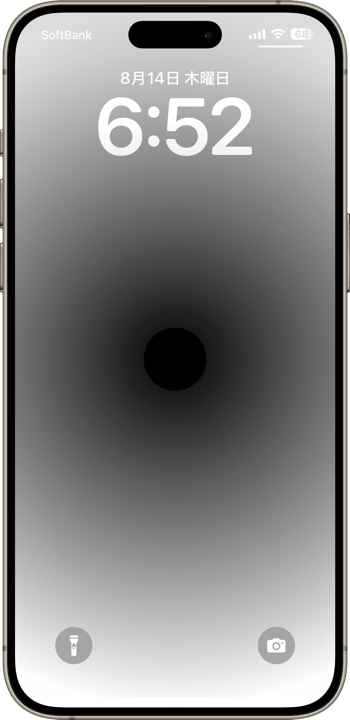
スリープ解除で暗闇が凝縮。
Wake it, and darkness condenses.
Wake it, and darkness condenses.
1320×3002
Universal Wallpaper
Universal Wallpaper
How to Set
・▲・
・▲・
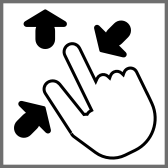

そっと少し、つまんで上げて、放す
自然光/白黒
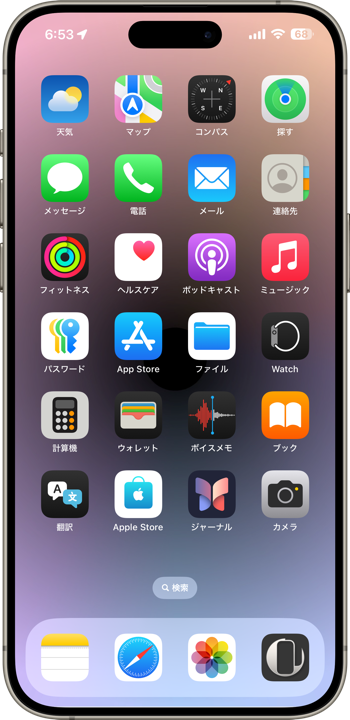
ホーム画面:明暗お好み
常時表示オフ
───────────────
Gently pinch up a little, then release
Natural/Black & White
Home: light/dark to taste
Always On Display Off
───────────────
⚙︎ Help ⚙︎
自然光/白黒
ホーム画面:明暗お好み
常時表示オフ
───────────────
Gently pinch up a little, then release
Natural/Black & White
Home: light/dark to taste
Always On Display Off
───────────────
⚙︎ Help ⚙︎
・▼・
タップ → 表示 → 長押し保存
Tap → View → Hold to save
タップ → 表示 → 長押し保存
Tap → View → Hold to save

White

Gray

Gold

Pink

Yellow

Green

Blue

Purple

Rainbow

Siri
★
- そっと少しピンチイン ▶︎ 少し上に上げて ▶︎ 指を放すと、自動的に左右いっぱい下ゾロエの位置に戻ってきます。とくにiOS 27以降のApple Intelligence対応機種ではピンチインし過ぎると「拡張」がはたらくので、その手前で止めてください。「拡張」に入ってしまったらキャンセルしてやり直す必要があります。
- 背景と要素の明暗差を保つ必要があるため、カラー調整で背景色を変えると効果が失われます。明るい屋外でも動きは悪くなります。
- 常時点灯モデルで「壁紙を表示」をオフにしても「常に画面オン」が有効だと動いては見えません。無効にしてお使いください。もちろん点灯するギミックを使わずにグラデーションを楽しむだけなら「常に画面オン」をオンにしていただいてかまいません。
- iOS 16以降のiPhoneでは壁紙を設定する時の表示位置がまちまちです。さらにiOS 17–26では壁紙を動かすと自動補完で上部がぼかされることがあります。これらをかいくぐって全画面表示にするため、超縦長壁紙を上にスワイプして設定する仕様にしました(iOSのバージョン、機種、絵柄の相性によってはぼかしを避けられないこともあるかもしれませんが、iOS 27で自動補完は廃止されました)。壁紙上部はカットされ、表示位置はすべての機種で下ゾロエになります。
- 画像形式をWebPにして高画質軽量化を図っています。iOS 14以降で表示できます。
- Gently pinch in a little ▶︎ lift up a little ▶︎ release your fingers, and it’ll automatically snap back to the bottom-aligned, full-width position. On iOS 27+ Apple Intelligence–compatible devices especially, pinching in too far triggers “Extend,” so stop just short of that point. If you do trigger “Extend,” you’ll need to cancel and start over.
- Since the difference between light and dark must be maintained, changing the background color in the color adjustment will lose the effect. Movement will also be poor in bright outdoors.
- Models with Always On Display, even if Show Wallpaper is turned off, it will not appear to be moving if Always On Display is enabled. Please disable it. Of course, if you just want to enjoy the gradation without using the lighting gimmick, you can turn on Always On Display.
- On iPhone running iOS 16 or later, the wallpaper’s display position varies when you set it. In addition, on iOS 17–26, moving the wallpaper can trigger Auto-Extend, which blurs the top area. To work around this and achieve a full-screen display, this wallpaper is designed as an extra-tall image that you swipe upward to set (depending on the iOS version, device model, and image composition, the blur may not always be avoidable — though Auto-Extend is removed in iOS 27). The top of the wallpaper will be cropped, and the display position will be bottom-aligned on all devices.
- The image format is WebP to make it high quality and lightweight. iOS 14 or later can display it.
Face ID iPhoneではスリープ解除の瞬間に画面がゆっくり明るくなるため、壁紙に明暗差があると明るい所から先に見えます。
この壁紙では周囲から中央に向かって暗くなるグラデーションを作り、中心には真っ黒な丸を置きました。すると周囲から中央に向けて見えていくわけですが、人の目には黒が集まっていくように映ります。
背景が複雑だと動きのスムーズさが損なわれるためシンプルなものにしました。
なおTouch ID iPhoneでは通常の動作だと壁紙を見る暇もなくホーム画面に行ってしまうため効果が見られません。
On Face ID iPhones, the screen brightens gradually when waking from sleep, so areas of higher brightness appear first if there’s contrast in the wallpaper.
This design uses a gradient that darkens toward the center, with a pure black circle at the middle. As the display lightens from the edges inward, the effect appears to the human eye as if the black is condensing into the center.
To keep the motion smooth, the background is kept simple.
On Touch ID iPhones, the lock screen is skipped too quickly in normal use to see the effect.
この壁紙では周囲から中央に向かって暗くなるグラデーションを作り、中心には真っ黒な丸を置きました。すると周囲から中央に向けて見えていくわけですが、人の目には黒が集まっていくように映ります。
背景が複雑だと動きのスムーズさが損なわれるためシンプルなものにしました。
なおTouch ID iPhoneでは通常の動作だと壁紙を見る暇もなくホーム画面に行ってしまうため効果が見られません。
On Face ID iPhones, the screen brightens gradually when waking from sleep, so areas of higher brightness appear first if there’s contrast in the wallpaper.
This design uses a gradient that darkens toward the center, with a pure black circle at the middle. As the display lightens from the edges inward, the effect appears to the human eye as if the black is condensing into the center.
To keep the motion smooth, the background is kept simple.
On Touch ID iPhones, the lock screen is skipped too quickly in normal use to see the effect.