カワイイニンジャドック壁紙
-LCD-
Kawaii Ninja Dock
可愛いグラデと半分隠れるドック。iPhone 11では部分的にドックを隠し、SEではロック解除とアプリを閉じた時にドックが見えなくなり傾けると見えます(iOS 26.3以降ではSEのリキッドグラスが固定)。
Kawaii gradient with a half-hidden Dock. On iPhone 11, the Dock is partially hidden. On SE, the Dock disappears when unlocking or closing an app, and reappears when tilted (In iOS 26.3 and later, SE's Liquid Glass is fixed).
Kawaii gradient with a half-hidden Dock. On iPhone 11, the Dock is partially hidden. On SE, the Dock disappears when unlocking or closing an app, and reappears when tilted (In iOS 26.3 and later, SE's Liquid Glass is fixed).


境界線は完全には消えません。
The border never disappears completely.
828×1290
Universal Wallpaper
The border never disappears completely.
828×1290
Universal Wallpaper
How to Set

日本語
ピンチインして上に・自然光
ホーム画面:ぼかしオフ
ホーム画面:ぼかしオフ
ホーム画面カスタマイズ:
ホーム画面長押し > 編集 > カスタマイズ
デフォルト・背景明るく
★ ダーク・自動→デフォルトと同じ
english
Pinch in then swipe up; Natural
Home: Blur off
Home: Blur off
Home Screen Customization:
Tap & hold Home Screen > Edit > Customize
Default; Brighter background
★ Dark; Auto → Same as Default

日本語
english
Pinch in then swipe up; Natural
Home: Blur off
Home: Blur off
Home Screen Customization:
Tap & hold Home Screen > Edit > Customize
Default/Dark
Brighter background
ライトモード・背景明るく
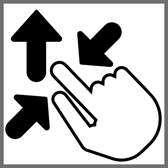
ピンチインして上に・ぼかしオフ
「自然光」
───────────────
Light Mode & Light Background
Pinch in then swipe up and Blur off.
Natural
───────────────
Help
ピンチインして上に・ぼかしオフ
「自然光」
───────────────
Light Mode & Light Background
Pinch in then swipe up and Blur off.
Natural
───────────────
Help
▼
タップ → 表示 → 長押し保存
Tap → View → Hold to save
タップ → 表示 → 長押し保存
Tap → View → Hold to save


★
- 壁紙のぼかしがオンになっていると背景の色が変わります。ホーム画面長押し > 壁紙を編集 > 💧アイコンを暗く
- 壁紙を設定後にホーム画面をカスタマイズするとドックの色が変わることがありますが、画面を切り替えると戻ります。
- 透明度を下げるがオンになっているとドックの色が合いません。設定アプリ > アクセシビリティ > 画面表示とテキストサイズ > 透明度を下げる:オフ
- コントラストを上げるがオンになっているとドックに白い縁が付いて色も合いません。設定アプリ > アクセシビリティ > 画面表示とテキストサイズ > コントラストを上げる:オフ
- 反転、ホワイトポイントを下げるなど、その他の視覚アクセシビリティ機能(Appleサポート)をオンにしてもドックの色が変わることがあります。
- 画像形式をWebPにして高品質軽量化を図っています。iOS 14以降で表示できます。
- When wallpaper blur is on, the background color changes. Home Screen long-press > Edit Wallpaper > turn the 💧 icon dark.
- After setting a wallpaper, customizing the Home Screen may change the Dock’s color, but it reverts when switching screens.
- If Reduce Transparency is on, the Dock color won’t match. Settings app > Accessibility > Display & Text Size > Reduce Transparency: Off
- When Increase Contrast is on, the Dock gets a white edge and the color doesn’t match. Settings app > Accessibility > Display & Text Size > Increase Contrast: Off
- When features like Invert or Reduce White Point and other visual accessibility options (Apple Support) are on, the Dock color may also change.
- The image format is WebP to make it high quality and lightweight. iOS 14 or later can display it.
iPhoneでは背景が一定以上の明るさの時にドックはそれより暗く、一定以下の明るさではそれより明るくなり、その中間では同じ色になります。
この壁紙は液晶画面iPhoneのライトモードに合わせました。
iOSでは設定する時に壁紙を動かすと上部がぼかされることがあります。これをより確実にキャンセルするために、画面サイズ以上の縦長アスペクト画像を上にスワイプするフォーマットにしています。また、この方式はどんな画面サイズでも下基準で位置を特定できるのでユニバーサル壁紙に適しています。
On iPhone, when the background is above a certain brightness, the Dock appears darker; when it’s below, the Dock appears lighter; and in between, it matches the same color.
This wallpaper is tuned for Light Mode on LCD iPhone.
In iOS, moving a wallpaper while setting it can sometimes blur the top area. To more reliably cancel this, the format uses vertically longer images than the screen size, swiped upward. This method is also suitable for universal wallpapers because it allows the image to be positioned based on the bottom edge regardless of the screen size.
この壁紙は液晶画面iPhoneのライトモードに合わせました。
iOSでは設定する時に壁紙を動かすと上部がぼかされることがあります。これをより確実にキャンセルするために、画面サイズ以上の縦長アスペクト画像を上にスワイプするフォーマットにしています。また、この方式はどんな画面サイズでも下基準で位置を特定できるのでユニバーサル壁紙に適しています。
On iPhone, when the background is above a certain brightness, the Dock appears darker; when it’s below, the Dock appears lighter; and in between, it matches the same color.
This wallpaper is tuned for Light Mode on LCD iPhone.
In iOS, moving a wallpaper while setting it can sometimes blur the top area. To more reliably cancel this, the format uses vertically longer images than the screen size, swiped upward. This method is also suitable for universal wallpapers because it allows the image to be positioned based on the bottom edge regardless of the screen size.
