Mysterious iPhone Wallpaper
  • New
  • Notes
  • iOS
  • Help
  • About This Site
  • Privacy Policy

New

January 20th, 2024

1/20/2024

0 コメント


ドックを電話に
Dock to Phone


フルスクリーンiPhoneのドックをレトロな電話にする壁紙です。iPhoneは電話ですし。
This wallpaper makes the full-screen iPhone Dock into retro phone. And the iPhone is a phone.
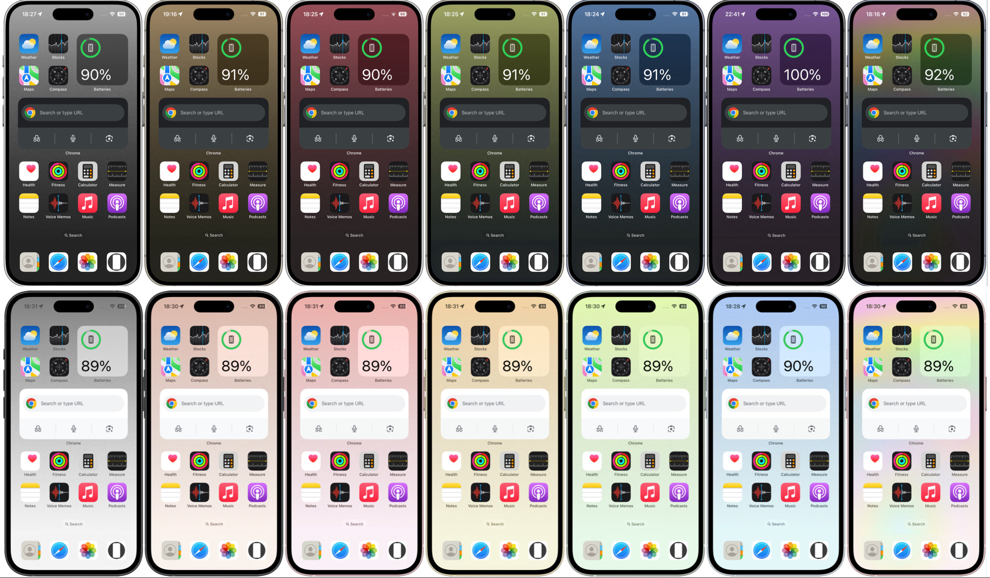
新作電話ドックの壁紙
背景はレトロカラー。ライトモード用、ダークモード用各7枚。
Backgrounds are retro colors, 7 each for Light Mode and Dark Mode.
電話ドックの壁紙のバリエーション
︎▶︎ 電話ドックの壁紙|Phone Dock
​iOS 14–15/16– ​​iOS 16– 18 sheets
Kritaでよかったんだ
久しぶりにG'MICで背景を作りました。500種類以上の画像編集フィルターを持ったプラグインで、私はよく2〜3種類のフィルターを組み合わせて背景を作っていました。半分しか思い通りにならなくて予想外の絵になるのがいいんですよ。
実はMac版GIMP(無料のグラフィックアプリ)のG'MICプラグインが使えなくなっていたんです。macOSのアップデートやApple Siliconの影響のようです。元々はWindows用なので仕方ない。しかしG'MICの代わりはなかなかありません。Photoshopの色んなブラシやFrescoを始めとして色々試しましたが、いずれも代用というわけにはいかないんですよね。
Windowsを買った方が早いかもしれないけどG'MICはグラフィック性能が高くないと辛いです。Windowsのスペックはよくわからない。そう思っていたらIntelからCore Ultraが発表されました。これなら15万円ぐらいでG'MICを快適に使えるかも。そう思っていたら見つけてしまいました。
Kritaでよかったんです。KritaはGIMPに似た基本無料の画像編集アプリで、なんとG'MICがデフォルトで入ってるそうじゃないですか。しかもMac App Storeでも2000円(2024年1月現在)で買える安価で安心アプリです。こんなに近くにいたのかよーG'MIC〜。
Krita Is the Way to Go
It's been a while since I created a background with G'MIC, a plugin with over 500 image editing filters, and I used to combine two or three different filters to create a background. I can only do half of what I want, and I like to get an unexpected picture.
Actually, the G'MIC plugin for the Mac version of GIMP (free graphic app) is no longer available. Probably due to macOS updates and Apple Silicon. It is unavoidable because it was originally for Windows. However, it is hard to find a replacement for G'MIC. I have tried various Photoshop brushes, Fresco and others, but none of them can be substituted.
It might be faster to buy Windows, but G'MIC has a hard time without high graphic performance, and I'm not sure about Windows specs. When I was thinking so, Intel announced Core Ultra. This might allow me to use G'MIC comfortably at a reasonable price. I found that one when I was thinking so.
I was fine with Krita. It is basic free image editing app similar to GIMP, and G'MIC is included by default. And it's a reasonably priced and reliable app that is also sold in the Mac App Store. I didn't know it was this close, my beloved G'MIC!
〉ドックをカスタムする壁紙|Custom Dock Wallpapers

0 コメント

January 16th, 2024

1/16/2024

1 コメント


ドックを封筒に
Dock to Envelope


​フルスクリーンiPhoneのドックを封筒にする壁紙です。
This wallpaper makes the full-screen iPhone Dock into an envelope.
新作お手紙ドックの壁紙
ドックの上の空間もいい感じに埋めます。背景は便箋デザイン。ライトモード用、ダークモード用各9枚。
It also fills the space above the Dock in a nice way. The background is a letterhead design. 9 sheets each for Light Mode and Dark Mode.
お手紙ドックの壁紙のバリエーション
︎▶︎ お手紙ドックの壁紙|Letter Dock
​iOS 14–15/16– 18 sheets
メールやメッセージや何かを送ったり送られたりはiPhoneの基本のひとつ。そしてiOS 7で現実を模したデザインからフラットデザインに移行したとはいえ、iPhoneにはどこかアナログなアレンジがしっくるように思います。
Emails, messages, and sending and receiving something are one of the basics of the iPhone. And even though iOS 7 has moved from a design that mimics reality to a flat design, it still seems to match the somewhat analog flavor of the iPhone.
〉ドックをカスタムする壁紙|Custom Dock Wallpapers

1 コメント

January 13th, 2024

1/13/2024

0 コメント


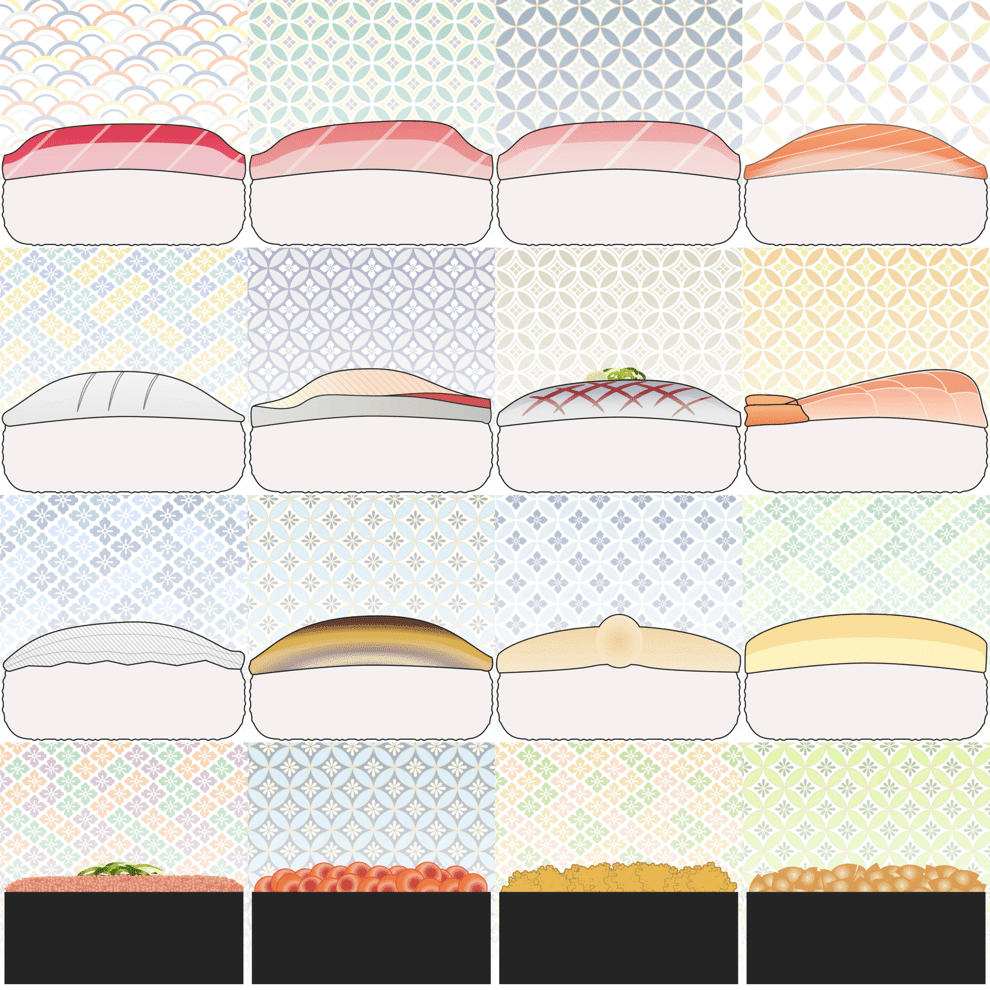
ドックをお寿司にする壁紙
Wallpaper to Make the Dock Sushi


へいらっしゃい! フルスクリーンiPhoneのドックを握り寿司にする壁紙だよ。
Welcome! These are the wallpapers that transform your full-screen iPhone Dock into a nigirizushi.
新作お寿司ドックの壁紙
ライトモード用12貫とダークモード用の軍艦巻き4貫を握りました。
I made 12 pieces for Light Mode and 4 pieces of gunkanmaki for Dark Mode.
お寿司ドックの壁紙のバリエーション
▶︎ お寿司ドックの壁紙|Sushi Dock
​iOS 14–15/16– 16 pieces
〉ドックをカスタムする壁紙|Custom Dock Wallpapers

0 コメント

January 08th, 2024

1/8/2024

0 コメント


私のMacの壁紙です
This Is My Mac Wallpaper


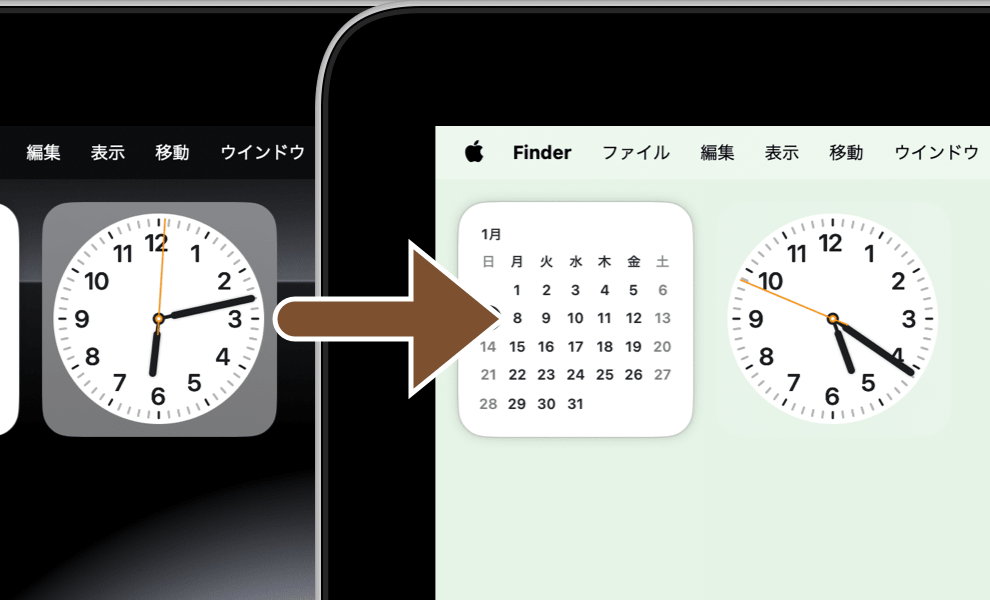
私が作業に集中しやすいように作っていた壁紙をほんの少し微調整、更にライトモード用も追加。
I made a few tweaks to the wallpaper I had made to make it easier for me to concentrate on my work, and added a few more for the Light mode.
新作文字盤だけの壁紙
Macに設定すると時計ウィジェット(時計Ⅰのみ)のケースが見えなくなります。
When set on a Mac, the Clock widget (only Clock Ⅰ) case is not visible.
​
文字盤だけの壁紙のバリエーション
ダークモード用1枚、ライトモード用4枚。残念ながらピンク、オレンジ、パープル系は作れませんでした。
One for Dark mode and four for Light mode. Unfortunately, pink, orange, and purple types could not be made.
︎▶︎ Mac用文字盤だけの壁紙
​  Dial Only Wallpaper for Mac
​macOS Big Sur– 5 sheets
私は無地の背景が好きなんですけど、真っ黒や真っ白ではコントラストが強過ぎてうるさいんですよね。そこでiPhone用のドックを隠す色を使っていたところ、時計ウィジェットのケース部分がほとんど見えなくなっていました。せっかくなので完全に見えないように微調整したのがこの壁紙です。
​I like plain backgrounds, but pure black or pure white is too loud due to too much contrast. So I used a color that hides the Dock for iPhone, and the case part of the Clock widget was almost invisible. Since I went through the trouble, I tweaked the wallpaper so that it is completely invisible.
〉その他の壁紙|Uncategorized Wallpapers

0 コメント

December 24th, 2023

12/24/2023

0 コメント


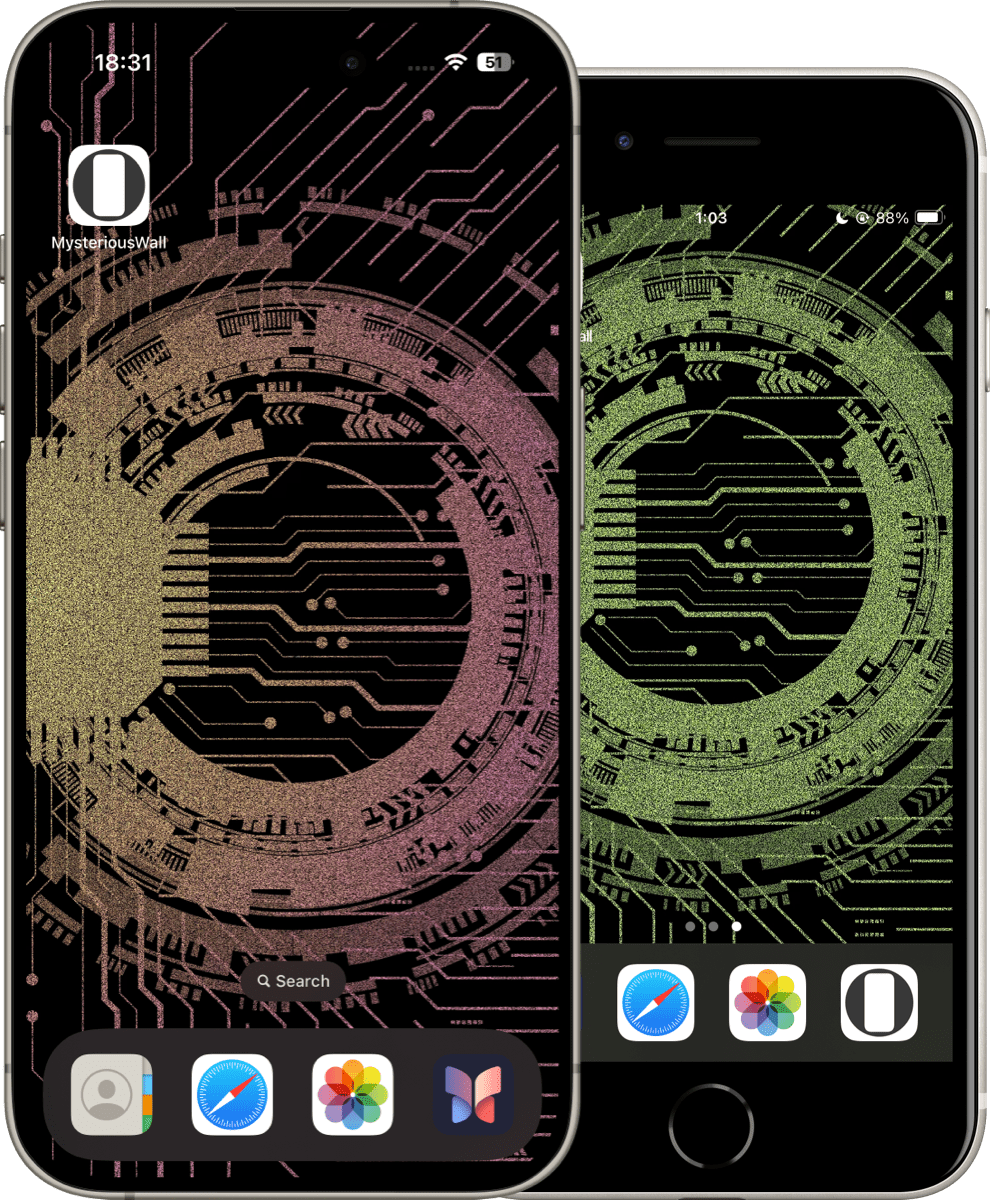
アプリを終了させた時に波打つ回路
Rippling Circuit When the App Is Close


アプリからホーム画面に戻った時に回路が波打つ壁紙です。
This wallpaper has a circuit that waves when you return to the Home Screen from the app.
新作波打つ回路の壁紙
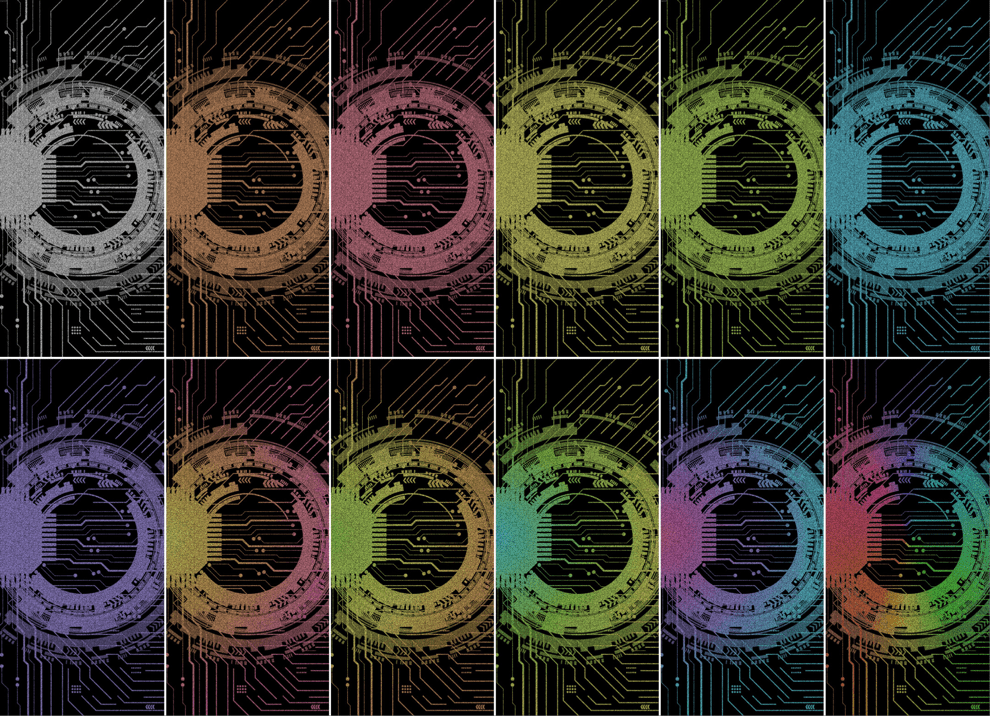
iOS 14以降のすべてのiPhone(第1世代SEを除く)で使えるユニバーサルタイプ。バリエーションは12種類。
Universal type for all iPhone (except 1st generation SE) with iOS 14 or later. There are 12 variations.
波打つ回路の壁紙のバリエーション
︎▶︎ 波打つ回路の壁紙|Rippling Circuit
​iOS 14–15/16– 12 sheets
​iOS 16で視差効果が廃止されて使えなくなった「動く静止画の壁紙」の機能制限版ですが、常に動いているよりは壁紙として落ち着いてはいます。背景パターンの違いから絵としてもいくらか自然です。
This is a feature-limited version of Static Dynamic Wallpapers, which can no longer be used since Perspective Zoom was discontinued in iOS 16, but it is calmer as a wallpaper than if it were constantly moving. It is more natural as a picture due to the difference in background patterns.
〉戻ると波打つ壁紙|Back & Wave Wallpapers

0 コメント

December 11th, 2023

12/11/2023

0 コメント


ドックを隠すシンプルな壁紙
Simple Hidden Dock


ざらざら感のあるグラデーション背景でドックを隠す壁紙です。iOS 14以降のすべてのiPhoneで使えます。
This wallpaper hides the Dock on a gradient background with a rough feel. For use on all iPhone with iOS 14 or later.
新作ドックを隠すシンプルな壁紙
ダークモード用、ライトモード用各7枚。
7 each for Dark Mode and Light Mode.
ドックを隠すシンプルな壁紙のバリエーション
▶︎ ドックを隠すシンプルな壁紙ダーク
  Simple Hidden Dock Dark
​iOS 14–15/16– 7 sheets
︎▶︎ ドックを隠すシンプルな壁紙ライト
  Simple Hidden Dock Light
​iOS 14–15/16– 7 sheets
単色背景ではない壁紙では初めて、iOS 17以降でもすべてのiPhoneで使える完全ユニバーサルタイプの壁紙です。
iOS 17で壁紙の表示範囲を安定させるには画面比率よりも縦に長い画像を使うことと、ピンチイン&スワイプアップが不可欠です。ということは十分な高さを持つフォーマットで、上の方を切り取っても成立するデザインにすればいいわけです。当サイトにはすべてのiPhoneで、特定の壁紙サイズでのドックの位置を正確に把握するノウハウもあります。
また、以前のiOSでもピンチイン&スワイプアップによって位置を正確に決められます。
This is the first wallpaper that is not a monochromatic background and is a completely universal type of wallpaper that can be used on all iPhones, even those running iOS 17 or later. To stabilize the display range of the wallpaper on iOS 17, it is essential to use images that are longer vertically than the screen aspect and pinch in & swipe up. This means that the format should be tall enough, and the design should be viable even if the top part is cut off. I also have the know-how to know exactly where the Dock is at a particular wallpaper size on all iPhone.
It can also be positioned precisely by pinch in & swipe up on earlier iOS.
〉ドックを隠す壁紙|Hide Dock Wallpapers

0 コメント

November 27th, 2023

11/27/2023

0 コメント


日本の冬
Japanese Winter


ドックを隠す日本の冬の壁紙をiOS 16/17に対応させました。
Japanese winter wallpaper that hides the Dock is now compatible with iOS 16/17.
新作冬のドックを隠す壁紙
フルスクリーンiPhone用とホームボタンiPhone用、ダークモード用、ライトモード用それぞれ各4枚。青い川は新バージョンです。
4 each for Full Screen iPhone and Home Button iPhone; 4 each for Dark Mode and Light Mode. The blue river is the new version.​
冬のドックを隠す壁紙
​Winter Hided Dock

iOS 14–15/16– 8 each
​➡︎ フルスクリーンiPhone
 Full Screen iPhone

15 Pro Max/15 Pro/15 Plus/15/
14 Pro Max/14Pro/14 Plus/​​​​​14/
13 Pro Max/13 Pro/13/13 mini/
​​12 Pro Max/​12 Pro/12/12 mini/
​11 Pro Max/11 Pro/11/XS Max/XS/XR/X
​➡︎ ホームボタンiPhone
 Home Button iPhone

SE3/​SE2/
​8 Plus/8/7 Plus/7/6s Plus/6s/
​SE/​iPod touch 7
冬の壁紙はライトモードでもiOS 14以降で使えます。背景が真っ白なので、以前のバージョンでも暗くならないのです。
The winter wallpaper works on iOS 14 or later, even in Light Mode. The background is pure white, so it is not darkened by earlier versions.​
〉ドックを隠す壁紙|Hide Dock Wallpapers

0 コメント
<<前へ
次へ>>


    Archive

    9月 2026
    8月 2026
    7月 2026
    6月 2026
    5月 2026
    4月 2026
    3月 2026
    2月 2026
    1月 2026
    12月 2025
    11月 2025
    10月 2025
    9月 2025
    8月 2025
    7月 2025
    6月 2025
    5月 2025
    4月 2025
    3月 2025
    2月 2025
    1月 2025
    12月 2024
    11月 2024
    10月 2024
    9月 2024
    8月 2024
    7月 2024
    6月 2024
    5月 2024
    4月 2024
    3月 2024
    2月 2024
    1月 2024
    12月 2023
    11月 2023
    10月 2023
    9月 2023
    6月 2023
    5月 2023
    4月 2023
    3月 2023
    2月 2023
    1月 2023
    12月 2022
    11月 2022
    10月 2022
    9月 2022
    8月 2022
    7月 2022
    6月 2022
    5月 2022
    4月 2022
    3月 2022
    2月 2022
    1月 2022
    12月 2021
    11月 2021
    10月 2021
    9月 2021
    8月 2021
    7月 2021
    6月 2021
    5月 2021
    4月 2021
    3月 2021
    2月 2021
    1月 2021
    12月 2020
    11月 2020
    10月 2020
    9月 2020
    8月 2020
    7月 2020
    6月 2020
    5月 2020
    4月 2020
    3月 2020
    2月 2020
    1月 2020
    12月 2019
    11月 2019
    10月 2019
    9月 2019
    8月 2019
    7月 2019
    6月 2019
    5月 2019
    4月 2019
    3月 2019
    2月 2019
    1月 2019
    12月 2018
    11月 2018
    10月 2018
    9月 2018
    8月 2018
    7月 2018
    6月 2018
    5月 2018
    4月 2018
    3月 2018
    2月 2018
    1月 2018
    12月 2017
    11月 2017
    10月 2017
    9月 2017
    8月 2017
    7月 2017
    6月 2017
    5月 2017
    4月 2017
    3月 2017
    2月 2017
    1月 2017

    heyeasedのXへのリンク heyeasedのThreadsへのリンク heyeasedのBlueskyへのリンク new-rss-feed
   About This Site   
     
 Privacy   Policy 

​​​Nakatani Hideaki @heyeased
​​​​CC BY-NC-SA 4.0
Powered by Weebly
​
不思議なiPhone壁紙ロゴ トップページへのリンク The logo as link to home page
  • New
  • Notes
  • iOS
  • Help
  • About This Site
  • Privacy Policy