Mysterious iPhone Wallpaper
  • New
  • Notes
  • iOS
  • Help
  • About This Site
  • Privacy Policy

New

July 08th, 2021

7/8/2021

0 コメント


マイルドにドックを隠します
Mildly Hide the Dock


ライトモードと落ち着いた背景でドックを隠すマイルドな壁紙です。
This is the mild wallpaper with Light Mode and a calm background that hides the Dock.
新作マイルドな壁紙
バリエーションは8枚。iOS 14以降のすべてのiPhoneで使えます。
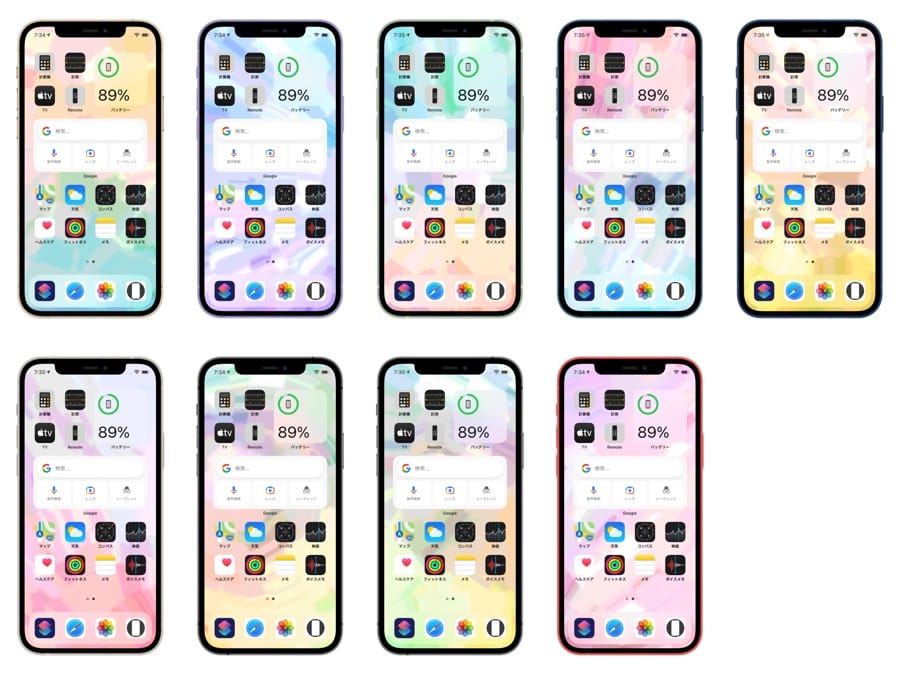
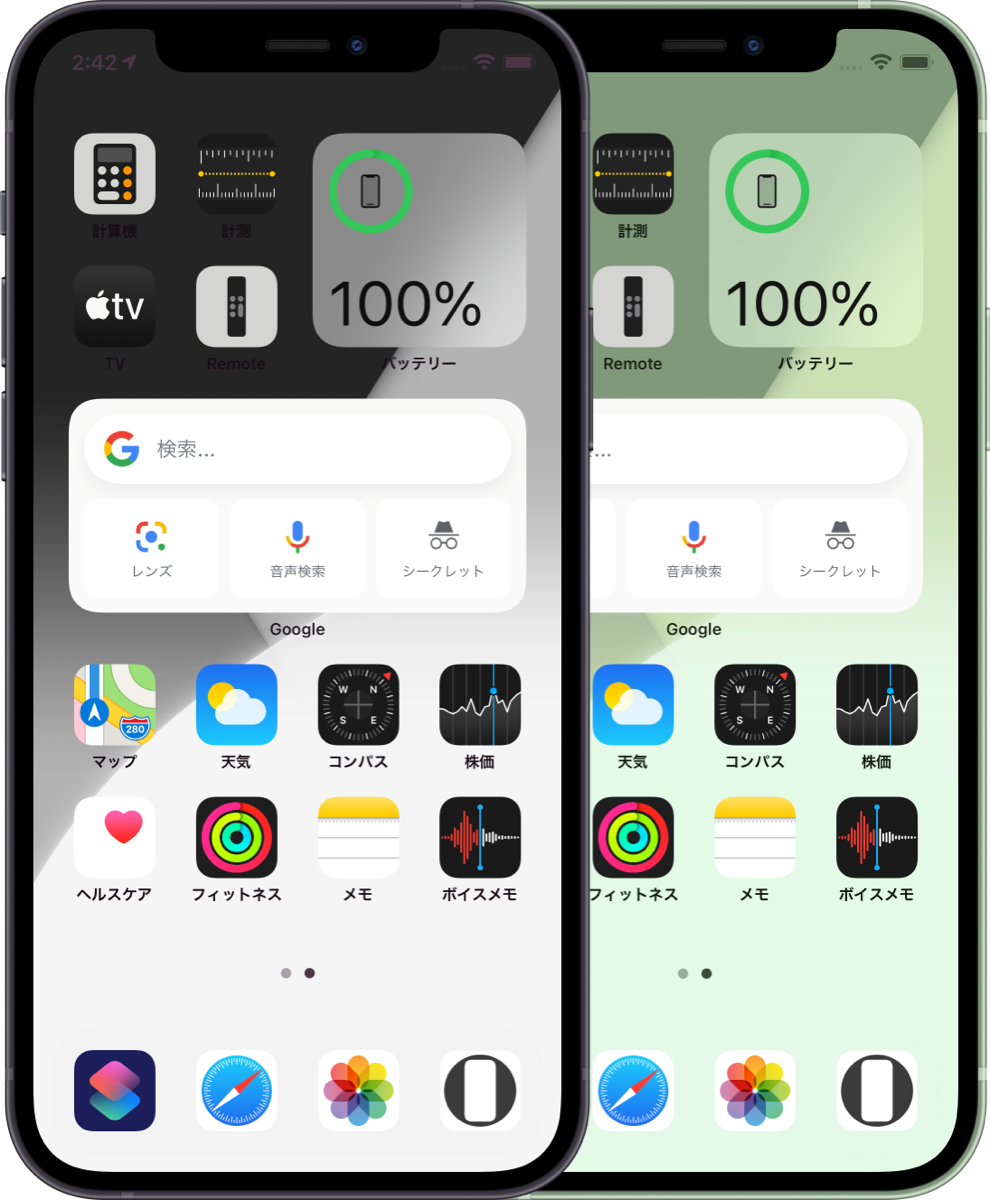
下のように、本来なら白文字になってホワイトポイントが下げられドックが隠せないはずの中間調の背景でドックを隠します。
Variations are 8. It works on all iPhones with iOS 14 or later.
As you can see below, the Dock is hidden by the mid-toned backgrounds, which should not hide the Dock because they have white text and the white point is lowered.
マイルドな壁紙のカラバリ
​➡︎ マイルドな壁紙|Mild
iOS 14–​
 8 sheets
iPhone ​12 Pro Max/12/12 Pro/12 mini/
​11 Pro Max/XS Max/11 Pro/XS/X/11/XR/
8 Plus/7 Plus/6s Plus/SE2/8/7/6s ᴀA
※ 壁紙の表示にはiOS 14以降が必要です。
* To view the wallpaper, iOS 14 or later is required.
ダークモードでドックを隠す場合はドック周辺以外に背景の制限はありませんが、ドックはかなり暗くなってバリエーションの幅もありません。一方ライトモードでは背景全体がかなり明るくないといけませんでした。今回はその制限を大幅に緩和することに成功しています。
デザインは当サイトの定番?ダンスの壁紙(カテゴリー : その他の壁紙)をベースにしました。
When hiding the Dock in Dark Mode, there is no restriction on the background except for the area around the Dock, but the Dock becomes much darker and there is no range of variation. In Light Mode, on the other hand, the entire background had to be quite bright. This time I succeeded in loosening that restriction significantly.
The design is based on this site's standard? Dance (Category : Uncategorized Wallpapers).
​
0 コメント

June 27th, 2021

6/27/2021

4 コメント


白い猫の壁紙
White Cat Wallpaper


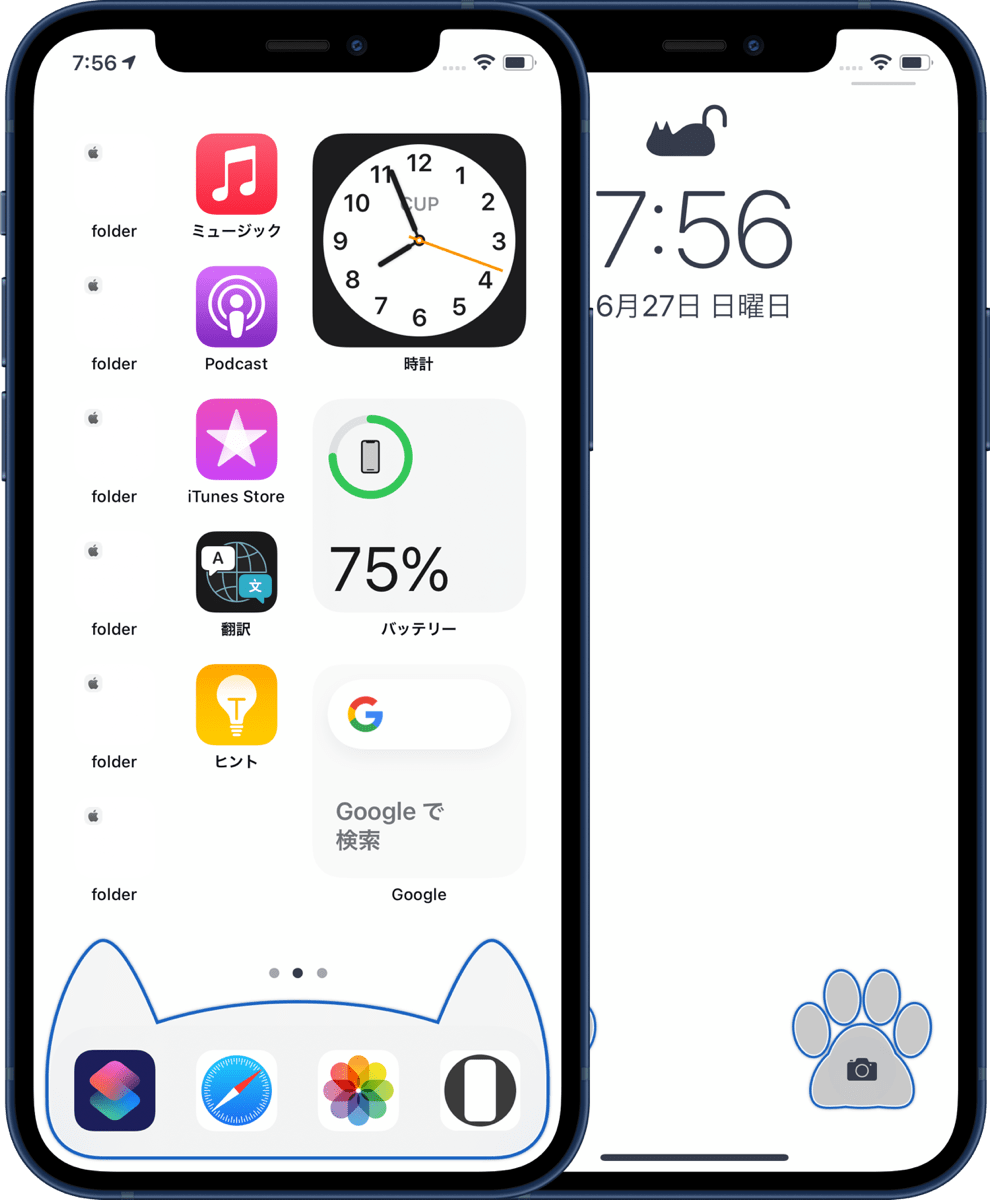
白い背景でドックを猫耳に、ついでにフォルダを見えなくして、鍵アイコンを猫にして、ボタンを肉球にする、猫づくしの壁紙です。
This is the cat-filled wallpaper with a white background, cat ears for the Dock, invisible folders, the cat lock icon, and paw pads for the buttons.​
新作白猫縁取り壁紙
​縁取りの色を各10色用意しました。
Ten colors are available for each of the borders.
白猫縁取り壁紙のカラバリ
​白猫縁取り壁紙|White Cat Border
iOS 14–​
 10 sets each
※ 壁紙の表示にはiOS 14以降が必要です。
* To view the wallpaper, iOS 14 or later is required.

➡︎ 12 Pro Max
➡︎ 12/12 Pro
➡︎ 12 mini
➡︎ 11 Pro Max/XS Max
➡︎ 11 Pro/XS/X
➡︎ 11/XR

​
4 コメント

June 15th, 2021

6/15/2021

2 コメント


りんごじゃない鍵のアイコン
Lock Icons That Are Not Apples


ロック画面の鍵アイコンをりんごじゃないフルーツの形に見せる壁紙。フルスクリーンiPhone用です。
Wallpapers that make the lock icon on the Lock Screen look like a fruit, not an apple. For full screen iPhones.
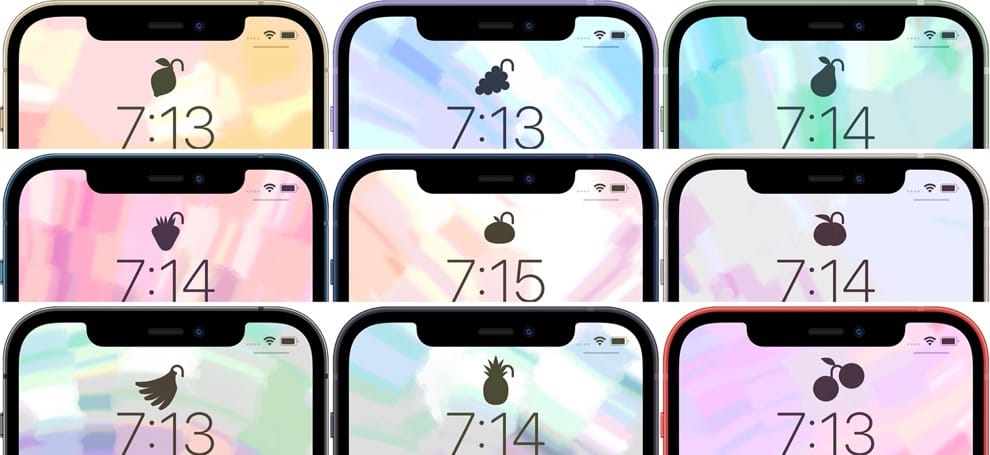
新作フルーツロックの壁紙
9種類のフルーツと夏にぴったりのトロピカルな背景。
9 different fruits and tropical backgrounds perfect for summer.
フルーツロックの壁紙のバリエーション
ホーム画面用に背景だけの壁紙もあります。
There are also wallpapers with just a background for your Home Screen.
フルーツロックの壁紙ホーム画面
​フルーツロックの壁紙|Fruit Lock
iOS 14–
​ 9 sets each
※ 壁紙の表示にはiOS 14以降が必要です。
* To view the wallpaper, iOS 14 or later is required.

➡︎ 12 Pro Max
➡︎ 12/12 Pro
➡︎ 12 mini
➡︎ 11 Pro Max/XS Max
➡︎ 11 Pro/XS/X
➡︎ 11/XR
(梨もありますが深い意味はありません)
(There is also a pear, but I didn’t mean anything by it.​)

​
2 コメント

May 15th, 2021

5/15/2021

0 コメント


クールカワイイ
Cool Kawaii


今回はフルスクリーンiPhone用。黒一色のシンプルな背景でホーム画面のドックを猫耳に、ロック画面のボタンを肉球にして縁取る壁紙です。
This time for the full screen iPhone. The wallpaper with a simple black background, framing the Dock on the Home Screen as cat ears and the buttons on the Lock Screen as paw pads.
新作猫の縁取り壁紙
バリエーションは11色。
Available in 11 colors.
猫の縁取り壁紙のバリエーション
​猫の縁取り壁紙|Cat Border
iOS 14–​ 11 sets each
※ 壁紙の表示にはiOS 14以降が必要です。
* To view the wallpaper, iOS 14 or later is required.

➡︎ 12 Pro Max
➡︎ 12/12 Pro
➡︎ 12 mini
➡︎ 11 Pro Max/XS Max
➡︎ 11 Pro/XS/X
➡︎ 11/XR

ホーム画面用の猫耳はダークモードでお使いください。ロック画面用の肉球はダークモード、ライトモードの両方で使えます。
The cat ears for the Home Screen can be used in Dark Mode. The paw pads for the Lock Screen can be used in both Dark and Light Modes.
​
0 コメント

May 01st, 2021

5/1/2021

0 コメント


ギミックはたまにでもいいかな
A Gimmick Might Be Nice Once in a While


今度の動く静止画の壁紙は動くけどあんまり動かないようにしました。未来的な回路がiPhoneの傾きでときどき瞬きます。
This time I made the moving still wallpaper move but not too much. The futuristic circuitry occasionally blinks when the iPhone is tilted.
新作未来回路の壁紙
たまに演算して電流が走るような演出です。機種によって動く頻度などは異なります。
The effect is like a current running through a calculation sometimes. The frequency of operation varies depending on the model.
未来回路の壁紙のバリエーション
バリエーションは11枚。4インチ(初代SE)を除くすべてのiPhoneで使えます。壁紙の表示にはiOS 14以降が必要です。今回のは各2MBくらいあります(これでも相当圧縮しています)。
Available in 11 variations for all iPhones, except the 4 inch screen (1st SE). Requires iOS 14 or later to view wallpapers. This one is about 2MB each (Even so, I compressed them considerably.).
➡︎ ​未来回路の壁紙|Future Circuit
iOS 14–​ 11 sheets
iPhone ​12 Pro Max/12/12 Pro/12 mini/
​11 Pro Max/XS Max/11 Pro/XS/X/11/XR/
8 Plus/7 Plus/6s Plus/SE2/8/7/6s ᴀA
​✳︎この壁紙は明滅します。
✳︎These wallpapers blink.
回路に電流が走るのは見たことないんですけどね。
Off course, I've never seen a current running in a circuit.​
​
0 コメント

April 14th, 2021

4/14/2021

0 コメント


動けばいいってもんじゃない
It's Not Necessarily Better to Move


iPhone 12シリーズ対応を機に動く静止画の壁紙を新シリーズとして再スタート。動く範囲を抑えてより使いやすいものにしました。
Taking the opportunity of the iPhone 12 series support, I restarted Static Dynamic Wallpapers as a new series. The range of movement has been reduced to make it more user friendly.
新作神秘の壁紙
iPhoneを傾けると暗闇に光がきらめきます。SE 2の4.7インチ画面から12 Pro Maxの6.7インチ画面までどれでも使える共通サイズ、対応バージョンはiOS 14以降です(14未満ではSafariで表示できません)。​4インチ画面はサポートしていません。バリエーションは18枚。
​When you tilt your iPhone, the light sparkles in the dark. It is a universal size that can be used on any screen from the SE 2's 4.7" screen to the 12 Pro Max's 6.7" screen, and is compatible with iOS 14 or later (Cannot be displayed in Safari under 14). The 4" screen is not supported. There are 18 variations.
神秘の壁紙のバリエーション
下のサンプルを指で拡大縮小すると実物に近い模様の出現を見られます。実際には形が変化します。画面サイズによって動き方は異なります。
If you zoom in and out on the sample below with your finger, you can see the appearance of the pattern close to the real screen.​ In reality, the shape will fluctuate. It works differently depending on the screen size.
神秘の壁紙のサンプル
※ 神秘の壁紙のサンプルはiOS 14以降で表示できます。
*The Mystery sample can be viewed on iOS 14 or later.
➡︎ ​神秘の壁紙|Mystery
iOS 14–​
 18 sheets
iPhone ​12 Pro Max/12/12 Pro/12 mini/
​11 Pro Max/XS Max/11 Pro/XS/X/11/XR/
8 Plus/7 Plus/6s Plus/SE2/8/7/6s ᴀA
✳︎この壁紙は明滅します。
​
視差効果オンで設定してください。
✳︎These wallpapers blink.
Set as Perspective Zoom: On.
以前の動く静止画の壁紙はとにかく動くことを追求していました。しかし、特にiOS 13で視差効果の遠近変形効果が廃止されてからは波紋状の模様も出なくなって、一層明滅が目立つようになりました。今後はもっとちょうど良さを考える方針です。
In the past, Static Dynamic Wallpapers gave top priority to move. However, especially after the removal of the parallax perspective effect in iOS 13, the rippled patterns no longer appear, and the flickering becomes more noticeable. In the future, I'll try to think of something more just right.
​
0 コメント

April 01st, 2021

4/1/2021

0 コメント


iPhone 12 miniで動く静止画の壁紙
Static Dynamic Wallpapers on iPhone 12 mini


iPhone 12 miniでは従来の5.8インチ用壁紙がそのまま使えました。
On the iPhone 12 mini, you can still use the traditional wallpaper for the 5.8 inch.
動く静止画の壁紙(既存)
スクリーンショットの解像度は同じでも実画面は違うのでうまくいかないと思っていたのですが、なんか普通に動いています。
I thought it wouldn't work because the resolution of the screenshot is the same but the actual screen is different, but it somehow works normally.
➡︎ 動く静止画の壁紙|Static Dynamic Wallpapers
12Pro Max/12/12 Pro用のリサイズ版は作らずにリスタートする予定です。iOS 14用に画像フォーマットを変更して軽量化します。何がいいかというとダウンロード速度が普通になります。動く静止画はとてつもなく重いのが多いので、物によっては10分の1以下(それでも普通)にできます。
I plan to restart without making a resized version for 12Pro Max/12/12 Pro. I'm going to change the image format for iOS 14 to make it lighter. What's nice is that the download speed will be normal; Static Dynamic Wallpapers are often incredibly heavy, so I can make it less than a tenth (but still normal) for some things.
​
0 コメント
<<前へ
次へ>>


    Archive

    6月 2026
    5月 2026
    4月 2026
    3月 2026
    2月 2026
    1月 2026
    12月 2025
    11月 2025
    10月 2025
    9月 2025
    8月 2025
    7月 2025
    6月 2025
    5月 2025
    4月 2025
    3月 2025
    2月 2025
    1月 2025
    12月 2024
    11月 2024
    10月 2024
    9月 2024
    8月 2024
    7月 2024
    6月 2024
    5月 2024
    4月 2024
    3月 2024
    2月 2024
    1月 2024
    12月 2023
    11月 2023
    10月 2023
    9月 2023
    6月 2023
    5月 2023
    4月 2023
    3月 2023
    2月 2023
    1月 2023
    12月 2022
    11月 2022
    10月 2022
    9月 2022
    8月 2022
    7月 2022
    6月 2022
    5月 2022
    4月 2022
    3月 2022
    2月 2022
    1月 2022
    12月 2021
    11月 2021
    10月 2021
    9月 2021
    8月 2021
    7月 2021
    6月 2021
    5月 2021
    4月 2021
    3月 2021
    2月 2021
    1月 2021
    12月 2020
    11月 2020
    10月 2020
    9月 2020
    8月 2020
    7月 2020
    6月 2020
    5月 2020
    4月 2020
    3月 2020
    2月 2020
    1月 2020
    12月 2019
    11月 2019
    10月 2019
    9月 2019
    8月 2019
    7月 2019
    6月 2019
    5月 2019
    4月 2019
    3月 2019
    2月 2019
    1月 2019
    12月 2018
    11月 2018
    10月 2018
    9月 2018
    8月 2018
    7月 2018
    6月 2018
    5月 2018
    4月 2018
    3月 2018
    2月 2018
    1月 2018
    12月 2017
    11月 2017
    10月 2017
    9月 2017
    8月 2017
    7月 2017
    6月 2017
    5月 2017
    4月 2017
    3月 2017
    2月 2017
    1月 2017

    heyeasedのXへのリンク heyeasedのThreadsへのリンク heyeasedのBlueskyへのリンク new-rss-feed
   About This Site   
     
 Privacy   Policy 
​Nakatani Hideaki @heyeased
​​​​CC BY-NC-SA 4.0
​Powered by ​Weebly
トップページへのリンク link to home page

  • New
  • Notes
  • iOS
  • Help
  • About This Site
  • Privacy Policy