Mysterious iPhone Wallpaper
  • New
  • Notes
  • iOS
  • Help
  • About This Site
  • Privacy Policy

New

September 27th, 2020

9/27/2020

0 コメント


修正のお知らせ
Notice of Correction


3D縁取り壁紙 Pro ver.1.5のリンクを間違えていました。修正してあります。
I made a mistake with the links in 3D Border Pro ver.1.5. I fixed it.
3D縁取り壁紙 Pro 1.5 リンク修正
➡︎ 3D縁取り壁紙 Pro (1.5)|3D Border Pro (1.5)
iOS 14–​ iPhone 11 Pro/XS/X 22 sheets
​​​​
0 コメント

September 26th, 2020

9/26/2020

0 コメント


iOS 14対応ベゼルを太くする壁紙
Bezel Thickening Wallpaper for iOS 14


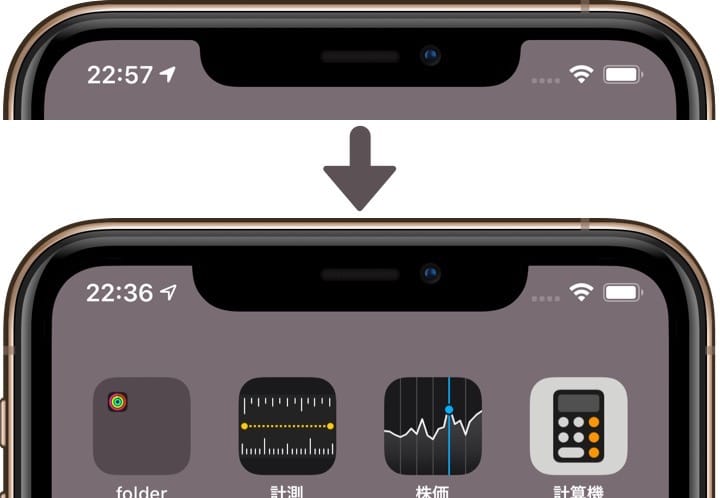
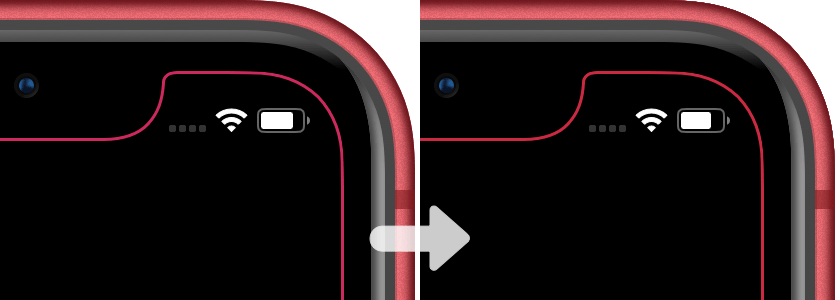
iOS 14に対応した有機EL iPhone用のベゼルを太くする壁紙です。フレームを1ピクセル右に動かしただけのバージョン1.5です。
These are the bezel-thickening wallpapers for OLED iPhones that are compatible with iOS 14. Version 1.5 with the frame moved one pixel to the right.
新作ベゼルを太くする壁紙1.5
ベゼルを太くする壁紙 (1.5)|Thick Bezl (1.5)
iOS 14– 14 sheets each
➡︎ iPhone 11 Pro Max/XS Max
➡︎ iPhone 11 Pro/XS/X
表示位置が違うだけの場合はご使用中の壁紙には影響はありません。再設定の場合に新OS対応版が必要になります。
If the only difference is the display position, the wallpaper in use is not affected. When you reconfigure the wallpaper, you need to install the new OS version.
​​​​
0 コメント

September 25th, 2020

9/25/2020

0 コメント


ウィジェット記念
Commemorate Widget


ウィジェットが追加されたiOS14のホーム画面の完全な地図。2種類の設計図の壁紙です。
The complete map of the iOS14 Home Screen with widgets added. Two different blueprint wallpapers.
完全版設計図の壁紙
Full Blueprint
アイコングリッドに加えてウィジェットが置ける場所にフレームを重ねました。ホーム画面用とロック画面用の各16セット。
In addition to the icon grid, I have stacked frames where widgets can be placed. 16 sets each for the Home Screen and Lock Screen.
新作完全版設計図の壁紙
➡︎ iPhone 11 Pro Max/XS Max
➡︎ iPhone 11 Pro/XS/X
➡︎ iPhone 11/XR
➡︎ iPhone SE/8/7/6s
➡︎ iPhone 8 Plus/7 Plus/6s Plus
➡︎ iPhone SE1/iPod touch 7 (SE/8/7/6s-ᴀA)

問題のページコントロールはシンプルに削除しました。ほぼ毎週ベータバージョンごとに位置を変える迷子ですから、Appleにも設計図が存在しないことを表現すれば足ります。4.7インチiPhoneのロック画面の時刻も14.2ベータ1では小さくなっています。
I simply removed the Page Control that was the problem. It's a stray that changes position with each beta version almost every week, so it's sufficient to express that the blueprint doesn't exist for Apple either. The 4.7 inch iPhone Lock Screen time is smaller at 14.2 beta 1.
ウィジェットマップ
Widget Map

ウィジェットのすべてのレイアウトを個別に作った壁紙。可能な組み合わせは全部で134通り。ウィジェット無しとロック画面用を加えて各136枚。カラバリはありません。4インチiPhone用は25通りで計27枚です。
Wallpaper with all the layouts of widgets made individually. There are a total of 134 possible combinations. 136 each, including one without widgets and for the Lock Screen. There are no color variations. 25 for the 4 inch iPhone, for a total of 27 wallpapers.
新作ウィジェットマップ
➡︎ iPhone 11 Pro Max/XS Max
➡︎ iPhone 11 Pro/XS/X
➡︎ iPhone 11/XR
➡︎ iPhone SE/8/7/6s
➡︎ iPhone 8 Plus/7 Plus/6s Plus
➡︎ iPhone SE1/iPod touch 7 (SE/8/7/6s-ᴀA)

弱点はレイアウトが異なる複数ページには対応できないことです。iOSは(まだ)ページごとに壁紙を設定できません。
The weakness is that it can't support multiple pages with different layouts, and on iOS you can't set the wallpaper for each page (yet).
​​​​
0 コメント

September 22nd, 2020

9/22/2020

0 コメント


お月見の青
Moon Viewing Blue


ドックを隠す秋の壁紙にお月見を追加しました。紅葉をモチーフにした既存の赤と黄色に鮮やかな青を加えます。
I've added Moon Viewing to Hide Dock Fall.​ A bright blue is added to the existing red and yellow with a fall foliage motif.
新作ドックを隠す秋の壁紙月見追加
今回はダークモード用のみ。水面に映る月をご鑑賞ください。
フルスクリーンiPhoneのロック画面ではライトとカメラボタンの輪郭も隠します。
This time, for Dark Mode only. Watch the moon reflected in the surface of the water.
The full-screen iPhone Lock Screen also hides the light and the camera button outline.
追加分はラインナップの下の方にあります。
The addition is at the bottom of the lineup. 
▶︎ ドックを隠す秋の壁紙|Hide Dock Fall
iOS 13–​ Added 1 sheet
今回は設計図の壁紙の予定でしたが、少し延期して全部作り直します。iOS 14.0ベータでも何度も変わっていたドット部分が14.2ベータ1でまた変わっています。
しかしバージョンごとに必ず変わるあの部分を完璧に理解しました。
I was going to do the blueprint wallpaper for this time, but I decided to postpone and rework it. The dots had changed many times in the 14.0 beta. And then it changed again in 14.2 beta 1.
However, I understood perfectly that it changed with each version.

0 コメント

September 18th, 2020ー3

9/18/2020

0 コメント


差し替えのお知らせ
Replacement Notice​


​縁取る壁紙 2のRedを差し替えました。わずかな修正ですが。ぎりぎり赤に見えるピンクを狙ったつもりが、Product REDに設定するとどうにもピンクに見えてしまうことが判明したのです。
Replaced the Red of Border 2. It's a slight modification. I was going to aim for a pink color which is just barely visible as red. However, it turned out that it looks pink when it is set to Product RED.
縁取る壁紙赤の差し替え
▶︎ iPhone 11 Pro Max/XS Max
▶︎ iPhone 11 Pro/XS/X
▶︎ iPhone 11/XR

​​​​
0 コメント

September 18th, 2020ー2

9/18/2020


ホーム画面編集の参考に
To Help You Edit Your Home Screen


​​iOS 14対応 ホーム画面の編集方法を公開しました。
How to Edit the Home Screen for iOS 14 is now available.​​
​​​​

September 18th, 2020

9/18/2020

0 コメント


シンプルで超高画質
Simple and Ultra High Quality.


iOS 14で加わった新しい壁紙のエッセンスを取り入れ、直線と透明な発光感でアレンジしました。スーツとドレスがモチーフです。​
It captures the essence of the new wallpapers joined in iOS 14, arranged in straight lines and transparent luminescence.  It's based on the motif of a suit and a dress.
新作ダンスの壁紙
新作ダンスの壁紙カラバリ
ダンスの壁紙|Dance
All iOS 16 sheets each
▶︎ フルスクリーンモデル用|For Full Screen iPhones
​
(iPhone 11 Pro Max/XS Max/11 Pro/XS/X/11/XR)
▶︎ ホームボタンモデル用|For Home Button iPhones
(iPhone 8 Plus/7 Plus/6s Plus/6 Plus/SE (2nd)/8/7/6s/6/SE (1st)/5s/5c/5/iPod touch 5–7)
iOS 14の壁紙はこれまでのアブストラクトアートとは一線を画すシンプルさです。新しいトレンドになりそうなのに、影響を受けたと思われるものを(珍しく)見かけません。やってみると難しいんです。その壁にチャレンジしました。
手加減なしでグラデーションを高品質にしたためデータサイズが1枚あたり1.6〜3.7MBあります(圧縮率を高くするとノイズの色が壊れてしまいます。形式をHEIFにしても解決しません。最高画質をキープした圧縮で最も軽くなるのはPNGです)。流出したiOS 14の壁紙を調べても縮小などされていない高画質なものは同レベルのデータサイズのPNGでした(機種にもよるかも?)。これで正解なんでしょう。きっと……
iOS 14's wallpapers are a far cry from the abstract art we've seen in the past, in terms of simplicity. Despite the fact that this is likely to be a new trend, I haven't seen anything that seems to have been influenced by it (Unusually). It's difficult to actually try to imitate it. I challenged that barrier.​
The data size is 1.6–3.7MB per sheet due to the relentlessly high quality gradients (Increasing the compression rate will break the color of the noise. Setting the format to HEIF will not solve this problem. The lightest compression that keeps the highest quality is PNG). I looked at the leaked iOS 14 wallpapers and the high quality ones that weren't shrunk or anything like that were PNGs of the same level of data size (Maybe it depends on the model?). I guess this is the right thing to do. Must be...
​​​​
0 コメント
<<前へ
次へ>>


    Archive

    6月 2026
    5月 2026
    4月 2026
    3月 2026
    2月 2026
    1月 2026
    12月 2025
    11月 2025
    10月 2025
    9月 2025
    8月 2025
    7月 2025
    6月 2025
    5月 2025
    4月 2025
    3月 2025
    2月 2025
    1月 2025
    12月 2024
    11月 2024
    10月 2024
    9月 2024
    8月 2024
    7月 2024
    6月 2024
    5月 2024
    4月 2024
    3月 2024
    2月 2024
    1月 2024
    12月 2023
    11月 2023
    10月 2023
    9月 2023
    6月 2023
    5月 2023
    4月 2023
    3月 2023
    2月 2023
    1月 2023
    12月 2022
    11月 2022
    10月 2022
    9月 2022
    8月 2022
    7月 2022
    6月 2022
    5月 2022
    4月 2022
    3月 2022
    2月 2022
    1月 2022
    12月 2021
    11月 2021
    10月 2021
    9月 2021
    8月 2021
    7月 2021
    6月 2021
    5月 2021
    4月 2021
    3月 2021
    2月 2021
    1月 2021
    12月 2020
    11月 2020
    10月 2020
    9月 2020
    8月 2020
    7月 2020
    6月 2020
    5月 2020
    4月 2020
    3月 2020
    2月 2020
    1月 2020
    12月 2019
    11月 2019
    10月 2019
    9月 2019
    8月 2019
    7月 2019
    6月 2019
    5月 2019
    4月 2019
    3月 2019
    2月 2019
    1月 2019
    12月 2018
    11月 2018
    10月 2018
    9月 2018
    8月 2018
    7月 2018
    6月 2018
    5月 2018
    4月 2018
    3月 2018
    2月 2018
    1月 2018
    12月 2017
    11月 2017
    10月 2017
    9月 2017
    8月 2017
    7月 2017
    6月 2017
    5月 2017
    4月 2017
    3月 2017
    2月 2017
    1月 2017

    heyeasedのXへのリンク heyeasedのThreadsへのリンク heyeasedのBlueskyへのリンク new-rss-feed
   About This Site   
     
 Privacy   Policy 
​Nakatani Hideaki @heyeased
​​​​CC BY-NC-SA 4.0
​Powered by ​Weebly
トップページへのリンク link to home page

  • New
  • Notes
  • iOS
  • Help
  • About This Site
  • Privacy Policy