光線の壁紙
Rays
iOS 14–
Air/17 Pro Max/17 Pro/17/
16 Pro Max/16 Pro/16 Plus/16/16e/
15 Pro Max/15 Pro/15 Plus/15/
14 Pro Max/14 Pro/14 Plus/14/
13 Pro Max/13 Pro/13/13 mini/
12 Pro Max/12 Pro/12/12 mini/
11 Pro Max/11 Pro/11/XS Max/XS/XR/X/
SE 3/SE 2/8 Plus/8/7 Plus/7/6s Plus/6s
Air/17 Pro Max/17 Pro/17/
16 Pro Max/16 Pro/16 Plus/16/16e/
15 Pro Max/15 Pro/15 Plus/15/
14 Pro Max/14 Pro/14 Plus/14/
13 Pro Max/13 Pro/13/13 mini/
12 Pro Max/12 Pro/12/12 mini/
11 Pro Max/11 Pro/11/XS Max/XS/XR/X/
SE 3/SE 2/8 Plus/8/7 Plus/7/6s Plus/6s
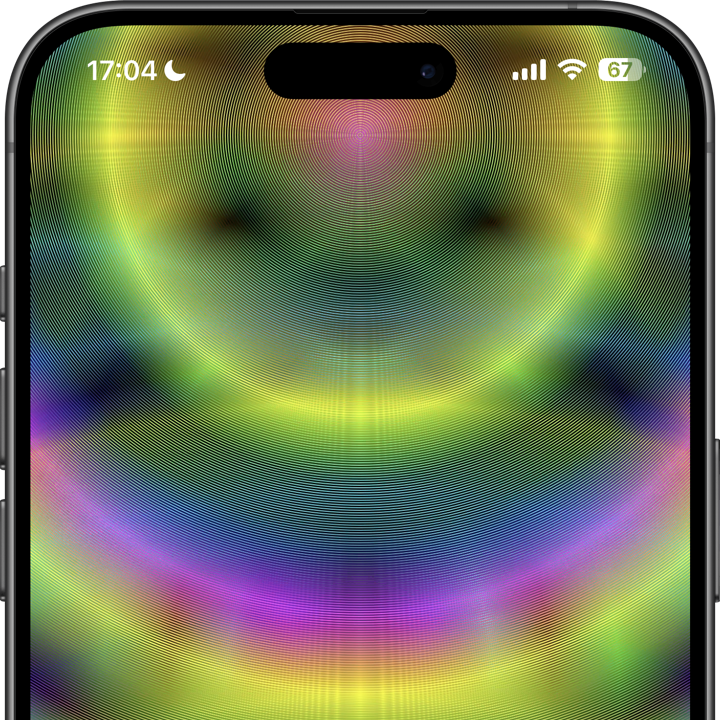
ホームに戻ると光線が震えます。
Returns home, light rays trembling.
Returns home, light rays trembling.
1320×3002
Universal Wallpaper
Universal Wallpaper
アプリスイッチャーから、
ホームに戻ると波打ちます。
Ripples when returning home
from App Switcher.
ホームに戻ると波打ちます。
Ripples when returning home
from App Switcher.
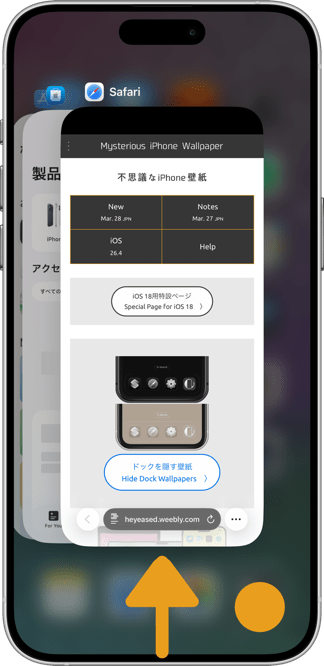
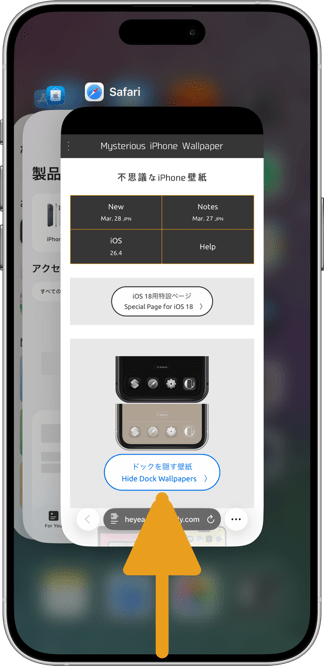
アプリからホームに戻ると波打ちます。
Ripples when returning home from App.
Ripples when returning home from App.
How to Set
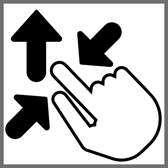

ピンチインして上に・自然光
ホーム画面:ぼかしオフ・壁紙明るく
───────────────
Pinch in then swipe up; Natural
Home: Blur off; light background
───────────────
Help
ホーム画面:ぼかしオフ・壁紙明るく
───────────────
Pinch in then swipe up; Natural
Home: Blur off; light background
───────────────
Help
▼
タップ → 表示 → 長押し保存
Tap → View → Hold to save
タップ → 表示 → 長押し保存
Tap → View → Hold to save


★
- 透明度を下げるがオンになっているとアプリスイッチャーの背景が暗くなって波打ちません。設定アプリ > アクセシビリティ > 画面表示とテキストサイズ > 透明度を下げる:オフ
- 背景が波打って見えるのはアプリからダイレクトにホーム画面に戻ったときだけです。フォルダ内のアプリからフォルダに戻っても背景の変化は見えません。機種によっては素早くフォルダから出れば間に合うかもしれません。
- 環境が明る過ぎたり画面が暗過ぎたりすると波打って見えない可能性があります。
- 壁紙の色を変更すると効果は減少します。
- 設定 > アクセシビリティ > 動作 > 視差効果を減らす:オフ
- 画像形式をWebPにして高品質軽量化を図っています。iOS 14以降で表示できます。
- Reduce Transparency darkens the App Switcher background and prevents the wave. Settings app > Accessibility > Display & Text Size > Reduce Transparency: Off
- The background appears wavy only when you return directly to the home screen from app. If you go from an app in a folder back to the folder, you will not see the background wave. Some models may make it if you get out of the folder quickly.
- If the environment is too bright or the screen is too dark, it may not appear wavy.
- The effect is reduced when the wallpaper color is changed.
- Settings > Accessibility > Motion > Reduce Motion: Off
- The image format is WebP to make it high quality and lightweight. iOS 14 or later can display it.
ホーム画面に戻った時に背景の光に振動が走ります。
波紋のしくみ
iPhoneではアプリを閉じてホーム画面に戻る時に壁紙がズームされます。画像も画面も1ピクセルという最小単位があるので、一つの画素に注目すれば動く時に飛び飛びに描写されることになります。普通の絵では認識もできないわずかな変化ですが、細かいパターンがある程度の広さで敷き詰められていると一斉に明滅して波打ったように見えるのです。
この壁紙は高画質で複雑なパターンとグラデーションの組み合わせなのでデータサイズはヘビー級です。それでもWebPフォーマットにすることでかなり軽量化しています。
超縦長フォーマット
iPhoneでは高品質フォーマットのWebP、PNG画像を壁紙にしたときの表示位置はまちまち、加えてiOS 17以降ではピンチ操作で画面上部がぼかされます。これを防ぐには画面よりも縦長の画像を上にスワイプするしかありません。そのための超縦長フォーマットです。
この設定方法によってレイアウトは必ず下揃えになります。フルスクリーンモデルとホームボタンモデルではアスペクトが大きく異なりますが、下基準でどちらでも成立するデザインにすることは可能です。
When you return to the Home screen, the background light vibrates.
How the Vibration works
When you close an app and return to the Home Screen, iPhone applies a zoom effect to the wallpaper. Since both the image and screen consist of tiny pixels, movement is rendered in discrete steps rather than a smooth transition. Normally, this is imperceptible, but when a finely detailed pattern covers a large enough area, the pixels flicker in unison, creating a wave-like effect.
This wallpaper combines high-resolution, complex patterns and gradients, resulting in a heavy data size. Even so, converting it to WebP has significantly lightened it.
Very Vertical Format
On the iPhone, high-quality format WebP and PNG images are displayed in different positions when used as wallpaper, and in addition, the top of the screen is blurred by pinch operation on iOS 17 or later. The only way to prevent this is to swipe up on an image that is more vertical than the screen. This is a very vertical format for this purpose.
The layout is always bottom-aligned by this setting method. The aspect is very different between the full-screen and Home button models, but it is possible to create a design that is viable in either based on the bottom of the screen.
波紋のしくみ
iPhoneではアプリを閉じてホーム画面に戻る時に壁紙がズームされます。画像も画面も1ピクセルという最小単位があるので、一つの画素に注目すれば動く時に飛び飛びに描写されることになります。普通の絵では認識もできないわずかな変化ですが、細かいパターンがある程度の広さで敷き詰められていると一斉に明滅して波打ったように見えるのです。
この壁紙は高画質で複雑なパターンとグラデーションの組み合わせなのでデータサイズはヘビー級です。それでもWebPフォーマットにすることでかなり軽量化しています。
超縦長フォーマット
iPhoneでは高品質フォーマットのWebP、PNG画像を壁紙にしたときの表示位置はまちまち、加えてiOS 17以降ではピンチ操作で画面上部がぼかされます。これを防ぐには画面よりも縦長の画像を上にスワイプするしかありません。そのための超縦長フォーマットです。
この設定方法によってレイアウトは必ず下揃えになります。フルスクリーンモデルとホームボタンモデルではアスペクトが大きく異なりますが、下基準でどちらでも成立するデザインにすることは可能です。
When you return to the Home screen, the background light vibrates.
How the Vibration works
When you close an app and return to the Home Screen, iPhone applies a zoom effect to the wallpaper. Since both the image and screen consist of tiny pixels, movement is rendered in discrete steps rather than a smooth transition. Normally, this is imperceptible, but when a finely detailed pattern covers a large enough area, the pixels flicker in unison, creating a wave-like effect.
This wallpaper combines high-resolution, complex patterns and gradients, resulting in a heavy data size. Even so, converting it to WebP has significantly lightened it.
Very Vertical Format
On the iPhone, high-quality format WebP and PNG images are displayed in different positions when used as wallpaper, and in addition, the top of the screen is blurred by pinch operation on iOS 17 or later. The only way to prevent this is to swipe up on an image that is more vertical than the screen. This is a very vertical format for this purpose.
The layout is always bottom-aligned by this setting method. The aspect is very different between the full-screen and Home button models, but it is possible to create a design that is viable in either based on the bottom of the screen.
