💾
Legacy
Legacy
シンプルにりんごの壁紙
simply Apple
iOS 16–18
16 Pro Max/16 Pro/16 Plus/16/16e/
15 Pro Max/15 Pro/15 Plus/15/
14 Pro Max/14 Pro/14 Plus/14/
13 Pro Max/13 Pro/13/13 mini/
12 Pro Max/12 Pro/12/12 mini/
11 Pro Max/11 Pro/11/XS Max/XS/XR/X
SE 3/SE 2/8 Plus/8
16 Pro Max/16 Pro/16 Plus/16/16e/
15 Pro Max/15 Pro/15 Plus/15/
14 Pro Max/14 Pro/14 Plus/14/
13 Pro Max/13 Pro/13/13 mini/
12 Pro Max/12 Pro/12/12 mini/
11 Pro Max/11 Pro/11/XS Max/XS/XR/X
SE 3/SE 2/8 Plus/8
ドックを隠してシンプルにりんご。
Hide Dock, just an apple.
Hide Dock, just an apple.
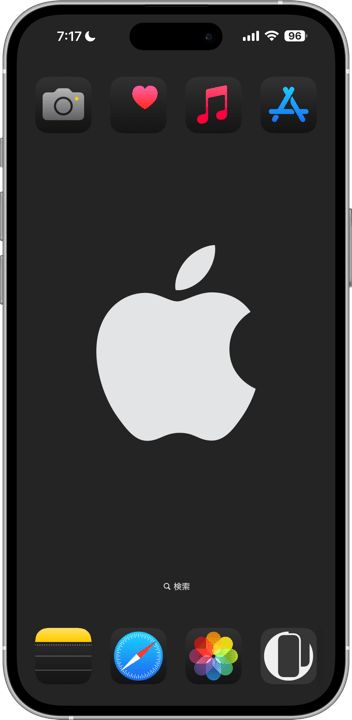
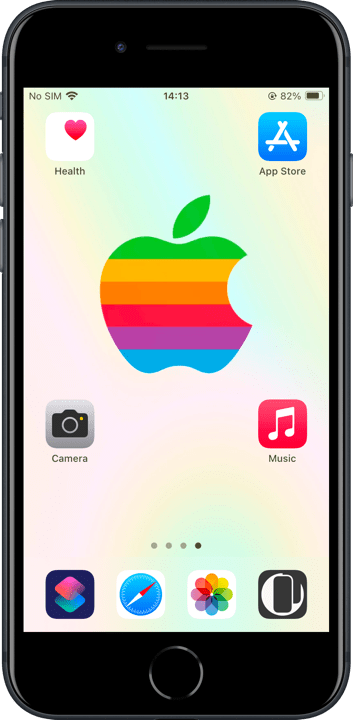
1320×3002
Universal Wallpaper
Universal Wallpaper
How to Set
ピンチインして上に・自然光
ホーム画面:ぼかしオフ
───────────────
Pinch in then swipe up; Natural
Home: Blur off
───────────────
Help
ホーム画面:ぼかしオフ
───────────────
Pinch in then swipe up; Natural
Home: Blur off
───────────────
Help
▼
タップ → 表示 → 長押し保存
Tap → View → Hold to save
タップ → 表示 → 長押し保存
Tap → View → Hold to save

Midnight

RED

Blue

Pink

Orange

Yellow

Green

Purple

White

Rainbow

Silver

Gold

Rose Gold

RED

Blue

Purple

Green

Yellow

Black

Rainbow
★
- ホーム画面の壁紙設定でぼかしをオンにすると背景が暗くなります。もしも設定し損ねて色が合わなかった場合は設定に戻ってぼかしをオフにしてください。
- 設定アプリ > アクセシビリティ > 画面表示とテキストサイズ > 透明度を下げる:オフ
- ホームボタンモデルではダークモード用でドックに薄い線が出ます。
- 画像形式をWebPにして高品質軽量化を図っています。iOS 14以降で表示できます。
- When you enable blur in the Home Screen wallpaper settings, the background will darken. If the colors don’t match as intended, go back to the settings and turn off the blur.
- Settings > Accessibility > Display & Text Size > Reduce Transparency: Off
- The Home button model has a thin line at the top of the Dock with Dark Mode.
- The image format is WebP to make it high quality and lightweight. iOS 14 or later can display it.
ドックを隠す色の背景に、アイコンに埋もれても成立する程よく大きなりんごを置きました。りんごマークはウィキペディアのAppleページからパブリックドメインの画像を使用しています。
ライトモードでは、基本的にドックは背景より明るくなりますが、一定以上の明るさだとドックの方が暗くなります。逆にダークモードではドックは背景より暗くなり、一定以下の明るさで明るくなります。いずれも明暗が逆転する境界で背景とドックが同じ色になります。デザインが許すときは上部を真っ黒にしてノッチやダイナミックアイランドも隠します。
iOS 17で導入された自動補完機能により、設定時に壁紙を動かすと強制的に上がカットされてぼかされます。これをキャンセルするには画面サイズより縦長アスペクトの壁紙を上にスワイプするしかないので、そのためのサイズで作ってあります。
A background that hides the Dock, with a perfectly sized Apple that stands out even among icons. The apple symbol is a public domain image from the Apple page on Wikipedia.
In Light Mode, the Dock is generally brighter than the background, but if the background is too bright, the Dock becomes darker. Conversely, in Dark Mode, the Dock is usually darker than the background, but if the background is too dark, the Dock lightens. At the brightness thresholds where this reversal occurs, the Dock and background match in color. When the design permits, the top area is solid black to hide the notch and Dynamic Island.
With the auto-cropping feature introduced in iOS 17, moving the wallpaper during setup forces the top to be cropped and blurred. To cancel this effect, you need to swipe up a taller-than-screen-aspect wallpaper. This wallpaper is designed to accommodate that, ensuring proper placement.
ライトモードでは、基本的にドックは背景より明るくなりますが、一定以上の明るさだとドックの方が暗くなります。逆にダークモードではドックは背景より暗くなり、一定以下の明るさで明るくなります。いずれも明暗が逆転する境界で背景とドックが同じ色になります。デザインが許すときは上部を真っ黒にしてノッチやダイナミックアイランドも隠します。
iOS 17で導入された自動補完機能により、設定時に壁紙を動かすと強制的に上がカットされてぼかされます。これをキャンセルするには画面サイズより縦長アスペクトの壁紙を上にスワイプするしかないので、そのためのサイズで作ってあります。
A background that hides the Dock, with a perfectly sized Apple that stands out even among icons. The apple symbol is a public domain image from the Apple page on Wikipedia.
In Light Mode, the Dock is generally brighter than the background, but if the background is too bright, the Dock becomes darker. Conversely, in Dark Mode, the Dock is usually darker than the background, but if the background is too dark, the Dock lightens. At the brightness thresholds where this reversal occurs, the Dock and background match in color. When the design permits, the top area is solid black to hide the notch and Dynamic Island.
With the auto-cropping feature introduced in iOS 17, moving the wallpaper during setup forces the top to be cropped and blurred. To cancel this effect, you need to swipe up a taller-than-screen-aspect wallpaper. This wallpaper is designed to accommodate that, ensuring proper placement.
