ロックをカスタムする物語
The Custom Lock Story
だんだん速くなってます。
Getting faster all the time.
Getting faster all the time.
➜ English
ロック画面やスリープ解除、ロック解除のトリックです。
★
- 代表的なトリックにスクショとリンクを添えて歴史をまとめています。
- トリックによって仕様が変更されたiOSのバージョンが異なるため、後に作られたトリックが先に使えなくなることもあります。
- 原則としてメジャーアップデート後の旧バージョンのマイナーアップデートは追跡していません。
- 対応OSのリリース期間を目安として表記しています。壁紙の公開とは必ずしも一致しません。
- このページは2026年5月にまとめました。
iOS 11.0–13.1
2017年9月 – 2019年9月
iPhone Xが発売された時はロック画面に鍵アイコンが大きく表示されていました。ロック中は閉じていて、解除されると開いた形で残ります。
最初のロックをカスタムする壁紙は、鍵アイコンの位置に同じ色の色んなパーツを置いて形が変わったように見せるトリック。
iPhoneのテキストは背景が濃いときは白、背景が明るいときは黒くなります。黒は実は黒ではなく、モノクロ背景ならダークグレー、壁紙に色があれば全体の平均色を反映した暗い色、鍵アイコンも同じ色です。
最初はアイコンパーツがより本物らしく見えるように、背景を立体的な絵柄にして浮かせました。
複雑な色合いだと鍵がどんな色になるか、やってみないと分からないのを合わせるのが腕の見せどころです。
ホーム画面用には鍵の開いた状態を正確に型取って半透明にしたパーツが残る演出でした。
最初のロックをカスタムする壁紙は、鍵アイコンの位置に同じ色の色んなパーツを置いて形が変わったように見せるトリック。
iPhoneのテキストは背景が濃いときは白、背景が明るいときは黒くなります。黒は実は黒ではなく、モノクロ背景ならダークグレー、壁紙に色があれば全体の平均色を反映した暗い色、鍵アイコンも同じ色です。
最初はアイコンパーツがより本物らしく見えるように、背景を立体的な絵柄にして浮かせました。
複雑な色合いだと鍵がどんな色になるか、やってみないと分からないのを合わせるのが腕の見せどころです。
ホーム画面用には鍵の開いた状態を正確に型取って半透明にしたパーツが残る演出でした。

➜ 色んなロックの壁紙
iOS 12で表示位置が0.5ピクセルずれましたがそのぐらいは吸収できるトリックです。
スリープ解除の時に左から右に光が走るトリックも作りましたが、この時は別カテゴリーだった静止画ライブ壁紙と被ってますね。
iOS 12で表示位置が0.5ピクセルずれましたがそのぐらいは吸収できるトリックです。
スリープ解除の時に左から右に光が走るトリックも作りましたが、この時は別カテゴリーだった静止画ライブ壁紙と被ってますね。
iOS 12.0–13.1
2018年9月 – 2019年9月
ライトボタンとカメラボタンの形を変えたように見せる壁紙。
こちらは0.5ピクセルのズレも許容できません。技術的にはiOS 11でも可能ですが、作ったのはiOS 12の時でした。
ボタンの色は背景を暗くしたものになります。相殺して周りと同じ色になる明るい色を、ボタンの背後に置くトリックです。
こちらは0.5ピクセルのズレも許容できません。技術的にはiOS 11でも可能ですが、作ったのはiOS 12の時でした。
ボタンの色は背景を暗くしたものになります。相殺して周りと同じ色になる明るい色を、ボタンの背後に置くトリックです。

iOS 13.2–15.7
2019年10月 – 2022年9月
iOS 13.2でそれまで上の方に寄っていた壁紙の表示位置が中央寄りになりました。
ロックをカスタムする壁紙も全てリメイクです。
ロックをカスタムする壁紙も全てリメイクです。

iOS 11.0–15.7(静止画ライブ壁紙)
2017年9月 – 2022年9月
iPhoneはスリープを解除する時に急に全点灯するのではなく、一瞬ですがゆっくりと明るくなります。壁紙に明暗差がある場合は明るい所から見えることになります。それを利用して動いて見える壁紙を作りました。
iOS 13.2で表示位置が下に移動しましたが許容範囲内。鍵アイコンやボタン位置のような精密さが要求されるトリックではありません。
レイアウト上問題があるものだけ別バージョンを用意して対応しました。
iOS 13.2で表示位置が下に移動しましたが許容範囲内。鍵アイコンやボタン位置のような精密さが要求されるトリックではありません。
レイアウト上問題があるものだけ別バージョンを用意して対応しました。

➜ ぐるぐるマークの壁紙
Face ID iPhone専用です。ホームボタンiPhoneではロック解除が早過ぎて動きを見る暇もありません。
iDeviceHelpさんのAnimated Lock Screenを見て閃いたのですが、実は私も2014年、iOS 7.1の時には既にこのトリックの壁紙を作っていて、当時別サイトだったブログには今と同じ説明までしていました。すっかり忘れていたのです。
Face ID iPhone専用です。ホームボタンiPhoneではロック解除が早過ぎて動きを見る暇もありません。
iDeviceHelpさんのAnimated Lock Screenを見て閃いたのですが、実は私も2014年、iOS 7.1の時には既にこのトリックの壁紙を作っていて、当時別サイトだったブログには今と同じ説明までしていました。すっかり忘れていたのです。

iOS 16.0–
2022年9月 –
視差効果が廃止され、Face ID iPhoneの鍵アイコンにも変更がありました。小さくなって一瞬開いたら消える仕様です。鍵アイコンの壁紙は作れません。
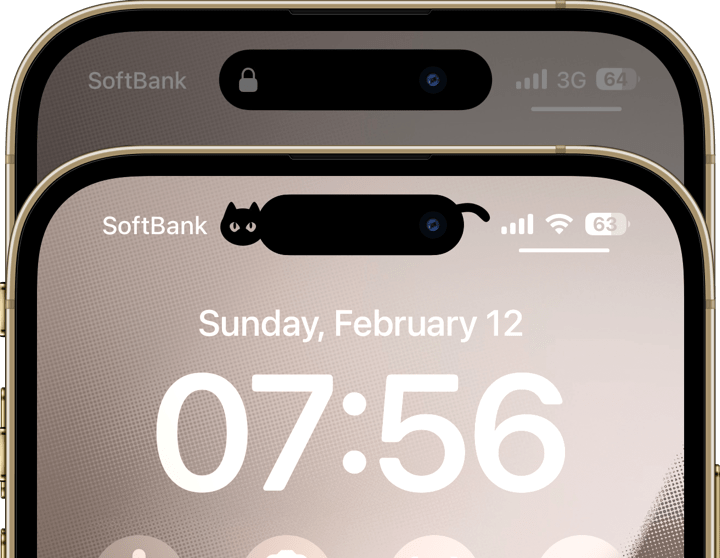
ほぼ同時に発売されたiPhone 14 Proシリーズのダイナミックアイランドのトリックがカテゴリーを引き継ぎました。
ロック中は普通のダイナミックアイランド。解除されると裏から色々出てくる仕掛けです。
ほぼ同時に発売されたiPhone 14 Proシリーズのダイナミックアイランドのトリックがカテゴリーを引き継ぎました。
ロック中は普通のダイナミックアイランド。解除されると裏から色々出てくる仕掛けです。
➜ ダイナミックいろいろ壁紙
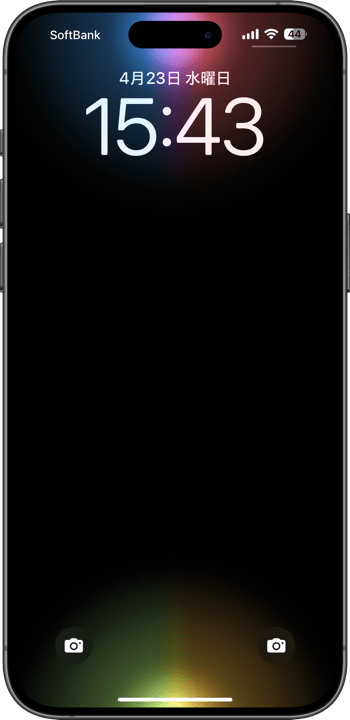
『静止画ライブ壁紙』も今までのものは使えなくなりました。
iOS 15までは例えば4段階で動く壁紙なら20%ずつ暗くすると一定の速度で動いていました。
それがiOS 16でいきなり50%ぐらいまで点くようになったのです。それからじわっと全点灯になります。これ目にやさしいのか?
動かすには明るい部分を狭く、50%以下を広範囲に伸ばさなければいけません。照明系以外は難しい状態です。
『静止画ライブ壁紙』も今までのものは使えなくなりました。
iOS 15までは例えば4段階で動く壁紙なら20%ずつ暗くすると一定の速度で動いていました。
それがiOS 16でいきなり50%ぐらいまで点くようになったのです。それからじわっと全点灯になります。これ目にやさしいのか?
動かすには明るい部分を狭く、50%以下を広範囲に伸ばさなければいけません。照明系以外は難しい状態です。
➜ ラージライトの壁紙
カテゴリーも『ロックをカスタムする壁紙』に統合しました。
ダイナミックアイランド系は並びで下の方に移動しました。
Air用は作っていません。画面サイズが増え過ぎたので機種専用壁紙の更新は停止中です。
カテゴリーも『ロックをカスタムする壁紙』に統合しました。
ダイナミックアイランド系は並びで下の方に移動しました。
Air用は作っていません。画面サイズが増え過ぎたので機種専用壁紙の更新は停止中です。
These are tricks related to the Lock Screen, waking from sleep, and unlocking.
★
★
- This is a historical overview of the major tricks, accompanied by screenshots and links.
- Because each trick depended on different iOS behaviors, some newer tricks stopped working before older ones.
- As a rule, I do not track minor updates for older iOS versions after a major update is released.
- Supported OS versions are listed based on their release periods and do not necessarily match the wallpaper release dates.
- This page was compiled in May 2026.
iOS 11.0–13.1
September 2017 – September 2019
When the iPhone X was released, the Lock Screen displayed a large lock icon. It appeared closed while locked, then stayed open after unlocking.
The first wallpapers that customized the lock used a trick where differently shaped parts in the same color were placed exactly over the lock icon, making it appear to transform.
On iPhone, text turns white on dark backgrounds and black on bright backgrounds. But the “black” is not actually pure black. On monochrome backgrounds it becomes dark gray, while colorful wallpapers produce a darker tone based on the average color of the image. The lock icon uses the same color system.
At first, I used dimensional backgrounds to make the fake icon parts appear more realistic and float naturally.
With complex color combinations, matching the exact color of the lock icon was something you could only figure out through testing. That was where the real skill came in.
For the Home Screen version, the trick left behind a precisely shaped semi-transparent part matching the unlocked lock icon.
The first wallpapers that customized the lock used a trick where differently shaped parts in the same color were placed exactly over the lock icon, making it appear to transform.
On iPhone, text turns white on dark backgrounds and black on bright backgrounds. But the “black” is not actually pure black. On monochrome backgrounds it becomes dark gray, while colorful wallpapers produce a darker tone based on the average color of the image. The lock icon uses the same color system.
At first, I used dimensional backgrounds to make the fake icon parts appear more realistic and float naturally.
With complex color combinations, matching the exact color of the lock icon was something you could only figure out through testing. That was where the real skill came in.
For the Home Screen version, the trick left behind a precisely shaped semi-transparent part matching the unlocked lock icon.
➜ Variety Lock
In iOS 12, the display position shifted by 0.5 pixels, but this trick was flexible enough to absorb that level of change.
I also created a trick where light sweeps from left to right while waking the iPhone, though at the time it overlapped with another category “Still Live Wallpapers.”
In iOS 12, the display position shifted by 0.5 pixels, but this trick was flexible enough to absorb that level of change.
I also created a trick where light sweeps from left to right while waking the iPhone, though at the time it overlapped with another category “Still Live Wallpapers.”
iOS 12.0–13.1
September 2018 – September 2019
Wallpapers that made the flashlight and camera buttons appear to change shape.
Unlike the lock icon’s trick, even a 0.5 pixel shift could not be tolerated here. Technically this was already possible in iOS 11, but I created it during the iOS 12 era.
The button color is a darkened version of the background. By placing a brighter color behind each button to cancel out the darkening, the buttons visually disappeared into the background.
Unlike the lock icon’s trick, even a 0.5 pixel shift could not be tolerated here. Technically this was already possible in iOS 11, but I created it during the iOS 12 era.
The button color is a darkened version of the background. By placing a brighter color behind each button to cancel out the darkening, the buttons visually disappeared into the background.
iOS 13.2–15.7
October 2019 – September 2022
In iOS 13.2, wallpapers shifted from an upper position to a more centered layout.
Every wallpaper related to lock customization had to be remade.
Every wallpaper related to lock customization had to be remade.
iOS 11.0–15.7 (Still Live Wallpapers)
September 2017 – September 2022
When an iPhone wakes from sleep, the screen does not instantly jump to full brightness. It brightens gradually for a brief moment. On wallpapers with strong contrast, the brighter areas appear first. I used this behavior to create wallpapers that seemed animated.
In iOS 13.2, the wallpaper position moved downward, but it remained within acceptable limits. This was not the kind of trick that required the same precision as the lock icon or button positions.
Only wallpapers with layout problems needed separate versions.
In iOS 13.2, the wallpaper position moved downward, but it remained within acceptable limits. This was not the kind of trick that required the same precision as the lock icon or button positions.
Only wallpapers with layout problems needed separate versions.
➜ Busy Cursor
This category was exclusive to the Face ID iPhone. On Home button models, unlocking happened too quickly to notice the animation.
I was inspired after seeing iDeviceHelp’s Animated Lock Screen. But in fact, I had already created wallpapers using the same principle back in 2014 during the iOS 7.1 era, and my old blog — which was still a different site at the time — even contained explanations almost identical to the current ones. I had completely forgotten about it.
This category was exclusive to the Face ID iPhone. On Home button models, unlocking happened too quickly to notice the animation.
I was inspired after seeing iDeviceHelp’s Animated Lock Screen. But in fact, I had already created wallpapers using the same principle back in 2014 during the iOS 7.1 era, and my old blog — which was still a different site at the time — even contained explanations almost identical to the current ones. I had completely forgotten about it.
➜ Lighting Lock Screen
However, the Face ID iPhone did not exist back then. The “slow brightening” I described at the time was actually on the iPhone 5. The older iPhone apparently woke more slowly.
However, the Face ID iPhone did not exist back then. The “slow brightening” I described at the time was actually on the iPhone 5. The older iPhone apparently woke more slowly.
iOS 16.0–
September 2022–
The Parallax Effect was removed, and the lock icon behavior on the Face ID iPhone also changed. The icon became smaller and disappeared immediately after opening. Lock icon wallpapers could no longer be created.
Almost at the same time, the Dynamic Island on the iPhone 14 Pro series inherited the category.
While locked, it appears as a normal Dynamic Island. Once unlocked, various elements emerge from behind it.
Almost at the same time, the Dynamic Island on the iPhone 14 Pro series inherited the category.
While locked, it appears as a normal Dynamic Island. Once unlocked, various elements emerge from behind it.
➜ Dynamic Variety
The old “Still Live Wallpapers” tricks also stopped working.
Up to iOS 15, for example, a wallpaper designed to animate in four steps could move smoothly by reducing brightness in even 20% intervals.
But in iOS 16, the screen suddenly jumps to around 50% brightness first, then slowly reaches full brightness afterward. Easier on the eyes, supposedly?
To create movement under these conditions, the bright areas must remain narrow while the sub-50% brightness range stretches across a large area. Aside from lighting-based effects, it became very difficult.
The old “Still Live Wallpapers” tricks also stopped working.
Up to iOS 15, for example, a wallpaper designed to animate in four steps could move smoothly by reducing brightness in even 20% intervals.
But in iOS 16, the screen suddenly jumps to around 50% brightness first, then slowly reaches full brightness afterward. Easier on the eyes, supposedly?
To create movement under these conditions, the bright areas must remain narrow while the sub-50% brightness range stretches across a large area. Aside from lighting-based effects, it became very difficult.
➜ Large Light
The category was eventually merged into “Custom Lock Wallpapers.”
Dynamic Island wallpapers were moved lower in the lineup alongside related categories.
I never created versions for Air models. There are simply too many screen sizes now, so I stopped updating device-specific wallpapers.
The category was eventually merged into “Custom Lock Wallpapers.”
Dynamic Island wallpapers were moved lower in the lineup alongside related categories.
I never created versions for Air models. There are simply too many screen sizes now, so I stopped updating device-specific wallpapers.
