超やわらかグラデの壁紙
Ultra-Soft Gradient
iOS 16–
iPhone Air/17 Pro Max/17 Pro/17/17e/
16 Pro Max/16 Pro/16 Plus/16/16e/
15 Pro Max/15 Pro/15 Plus/15/
14 Pro Max/14 Pro/14 Plus/14/
13 Pro Max/13 Pro/13/13 mini/
12 Pro Max/12 Pro/12/12 mini/
11 Pro Max/11 Pro/11/XS Max/XS/XR/X
SE 3/SE 2/8 Plus/8
iPhone Air/17 Pro Max/17 Pro/17/17e/
16 Pro Max/16 Pro/16 Plus/16/16e/
15 Pro Max/15 Pro/15 Plus/15/
14 Pro Max/14 Pro/14 Plus/14/
13 Pro Max/13 Pro/13/13 mini/
12 Pro Max/12 Pro/12/12 mini/
11 Pro Max/11 Pro/11/XS Max/XS/XR/X
SE 3/SE 2/8 Plus/8
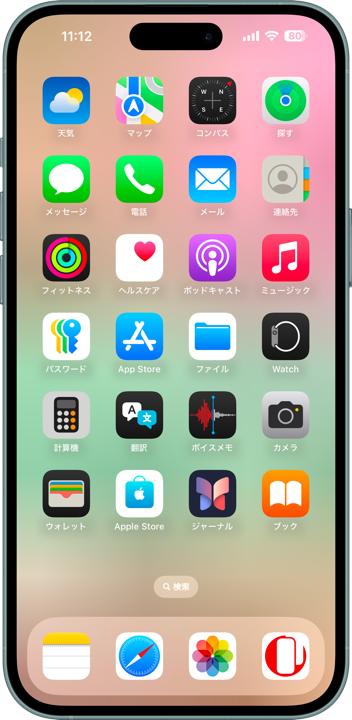
複雑グラデを超縮小した究極やわらか。
Ultra-soft, ultra-minimized gradients.
Ultra-soft, ultra-minimized gradients.

4×8
Universal Wallpaper
Universal Wallpaper
How to Set

設定時に動かさない
ホーム画面:明暗お好み
───────────────
Don't move it on setup
Home: light/dark to taste
───────────────
Help
ホーム画面:明暗お好み
───────────────
Don't move it on setup
Home: light/dark to taste
───────────────
Help
超マイクロサイズの画像です。
保存すると描写が変わります。
下の見本の番号でお選びください。
───────────────
These are ultra-micro images.
Saving changes the rendering.
Pick a number from the samples bellow.
保存すると描写が変わります。
下の見本の番号でお選びください。
───────────────
These are ultra-micro images.
Saving changes the rendering.
Pick a number from the samples bellow.

ダイレクトに長押し保存
Hold to save directly
▼
Hold to save directly
▼


★
- ピンチ操作は利きません。設定中に壁紙を動かすと上部が白くまたは黒くぼかされます。元に戻すには一度他の壁紙を設定した後で再度設定し直してください。同じ壁紙のままではもう一度やっても変更なしの扱いになります。
- 11世代より前の機種では壁紙によっては設定後に下の方の色が変わります。
- 透明度を下げるとホーム画面のぼかしが両方オンだとほとんどの壁紙は全面1色になります。
- このページでは4×8ピクセルの壁紙を、保存しやすいように160×280ピクセル相当に引き伸ばして表示しています。
- Pinch does not work. If you move the wallpaper while setting it, the top part is blurred in white or black. To restore the original color, set another wallpaper and then set it again. If you keep the same wallpaper, it will be treated as unchanged even if you try again.
- On devices older than the 11th generation, some wallpapers may change colors near the bottom after being applied.
- When both Reduce Transparency and Home Screen Blur are turned on, most wallpapers become a single solid color.
- The 4x8 pixel wallpapers on this page are stretched to the equivalent of 160x280 pixels to make them easier to save.
複雑なグラデーションを4×8ピクセルに縮小してディティールを消しました。マイクロサイズの画像を壁紙にするとiOSのレンダリングによって独特の美しいグラデーションが作られます。
I reduced a complex gradient to 4×8 pixels, stripping away details. When this micro-sized image becomes a wallpaper, iOS rendering creates uniquely beautiful gradients.
I reduced a complex gradient to 4×8 pixels, stripping away details. When this micro-sized image becomes a wallpaper, iOS rendering creates uniquely beautiful gradients.
