💾
Legacy
Legacy
スーパーカラー壁紙
Super Color
iOS 26.0
iPhone Air/17 Pro Max/17 Pro/17/
16 Pro Max/16 Pro/16 Plus/16/16e/
15 Pro Max/15 Pro/15 Plus/15/
14 Pro Max/14 Pro/14 Plus/14/
13 Pro Max/13 Pro/13/13 mini/
12 Pro Max/12 Pro/12/12 mini/
11 Pro Max/11 Pro/11/SE 3/SE 2
・▲・ iPhone=?iOS=? ・▼・
iPhone Air/17 Pro Max/17 Pro/17/
16 Pro Max/16 Pro/16 Plus/16/16e/
15 Pro Max/15 Pro/15 Plus/15/
14 Pro Max/14 Pro/14 Plus/14/
13 Pro Max/13 Pro/13/13 mini/
12 Pro Max/12 Pro/12/12 mini/
11 Pro Max/11 Pro/11/SE 3/SE 2
・▲・ iPhone=?iOS=? ・▼・
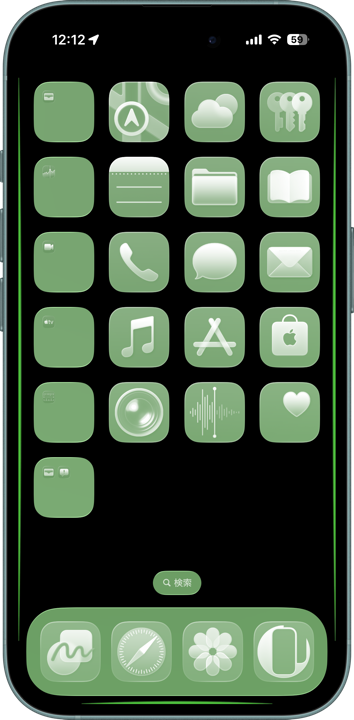
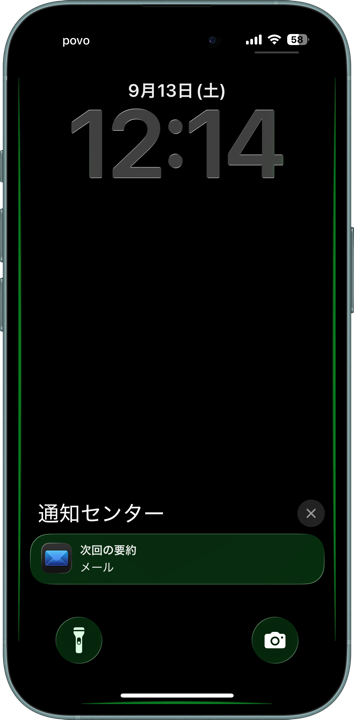
ドックなどのUIをカラーにします。
Make the Dock and UI one color.
Make the Dock and UI one color.
How to Set
・▲・
・▲・

透明度を下げる: オン
設定 > アクセシビリティ >
画面表示とテキストサイズ > 透明度を下げる
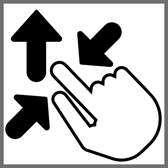
ピンチインして上に・自然光
ホーム画面:ぼかしオフ・明暗お好み
(UIの色に影響します)
───────────────
Reduce Transparency: On
Settings > Accessibility >
Display & Text Size > Reduce Transparency
Pinch in then swipe up; Natural
Home: Blur off; light/dark to taste
(It affects the UI color.)
───────────────
⚙︎ Help ⚙︎
設定 > アクセシビリティ >
画面表示とテキストサイズ > 透明度を下げる
ピンチインして上に・自然光
ホーム画面:ぼかしオフ・明暗お好み
(UIの色に影響します)
───────────────
Reduce Transparency: On
Settings > Accessibility >
Display & Text Size > Reduce Transparency
Pinch in then swipe up; Natural
Home: Blur off; light/dark to taste
(It affects the UI color.)
───────────────
⚙︎ Help ⚙︎
・▼・
タップ → 表示 → 長押し保存
Tap → View → Hold to save
タップ → 表示 → 長押し保存
Tap → View → Hold to save

Red

Orange

Yellow

Green

Blue

Purple

Gold

Pink
★
- 壁紙のぼかしがオンになっていると効果が失われます。ホーム画面長押し > 壁紙を編集 > 💧アイコンを暗く
- 壁紙を設定後にホーム画面をカスタマイズするとドックの色が変わることがありますが、画面を切り替えると戻ります。
- 画像形式をWebPにして高品質軽量化を図っています。iOS 14以降で表示できます。
- If wallpaper blur is on, the effect is lost. Home Screen long-press > Edit Wallpaper > turn the 💧 icon dark.
- After setting a wallpaper, customizing the Home Screen may change the Dock’s color, but it reverts when switching screens.
- The image format is WebP to make it high quality and lightweight. iOS 14 or later can display it.
iPhoneの透明度を下げるをオンにすると、ドック、フォルダ、検索ボタン、ホーム画面カスタマイズでクリアを選択した時のアプリアイコン、ロック画面の通知とボタンは背景透過がオフになり、全てそれぞれ1色になります。
iOS 26以降の透明度を下げるは極端に周辺部の色を拾います。自然なデザインでドックが目立つ配色にしました。
iOSでは設定する時に壁紙を動かすと上部がぼかされることがあります。これをより確実にキャンセルするために、画面サイズ以上の縦長アスペクト画像を上にスワイプするフォーマットにしています。
When Reduce Transparency is turned on for iPhone, the Dock, folders, Search button, app icons selected as 'Clear' in Home Screen customization, and notifications and buttons on the Lock Screen will have their background transparency turned off, becoming a solid color.
From iOS 26 onwards, Reduce Transparency picks up surrounding colors more intensely. I have chosen a color scheme that makes the Dock stand out with a natural design.
In iOS, moving a wallpaper while setting it can sometimes blur the top area. To more reliably cancel this, the format uses vertically longer images than the screen size, swiped upward.
iOS 26以降の透明度を下げるは極端に周辺部の色を拾います。自然なデザインでドックが目立つ配色にしました。
iOSでは設定する時に壁紙を動かすと上部がぼかされることがあります。これをより確実にキャンセルするために、画面サイズ以上の縦長アスペクト画像を上にスワイプするフォーマットにしています。
When Reduce Transparency is turned on for iPhone, the Dock, folders, Search button, app icons selected as 'Clear' in Home Screen customization, and notifications and buttons on the Lock Screen will have their background transparency turned off, becoming a solid color.
From iOS 26 onwards, Reduce Transparency picks up surrounding colors more intensely. I have chosen a color scheme that makes the Dock stand out with a natural design.
In iOS, moving a wallpaper while setting it can sometimes blur the top area. To more reliably cancel this, the format uses vertically longer images than the screen size, swiped upward.
