戻ると波打つ物語
The Back & Wave Story
ロマンはあるか。
Is there any romance to it?
Is there any romance to it?
➜ English
ライブ壁紙を使えばロック画面は動かせます。でも動く機能で動くのは当たり前じゃないですか。
『戻ると波打つ壁紙』は当初『動く静止画の壁紙』としていました。最初はロック画面でもホーム画面でもiPhoneを傾ければ動いていたのです。
今はホーム画面に戻る一瞬だけですが、独特のモーションは残りました。
★
- ドックを隠すタイプの説明は省略しています。
- 代表的なトリックにスクショとリンクを添えて歴史をまとめています。
- 原則としてメジャーアップデート後の旧バージョンのマイナーアップデートは追跡していません。
- 対応OSのリリース期間を目安として表記しています。壁紙の公開とは必ずしも一致しません。
- このページは2026年5月にまとめました。
iOS 7.0–12.4
2015年1月(2013年9月) – 2019年9月
公開したのはiOS 8.1の時ですが仕様上はiOS 7以降に対応。iOS 7では視差効果が導入され、iPhoneの傾きに合わせて壁紙が擬似3Dで動くようになりました。
液晶でも有機ELでも、レティナディスプレイが2倍密度でも3倍密度でも、画面はピクセルで作られています。画像もピクセルです。
普通の画像ではまず分かりませんが、実はこれが動くときには描画される画素とされない画素が交互に発生しています。アプリやブラウザのスクロールでも同じ、画像の移動には見えない明滅があるのです。
概ね黒3ピクセルとビビットな色2ピクセルのハイコントラストのパターンがベストで、規則正しく敷き詰めれば一斉に明滅します。その場所が指向性を持って移動することで波のように見える仕組みです。
当初の視差効果は傾きに合わせて画像にもパースがつく凝りようだったので、波もカーブすることになります。パターンの種類によっては炎のように見えたり、白い波やカラーの波、金属の反射のような明滅も可能でした。
液晶でも有機ELでも、レティナディスプレイが2倍密度でも3倍密度でも、画面はピクセルで作られています。画像もピクセルです。
普通の画像ではまず分かりませんが、実はこれが動くときには描画される画素とされない画素が交互に発生しています。アプリやブラウザのスクロールでも同じ、画像の移動には見えない明滅があるのです。
概ね黒3ピクセルとビビットな色2ピクセルのハイコントラストのパターンがベストで、規則正しく敷き詰めれば一斉に明滅します。その場所が指向性を持って移動することで波のように見える仕組みです。
当初の視差効果は傾きに合わせて画像にもパースがつく凝りようだったので、波もカーブすることになります。パターンの種類によっては炎のように見えたり、白い波やカラーの波、金属の反射のような明滅も可能でした。
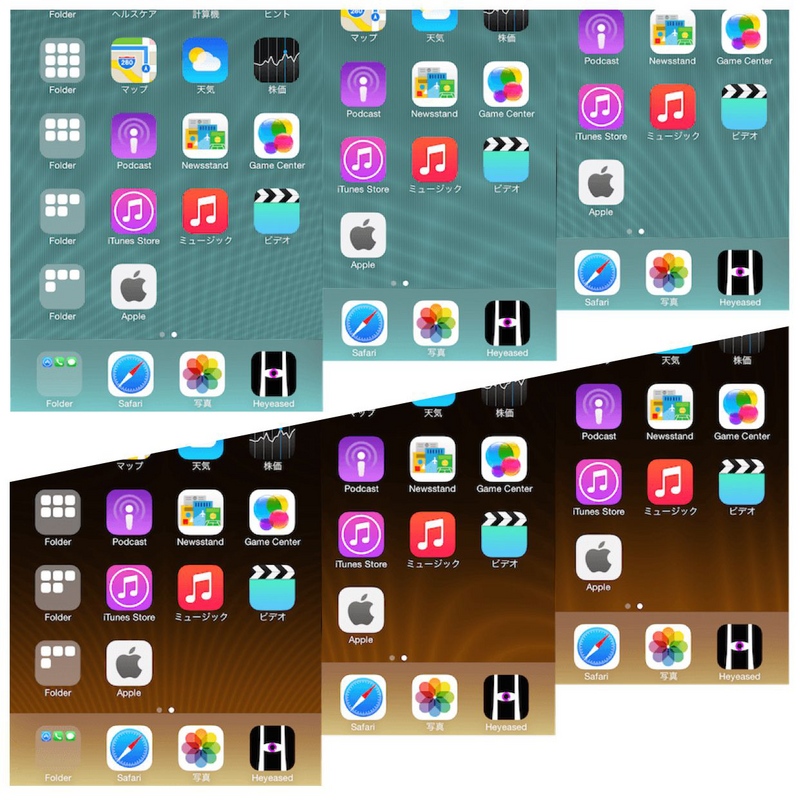
➜ 水の壁紙 ➜ 火の壁紙
発見のきっかけは『カラーUIの壁紙(iOS 8–)』。マイクロサイズの画像を通常サイズにパターンとして敷き詰めたらどう見えるのか試したら、まさかの結果に周期の追究を始めたのでした。
ところが後に、iOS 7の時に同じ原理の壁紙を作っていた人を発見。オリジナルの壁紙があったThe Glitch Lifeのページは既に残っていませんが、以下のYouTubeで動きが見られます。
Pseudo dynamic animated iOS Wallpaper glitch - no jailbreak
発見のきっかけは『カラーUIの壁紙(iOS 8–)』。マイクロサイズの画像を通常サイズにパターンとして敷き詰めたらどう見えるのか試したら、まさかの結果に周期の追究を始めたのでした。
ところが後に、iOS 7の時に同じ原理の壁紙を作っていた人を発見。オリジナルの壁紙があったThe Glitch Lifeのページは既に残っていませんが、以下のYouTubeで動きが見られます。
Pseudo dynamic animated iOS Wallpaper glitch - no jailbreak
iOS 13.0–15.7
2019年9月 – 2022年9月
iOS 13で視差効果の画像を歪めてパースを付ける効果が削除されました。ただ上下左右に動くだけです。
すると波のカーブもなくなります。パターンや絵柄を作り直す必要がありました。
すると波のカーブもなくなります。パターンや絵柄を作り直す必要がありました。

➜ 金属の壁紙
画面サイズが増えてきたので、新たに複数機種対応のユニバーサルパターンも研究。
画面サイズ(視差効果のための余白を含めた規定サイズ)に合わせて作っていた時は周期が常に1分の1スケールで表示されていましたが、ユニバーサルではそうはいきません。ある程度まで拡大縮小されてもハマるように多層的な周期を持たせました。
画面サイズが増えてきたので、新たに複数機種対応のユニバーサルパターンも研究。
画面サイズ(視差効果のための余白を含めた規定サイズ)に合わせて作っていた時は周期が常に1分の1スケールで表示されていましたが、ユニバーサルではそうはいきません。ある程度まで拡大縮小されてもハマるように多層的な周期を持たせました。
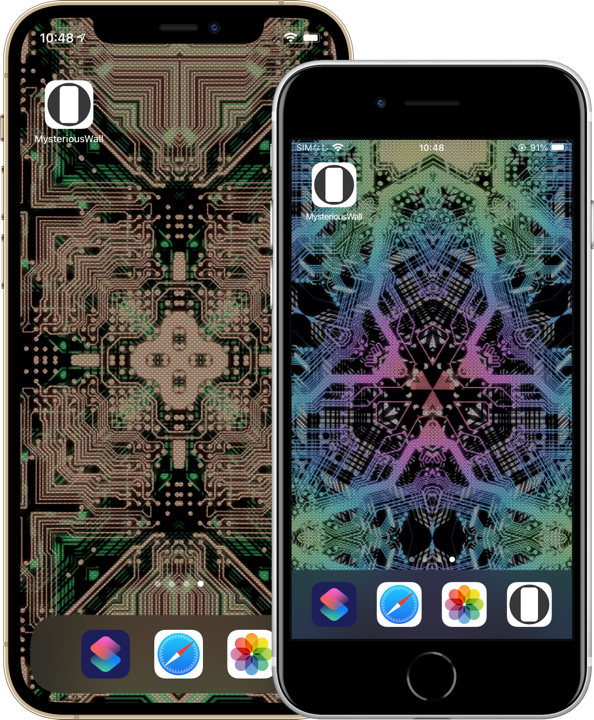
➜ 未来回路の壁紙
iOS 16.0–iOS 18.7
2022年9月 – 2025年9月
iOS 16では視差効果そのものが廃止されました。「動く静止画の壁紙」も、もう動くことはありません。
しかしまだ終わりません。アプリを閉じてホーム画面に戻った時に壁紙がズームアウトする仕様は残っています。
その瞬間は波打って見えるのでカテゴリーを『戻ると波打つ壁紙』にして名前で解決です。
もちろん中身も変える必要があります。動くのは一瞬、パターンはよりシビアです。
ユニバーサル対応にはノイズ、フラクタル、回転、同心円とそれらの変形が有効でした。これらは微分的に無数のスケールを持っています。
普段は止まっているので静止状態でも絵になる壁紙じゃないといけません。
しかしまだ終わりません。アプリを閉じてホーム画面に戻った時に壁紙がズームアウトする仕様は残っています。
その瞬間は波打って見えるのでカテゴリーを『戻ると波打つ壁紙』にして名前で解決です。
もちろん中身も変える必要があります。動くのは一瞬、パターンはよりシビアです。
ユニバーサル対応にはノイズ、フラクタル、回転、同心円とそれらの変形が有効でした。これらは微分的に無数のスケールを持っています。
普段は止まっているので静止状態でも絵になる壁紙じゃないといけません。

iOS 26.4 (26.0)–
2026年4月(2025年9月)–
iOS 26ではホームに戻った時のズームアウトも廃止。どうやっても壁紙が動かないのでは打つ手なしです。レガシー入りになりました。
と思っていたある日のこと、たまたま波打つ壁紙を使っていた時に波打ったのです。アプリスイッチャーの状態からホームに戻った時のズームアウトが残されていました。
と思っていたある日のこと、たまたま波打つ壁紙を使っていた時に波打ったのです。アプリスイッチャーの状態からホームに戻った時のズームアウトが残されていました。
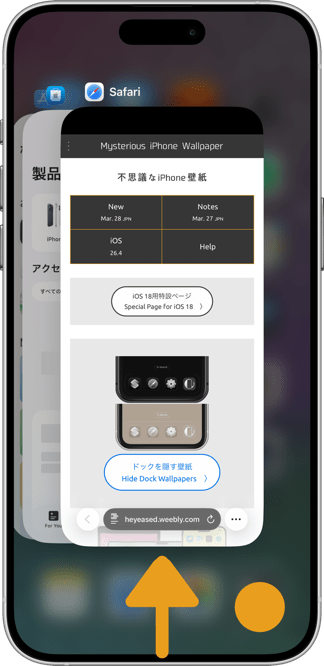
壁紙に変更はありません。遊び方を説明するサイトのデザインで復活です。
Lock Screens can move using Live Wallpapers. But if something moves because it has a built-in motion feature, that is only natural, isn’t it?
At first, “Back & Wave Wallpapers” were called “Static Dynamic Wallpapers.” Originally, they moved both on the Lock Screen and the Home Screen whenever the iPhone was tilted.
Now the movement only appears for a brief instant when returning to the Home Screen, but the unique motion still survives.
★
- Descriptions of versions that hide the Dock are omitted.
- This is a historical overview of the major tricks, accompanied by screenshots and links.
- As a rule, I do not track minor updates for older iOS versions after a major update is released.
- Supported OS versions are listed based on their release periods and do not necessarily match the wallpaper release dates.
- This page was compiled in May 2026.
iOS 7.0–12.4
January 2015 (September 2013) – September 2019
Although I released them during the iOS 8.1 era, the behavior technically worked from iOS 7 onward. iOS 7 introduced the Parallax Effect, making wallpapers move in pseudo-3D based on the tilt of the iPhone.
Whether LCD or OLED, whether Retina displays were @2x or @3x density, screens are made of pixels. Images are also pixels.
Normally you would never notice, but when images move, certain pixels are alternately rendered and not rendered. The same thing happens while scrolling apps or browsers — image movement contains invisible flickering.
In general, patterns using 3 black pixels and 2 vivid colored pixels produced the strongest effect. By arranging them in orderly repetition, the flickering synchronized across the image. As those synchronized areas moved directionally, the result resembled waves.
The early Parallax Effect even applied perspective distortion to wallpapers based on device tilt, so the waves themselves curved dynamically. Depending on the pattern design, the effect could resemble flames, white waves, colored waves, or metallic reflections.
Whether LCD or OLED, whether Retina displays were @2x or @3x density, screens are made of pixels. Images are also pixels.
Normally you would never notice, but when images move, certain pixels are alternately rendered and not rendered. The same thing happens while scrolling apps or browsers — image movement contains invisible flickering.
In general, patterns using 3 black pixels and 2 vivid colored pixels produced the strongest effect. By arranging them in orderly repetition, the flickering synchronized across the image. As those synchronized areas moved directionally, the result resembled waves.
The early Parallax Effect even applied perspective distortion to wallpapers based on device tilt, so the waves themselves curved dynamically. Depending on the pattern design, the effect could resemble flames, white waves, colored waves, or metallic reflections.
➜ Water ➜ Fire
The discovery came while experimenting with “Color UI Wallpapers (iOS 8–).” I tried repeating a micro-sized image as a tiled pattern across a normal-sized wallpaper just to see what it would look like. The result was completely unexpected, and I began investigating the cycle patterns behind it.
Later, however, I discovered someone else had already created wallpapers based on the same principle during the iOS 7 era. The original page from The Glitch Life, where the wallpapers were hosted, no longer exists, but the motion can still be seen in this YouTube video.
Pseudo dynamic animated iOS Wallpaper glitch - no jailbreak
The discovery came while experimenting with “Color UI Wallpapers (iOS 8–).” I tried repeating a micro-sized image as a tiled pattern across a normal-sized wallpaper just to see what it would look like. The result was completely unexpected, and I began investigating the cycle patterns behind it.
Later, however, I discovered someone else had already created wallpapers based on the same principle during the iOS 7 era. The original page from The Glitch Life, where the wallpapers were hosted, no longer exists, but the motion can still be seen in this YouTube video.
Pseudo dynamic animated iOS Wallpaper glitch - no jailbreak
iOS 13.0–15.7
September 2019 – September 2022
In iOS 13, Apple removed the perspective distortion effect from parallax wallpapers. Wallpapers now simply moved up, down, left, and right.
As a result, the wave curvature disappeared as well. The patterns and artwork had to be redesigned.
As a result, the wave curvature disappeared as well. The patterns and artwork had to be redesigned.
➜ Metal
Since the number of screen sizes had increased, I also began researching universal patterns compatible across multiple devices.
Previously, wallpapers were designed specifically for each screen size, including the parallax margins, meaning the cycle patterns always displayed at exact one-to-one scale. Universal wallpapers could no longer rely on that. I had to create layered periodic structures that still worked effectively even after scaling up or down.
Since the number of screen sizes had increased, I also began researching universal patterns compatible across multiple devices.
Previously, wallpapers were designed specifically for each screen size, including the parallax margins, meaning the cycle patterns always displayed at exact one-to-one scale. Universal wallpapers could no longer rely on that. I had to create layered periodic structures that still worked effectively even after scaling up or down.
iOS 16.0–18.7
September 2022 – September 2025
In iOS 16, the Parallax Effect itself was completely removed. “Static Dynamic Wallpapers” no longer moved at all.
But it was not over yet.
The zoom-out animation when closing an app and returning to the Home Screen still remained. During that moment, the wallpaper still appeared to ripple. So I solved the problem by renaming the category itself to “Back & Wave Wallpapers.”
Naturally, the internal design also needed to change. The motion now lasted only an instant, making the patterns far more demanding.
For universal compatibility, noise, fractals, rotation, concentric circles, and distorted variations of those patterns proved effective. These structures contain effectively infinite scales in a differential sense.
And because the wallpaper now remained still most of the time, it also had to function as a visually appealing static image.
But it was not over yet.
The zoom-out animation when closing an app and returning to the Home Screen still remained. During that moment, the wallpaper still appeared to ripple. So I solved the problem by renaming the category itself to “Back & Wave Wallpapers.”
Naturally, the internal design also needed to change. The motion now lasted only an instant, making the patterns far more demanding.
For universal compatibility, noise, fractals, rotation, concentric circles, and distorted variations of those patterns proved effective. These structures contain effectively infinite scales in a differential sense.
And because the wallpaper now remained still most of the time, it also had to function as a visually appealing static image.
iOS 26.4 (26.0)–
April 2026 (September 2025) –
In iOS 26, even the Home Screen zoom-out animation was removed. If wallpapers no longer moved under any circumstance, there was nothing left to work with. The category effectively became legacy content.
Or so I thought.
One day, while casually using a wave wallpaper, I suddenly noticed it ripple again. The zoom-out animation still remained when returning to the Home Screen from the App Switcher state.
The wallpapers themselves were unchanged.
Or so I thought.
One day, while casually using a wave wallpaper, I suddenly noticed it ripple again. The zoom-out animation still remained when returning to the Home Screen from the App Switcher state.
The wallpapers themselves were unchanged.
What revived the category was the design of the instructional website explaining how to play with them.
