Mysterious iPhone Wallpaper
  • New
  • Notes
  • iOS
  • Help
  • About This Site
  • Privacy Policy

New

September 22nd, 2024

9/22/2024

0 コメント


ロックをカスタムする壁紙16 Pro
Custom Lock Wallpapers 16 Pro


ダイナミックアイランドのトリック4種類をiPhone 16 Proに対応させました。既存機種用リンクも。
The four Dynamic Island tricks have been adapted for iPhone 16 Pro. Links for existing models are also provided.
※早く出来すぎてモックアップが間に合わなかったため設定サンプルは15 Proのものを使用しています。
Since it was completed ahead of schedule, the mockups weren’t ready in time, so the sample setup uses those from the 15 Pro.
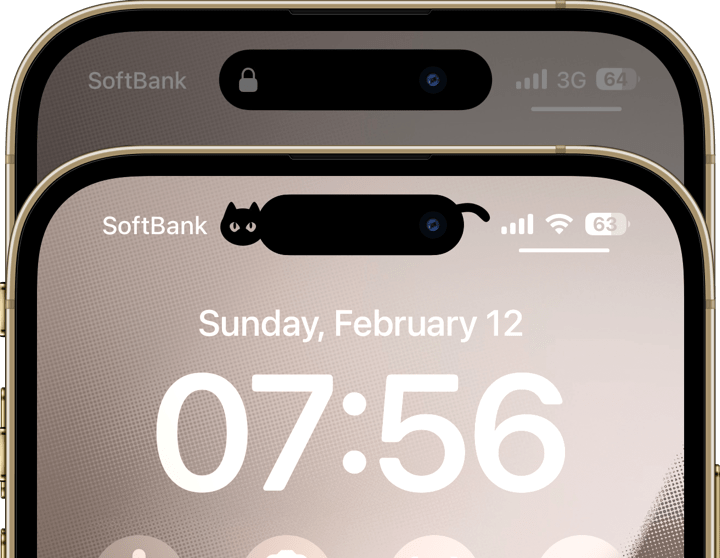
新作ダイナミックいろいろ壁紙 16 Pro(仮)
ダイナミックいろいろ壁紙|Dynamic Variety
iOS 16–​ 9 each
➜ 16 Pro
​
➜ 16 Plus/15 Pro Max/15 Plus/14 Pro Max
➜ 16/15 Pro/15/14 Pro
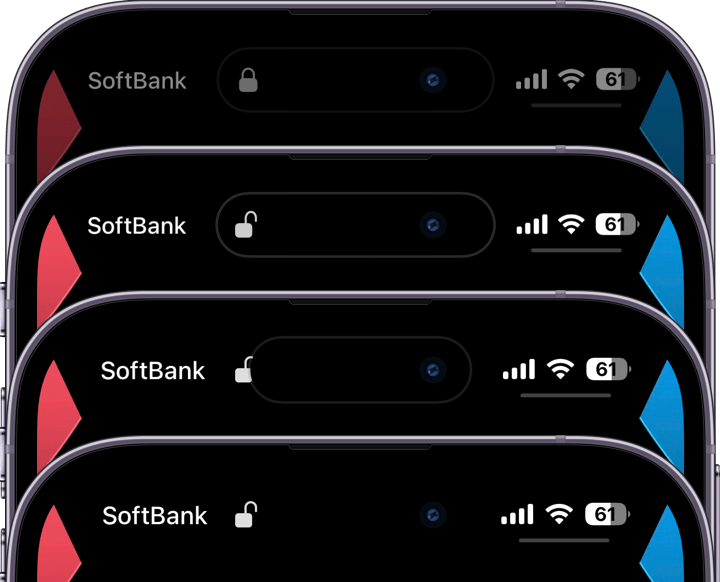
新作開錠の壁紙 16 Pro(仮)
開錠の壁紙|Unlocking
iOS 16–​ 20 each
➜ 16 Pro
​​➜ 16 Plus/15 Pro Max/15 Plus/14 Pro Max
➜ 16/15 Pro/15/14 Pro
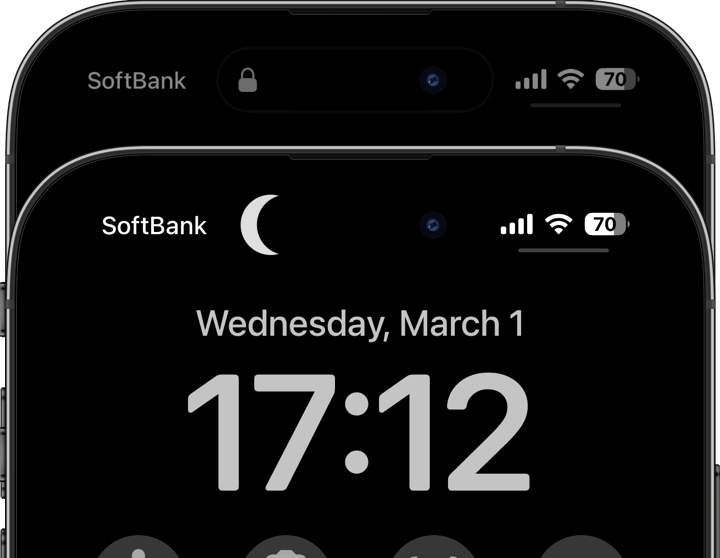
新作夜または宇宙の壁紙 16 Pro(仮)
夜または宇宙の壁紙|Night or Space
iOS 16–​ 11 each
➜ 16 Pro
​➜ 16 Plus/15 Pro Max/​15 Plus/14 Pro Max
➜​ 16/15 Pro/15/14 Pro
新作隠れりんごの壁紙16Pro(仮)
隠れりんごの壁紙|Hidden Apple
iOS 16–​ 5 each
➜ 16 Pro
➜ 16 Plus/15 Pro Max/15 Plus/14 Pro Max
​➜ 16/15 Pro/15/14 Pro
16 Pro Max用は(私が争奪戦に負けたので)しばらくお待ちください。
As for the 16 Pro Max, please wait a bit longer (as I lost in the preorder battle).
〉ロックをカスタムする壁紙|Custom Lock Wallpapers

0 コメント

September 21st, 2024

9/21/2024

0 コメント


16 Proを区切る
Zoned 16 Pro


iPhone16 Proのスワイプゾーンを可視化しました。
I’ve visualized the swipe zones for the iPhone 16 Pro.
新作ザ・ゾーン縁取り壁紙16 Pro(仮)
早く出来すぎてモックアップが間に合わなかったため設定サンプルは15 Proのものを使用しています。
Since it was completed ahead of schedule, the mockups weren’t ready in time, so the sample setup uses those from the 15 Pro.
バリエーションは12セット。
There are 12 sets variations.
ザ・ゾーン壁紙のバリエーション
​ザ・ゾーン縁取り壁紙|The Zoned Border
iOS 18–​ 12 sets
➜ 16 Pro
その他のiPhone用は17日に公開済み。
The versions for other iPhones were released on the 17th.
➜ iOS 18
16 Pro Max用は(私が争奪戦に負けたので)しばらくお待ちください。
As for the 16 Pro Max, please wait a bit longer (as I lost in the preorder battle).
〉縁取る壁紙|Border Wallpapers

0 コメント

September 20th, 2024

9/20/2024

0 コメント


16 Proを縁取る
Border 16 Pro


ザ・縁取る壁紙iPhone16 Pro用です。
The iPhone 16 Pro version of The Border.
新作ザ・縁取る壁紙16 Pro(仮)
※早く出来すぎてモックアップが間に合わなかったため設定サンプルは15 Proのものを使用しています。
Since it was completed ahead of schedule, the mockups weren’t ready in time, so the sample setup uses those from the 15 Pro.
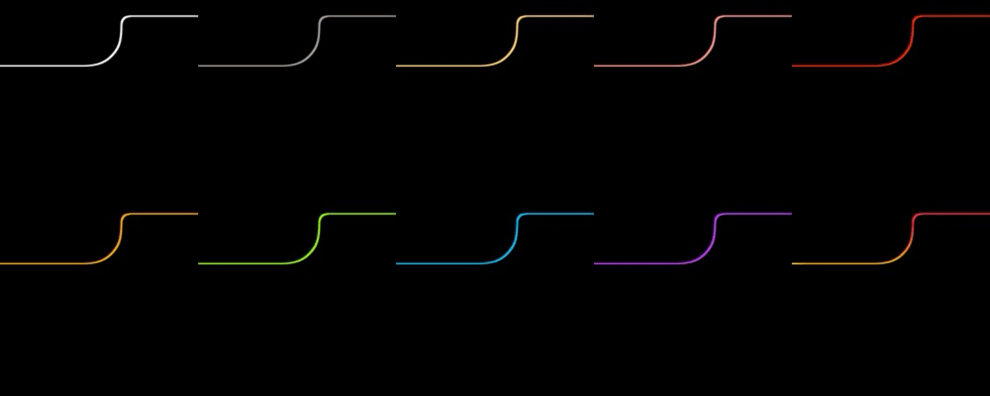
バリエーションは10色。
There are 10 color variations.
ザ・縁取る壁紙16Proのバリエーション
​ザ・縁取る壁紙|The Border
iOS 18–​ 10 sheets
➜ 16 Pro
その他のiPhone用も公開中。
Other versions for iPhone models are already available.
iOS 17–​ 10 each
➜ 15 Pro Max/15 Plus/14 Pro Max
➜ 15 Pro/15/14 Pro
➜ 14 Plus/13 Pro Max
➜ 14/13 Pro/13
➜ 13 mini
➜ 12 Pro Max
➜ 12 Pro/12
➜ 12 mini
➜ ​11 Pro Max/XS Max
➜ 11 Pro/XS
➜ ​11/XR
機種を間違えないようご注意ください。
Please be careful not to mistake compatible models.

16 Pro Max用は(私が争奪戦に負けたので)しばらくお待ちください。
As for the 16 Pro Max, please wait a bit longer (as I lost in the preorder battle).
〉縁取る壁紙|Border Wallpapers

0 コメント

September 19th, 2024

9/19/2024

0 コメント


ノッチというレガシー
The Notch as a Legacy


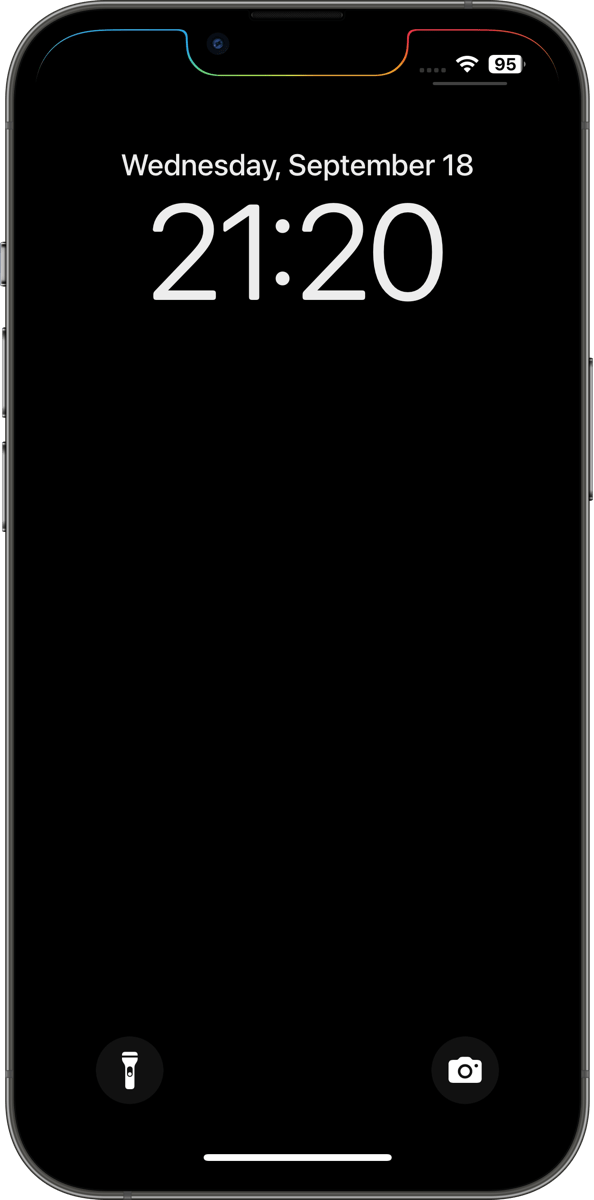
ノッチモデル専用壁紙。ノッチだけを縁取ります。
Wallpaper exclusively for notch models, highlighting only the notch.
新作ザ・ノッチ縁取り壁紙
ダイナミックアイランドにはない造形美。バリエーションは各10色。
A design beauty not found in the Dynamic Island. Available in 10 color variations.
ザ・ノッチ縁取り壁紙バリエーション
​ザ・ノッチを縁取る壁紙|The Notch Border
iOS 17–​ 10 each
➜ 14 Plus/13 Pro Max
➜ 14/13 Pro/13
➜ 13 mini
➜ 12 Pro Max
➜ 12 Pro/12
➜ 12 mini
➜ 11 Pro Max/XS Max
➜ 11 Pro/XS
➜ 11/XR
機種を間違えないようにご注意ください。
Please be careful not to mistake compatible models.
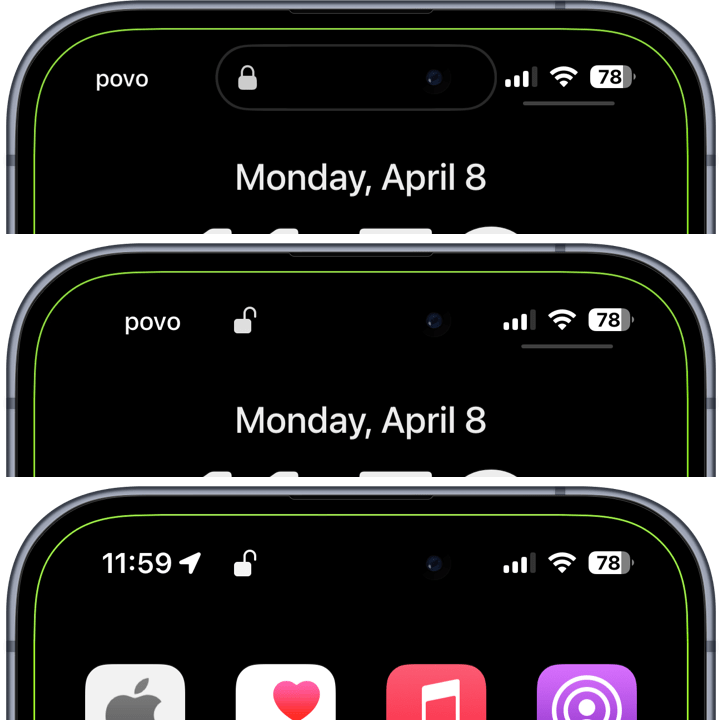
ダイナミックアイランドモデル専用の縁取り壁紙も既にあります。ロックを解除した時の開いた鍵がそのまま残ります。
There are already bordered wallpapers specifically for Dynamic Island models. The unlocked padlock icon remains visible when you unlock the device.
新作ではないザ・開錠の縁取り壁紙
ザ・開錠の縁取り壁紙|The Unlocked Border
iOS 17–​ 10 each
➜ 16 Plus/15 Pro Max/15 Plus/14 Pro Max
➜ 16/15 Pro/15/14 Pro
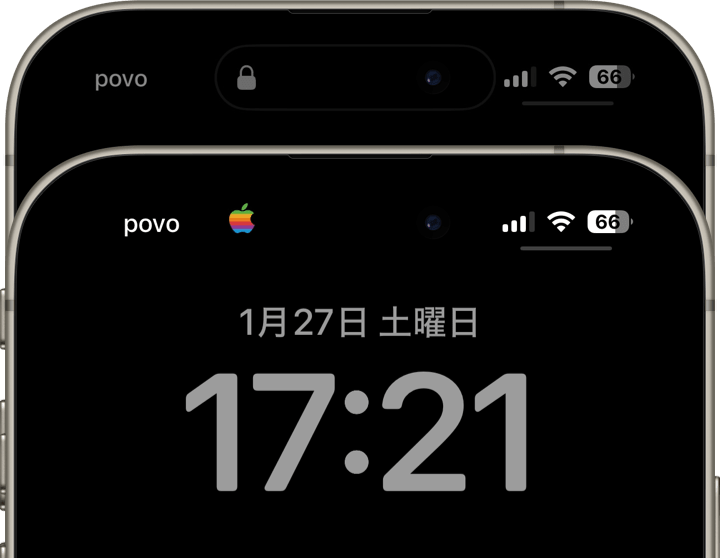
ザ・ノッチ縁取り壁紙はノッチとドックだけを縁取っていたザ・要素を縁取る壁紙のiOS 18対応版という位置付けです。ホーム画面のカスタマイズでアイコンを大きくするとドックの縁取りが隠れてしまいます。
そこでノッチモデル専用と割り切ってドックとボタンは捨てました。部品を省いただけの手抜きではありませんよ。要素を縁取る壁紙は縁を太めに作っていましたが、今回は上が重くならないように細くしてあります。縁取りシリーズの標準太さです。
The Notch Border is positioned as the iOS 18-compatible version of The Element Border, which only outlined the notch and Dock. If you enlarge the icons in the Home Screen customization, the Dock's outline will be hidden.
So, I decided to make it exclusively for notch models, leaving out the Dock and buttons. It's not just about cutting corners by removing components. While The Element Border had a thicker frame, this time, I've made it thinner to avoid making the top feel heavy. It's the standard thickness for the border series.
〉縁取る壁紙|Border Wallpapers

0 コメント

September 17th, 2024

9/17/2024


iOS18


iOS 18がいよいよ来ました。使い方と新作壁紙のご案内です。
iOS 18 has finally arrived. Here's a guide on how to use it and a showcase of new wallpaper.
➜ English
インデックス
ヘルプをアップデート
設計図の壁紙に代わって
その他過去作への影響

ヘルプをアップデート


直感的にイメージするだけで設定をマスターできるように、全て項目ごとに1〜2枚のスクリーンショットで解説しました。2枚あっても内容はほぼ1枚。
​iOS 18最大の変更点ホーム画面のカスタマイズ。
➜ ホーム画面のカスタマイズ
ロック画面もボタンのカスタマイズが加わっています。壁紙と画面の設定全体をおさらいするには頭から。
➜ 真iPhone壁紙の設定方法
ホーム画面の新モード、色合い調整についてさらに詳しく。
➜ ホーム画面の色合い調整
ダークモードオンオフの新ルールはこちら。
➜ ライトモードとダークモード

設計図の壁紙に代わって


設計図の壁紙はディスコンとなります。代わって便利な所だけ引き継いでシンプルに生まれ代わったのが、スワイプゾーンを可視化したゾーン縁取り壁紙です。
新作ザ・ゾーン縁取り壁紙
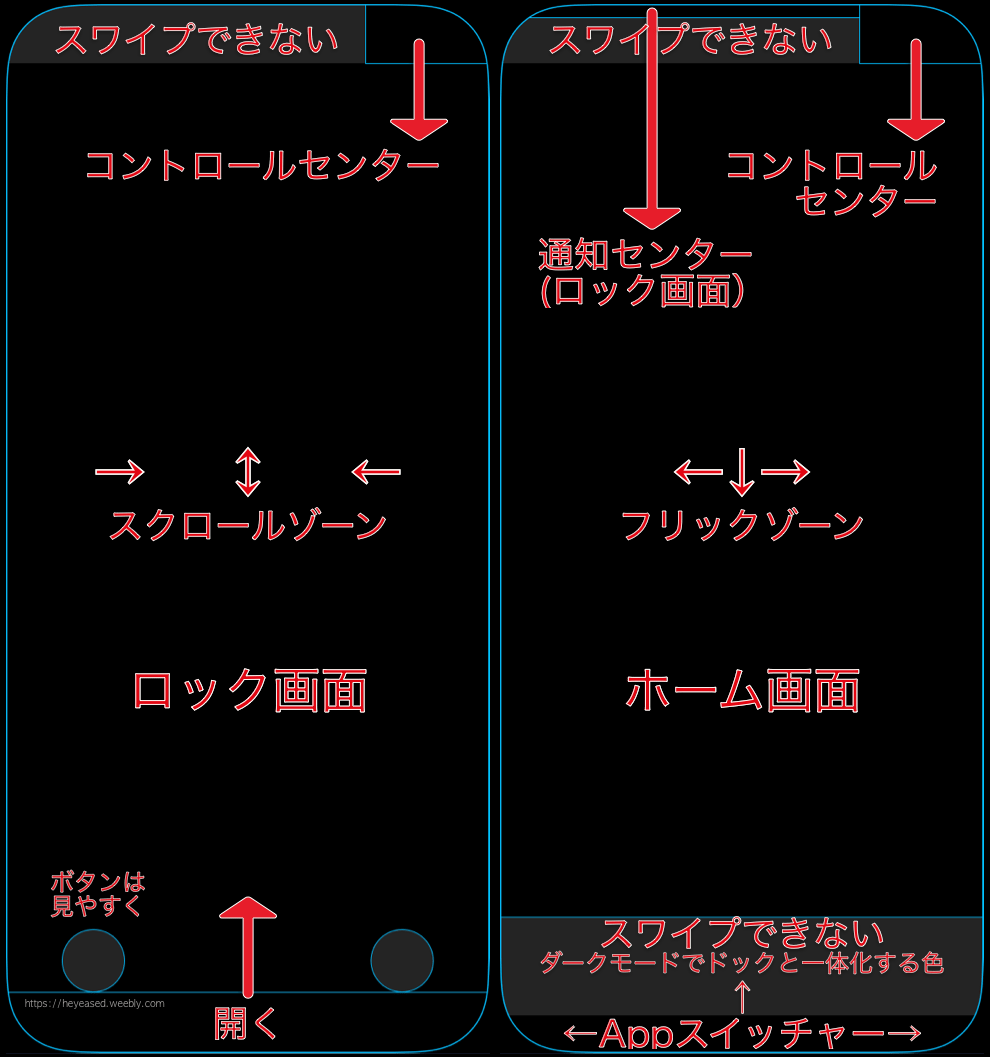
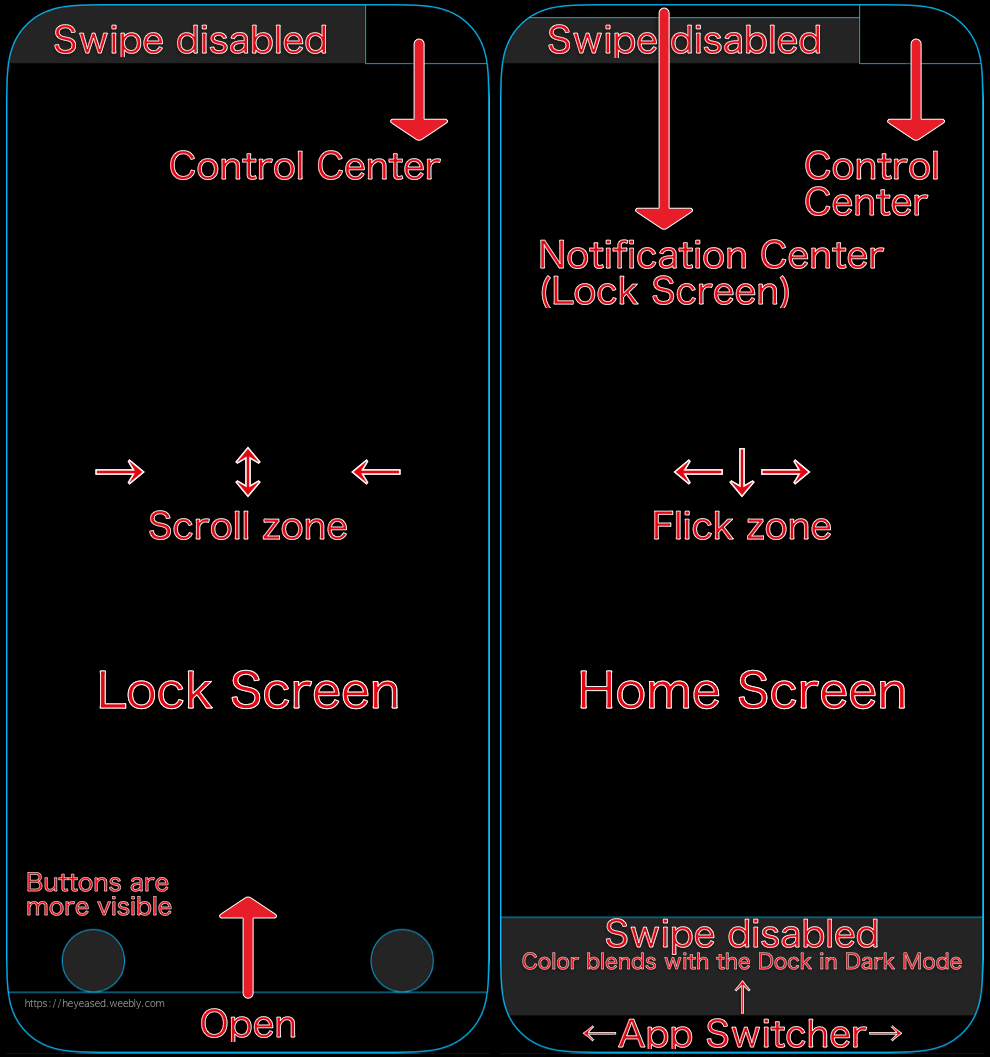
コントロールセンター、通知センターなどの反応ゾーンがはっきり分かります。
ザ・ゾーン縁取り壁紙の説明
スワイプできないゾーンはダークグレーになっています。バリエーションは各機種12セット。
ザ・ゾーン壁紙のバリエーション
設計図の壁紙のiOS 18対応バージョンという位置付けですがiOS 17でも使えます。
​iPhone 16シリーズには15シリーズ用の壁紙が全て使えます。16Proシリーズ用は私のところに物が来てからの制作になります。
ザ・ゾーン縁取り壁紙
iOS 17–​ 各12セット
➜ 16 Plus/15 Pro Max/15 Plus/14 Pro Max
➜ 16/15 Pro/15/14 Pro
➜ 14 Plus/13 Pro Max
➜ 14/13 Pro/13
➜ 13 mini
➜ 12 Pro Max
➜ 12 Pro/12
➜ 12 mini
➜ 11 Pro Max/XS Max
➜ 11 Pro/XS
➜ 11/XR
機種を間違えないようにご注意ください。
スワイプゾーンのUIじゃないホームボタンモデルは残念ながら非対応になります。
アイコンとウィジェットの拡大までカバーしてたらもう線だらけでごちゃごちゃになりますからね。
最近は設計図の壁紙も粗探しみたいになってたし設計思想に合わないなとは思っていました。かっちりしてるとこはしてるんだけど、ソフトウェアなので特に真ん中はフレキシブルに作りたいんだろうなと。iOS 18ではそれが前面に押し出されています。画面の中まで精密機械のように一つの設計図に縛られる必要はないですからね。
線が少なくなったので明るい背景のバージョンは廃止しています。

その他過去作への影響


ロック画面のボタンの色
iOS 17まではダークモードのドックと同じ色でしたが、iOS 18ではダークモードのフォルダと同じ色になりました。少し暗くなっています。
そのためダークモードでドックを隠す壁紙をロック画面でも使う場合ボタンは隠れなくなります。
ザ・黒い壁紙用にはiOS 18のロック画面用を用意しています。
アイコンを大きくしたとき
ホーム画面のカスタマイズでアイコンを大にするとドックも大きくなるので、以下の壁紙ではドックが干渉することがあります。
  • 縁取る壁紙のザ・要素を縁取る壁紙はアイコン大に対応しません。
正直アイコンが大味になるので精密さを好む方はあまりやらないのではないかという読みを踏まえれば、他は使えないほどではないのですが……
  • 縁取る壁紙のザ・ゲーミング縁取り壁紙
  • ベゼルを遊ぶ壁紙のプロテクターベゼルの壁紙 4
  • ドックをカスタムする壁紙のお手紙ドックの壁紙、寿司ドックの壁紙、車ドックの壁紙、猫耳ドックの壁紙
以上は機種によって若干欠けたりはみ出したりがあります。該当機種はページの下の方⚠️に記載しています。


INDEX
Help Update
Replacing Blueprint Wallpaper
Impact on Previous Works

Help Update


I’ve explained everything with 1-2 screenshots per section so you can master the settings just by visualizing them. Even with two screenshots, the content is almost the same as one.
The biggest change in iOS 18 is Home Screen customization.
➜ Home Screen Customization
Lock Screen now also supports button customization. To review the wallpaper and entire screen settings, start from the top.
➜ How to Set iPhone Wallpaper True
Here’s more on the new Home Screen mode, Tinted.
➜ Home Screen Tinted Mode
Here are the new rules for turning Dark Mode on and off.
➜ Light Mode and Dark Mode

Replacing Blueprint Wallpaper


The Blueprint wallpapers will be discontinued. Instead, a simpler version that retains only the useful features has been reborn as Zoned Border, which visualizes swipe zones.
new the zoned border
The response zones for the Control Center, Notification Center, and others are clearly visible.
The Zoned Border Explains
The zones where swiping is not possible are marked in dark gray. There are 12 sets of variations for each iPhone model.
The Zoned Border variation
Though positioned as the iOS 18-compatible version of the blueprint wallpaper, it can still be used on iOS 17.
All iPhone 15 wallpapers work on the iPhone 16 series. 16 Pro series wallpapers will be made after I receive the device.
The Zoned Border
iOS 17–​ 12 sets each
➜ 16 Plus/15 Pro Max/15 Plus/14 Pro Max
➜ 16/15 Pro/15/14 Pro
➜ 14 Plus/13 Pro Max
➜ 14/13 Pro/13
➜ 13 mini
➜ 12 Pro Max
➜ 12 Pro/12
➜ 12 mini
➜ 11 Pro Max/XS Max
➜ 11 Pro/XS
➜ 11/XR
Please be careful not to mistake compatible models.
Home button models that don't have a swipe zone UI are unfortunately not supported.
If the wallpaper covered icon and widget scaling, it would just be a mess of lines everywhere. Lately, the blueprint wallpaper started to feel like nitpicking, and I felt it no longer aligned with the design philosophy. While some areas are precise, I believe they want to keep the center flexible since it's software. iOS 18 emphasizes that even more. There's no need for the screen to be restricted by a single blueprint like it's a precision machine.
​The version with a bright background has been discontinued due to the reduced number of lines.

Impact on Previous Works


The Color of the Lock Screen Buttons
The color of the buttons on the Lock Screen used to match the Dock in Dark Mode up until iOS 17. However, in iOS 18, they now share the same color as the Dark Mode folder, making them slightly darker. As a result, when using a wallpaper designed to hide the Dock in Dark Mode on the Lock Screen, the buttons will no longer be hidden. For The Black, I’ve pre pared a version specifically for the iOS 18 Lock Screen.
When the Icons Are Enlarged
When you enlarge the icons using Home Screen customization by setting them to Large, the Dock also increases in size. As a result, the following wallpapers may have conflicts with the Dock:
  • Border Wallpapers: The Element Border does not support large icons.
To be honest, since larger icons tend to lose detail, I anticipate that those who prefer precision won’t choose this option frequently. Based on that assumption, other wallpapers are not entirely unusable, but there are some issues:
  • Border Wallpapers: The Gaming Border
  • Playing Bezel Wallpapers: Protective Bezel 4
  • Custom Dock Wallpapers: Letter Dock, Sushi Dock, Car Dock, and Cat Ears Dock
These may be slightly cut off or misaligned depending on the device. A list of affected models can be found under the ⚠️ symbol at the bottom of each page.
〉縁取る壁紙|Border Wallpapers
〉アプデと設定方法|Updates & Help

August 21st, 2024

8/21/2024

0 コメント


夏にぴったり
Perfect for summer


夏にぴったりなネオンカラーからドックを隠す色へのグラデーション壁紙です。
These are gradient wallpapers transitioning from vivid neon colors to a shade that hides the Dock, perfect for summer.
新作シームレスネオン壁紙
ライト用とダーク用各6枚。
Six for Light and six for Dark.
シームレスネオン壁紙バリエーション
➜ シームレスネオン壁紙
​  Seamless Neon Color

​iOS 17– 6 each
15 Pro Max/15 Pro/15 Plus/15/
​14 Pro Max/14 Pro/​14 Plus/14/
13 Pro Max/13 Pro/13/13 mini/
​​12 Pro Max/​12 Pro/12/12 mini/
11 Pro Max/11 Pro/11/XS Max/XS/XR/
SE3/SE2
もうこの時期の新作なので、モードを示すアイコンは一足先にiOS 18対応になっています。
Since these are new releases for this season, the mode icons are already compatible with iOS 18.
〉ドックを隠す壁紙|Hide Dock Wallpapers

0 コメント

August 14th, 2024

8/14/2024

0 コメント


サルベージ
Salvage


写真を更新しました。昔のを4枚。
Photo updated. Past 4 pictures.
新作写真5
➜ 写真 5|Photo 5
先日、古いMacBook Proから昔撮った写真をサルベージしました。微かに異音がしていていつ壊れてもおかしくないやつです。写真全てを移動させる作業には耐えられないかもと保存だけしていました。バックアップしていたTime Capsuleは先に壊れてしまったんです。でも復活してほしいなあ。お手頃価格で簡単にWi-Fi経由でバックアップできてたのに。写真は少しずつ、拾って再現像していきます。
I recently salvaged some old photos from my older MacBook Pro, which is on the verge of breaking down as it’s making strange noises. I was worried it wouldn’t survive transferring all the photos, so I just focused on saving them. Unfortunately, the Time Capsule I was using for backups had already broken. I really wish it could come back. It was affordable and made backing up over Wi-Fi so easy. I’ll be picking up and re-editing these photos little by little.
〉写真|Photo

0 コメント
<<前へ
次へ>>


    Archive

    5月 2026
    4月 2026
    3月 2026
    2月 2026
    1月 2026
    12月 2025
    11月 2025
    10月 2025
    9月 2025
    8月 2025
    7月 2025
    6月 2025
    5月 2025
    4月 2025
    3月 2025
    2月 2025
    1月 2025
    12月 2024
    11月 2024
    10月 2024
    9月 2024
    8月 2024
    7月 2024
    6月 2024
    5月 2024
    4月 2024
    3月 2024
    2月 2024
    1月 2024
    12月 2023
    11月 2023
    10月 2023
    9月 2023
    6月 2023
    5月 2023
    4月 2023
    3月 2023
    2月 2023
    1月 2023
    12月 2022
    11月 2022
    10月 2022
    9月 2022
    8月 2022
    7月 2022
    6月 2022
    5月 2022
    4月 2022
    3月 2022
    2月 2022
    1月 2022
    12月 2021
    11月 2021
    10月 2021
    9月 2021
    8月 2021
    7月 2021
    6月 2021
    5月 2021
    4月 2021
    3月 2021
    2月 2021
    1月 2021
    12月 2020
    11月 2020
    10月 2020
    9月 2020
    8月 2020
    7月 2020
    6月 2020
    5月 2020
    4月 2020
    3月 2020
    2月 2020
    1月 2020
    12月 2019
    11月 2019
    10月 2019
    9月 2019
    8月 2019
    7月 2019
    6月 2019
    5月 2019
    4月 2019
    3月 2019
    2月 2019
    1月 2019
    12月 2018
    11月 2018
    10月 2018
    9月 2018
    8月 2018
    7月 2018
    6月 2018
    5月 2018
    4月 2018
    3月 2018
    2月 2018
    1月 2018
    12月 2017
    11月 2017
    10月 2017
    9月 2017
    8月 2017
    7月 2017
    6月 2017
    5月 2017
    4月 2017
    3月 2017
    2月 2017
    1月 2017

    heyeasedのXへのリンク heyeasedのThreadsへのリンク heyeasedのBlueskyへのリンク new-rss-feed
   About This Site   
     
 Privacy   Policy 
​Nakatani Hideaki @heyeased
​​​​CC BY-NC-SA 4.0
​Powered by ​Weebly
トップページへのリンク link to home page

  • New
  • Notes
  • iOS
  • Help
  • About This Site
  • Privacy Policy