邪魔な物語
The Jammer Story
ニクイぜiOSチーム。
Well played, iOS team.
Well played, iOS team.
➜ English
ステータスを部分的に隠して遊ぶ壁紙です。
文字色はiOS 7から18まで変わっていません。白い壁紙の文字色を測って一時期はサイトのアイコンなどに使ったりもしました。モノトーンならカラーコードは#4d4d4dです。
ちなみにiOS 26では文字色が少し暗くなりました。そしてホーム画面では明るい壁紙が暗くされます。その結果なんと、結局iOS 18までと同じ色で見えなくなるという、何ともニクイ調整になっています。
4ステップで解説。
① ステータスを隠すにはまずホーム画面のテキストが黒くなければいけません。白文字だと文字に影が付きますし、壁紙の白はライトグレーにされて文字と合いません。
② 文字が黒くなるのは壁紙がかなり明るいときです。仮に白から黒まで一定の差で暗くなっていく壁紙を一枚ずつ設定していくと、割と早い段階で白文字になります。色がついていればより白文字になりやすく、ほとんどの壁紙では白文字です。
③ 黒文字と言っていますが実際には黒ではなく、壁紙全体の背景色に合わせた色味になります。ステータスの背後がその色とまったく同じなら見えなくなるという仕組みです。
④ 変わるのは文字の色相だけ。明度と彩度は一定です。それまでは背景ありきで個別に合わせていたので、壁紙の濃淡は関係ないと確認したのはiOS 18になってからですけどね。
★
- iOS 18までのバージョンは『ドックを隠す壁紙』または『ロックをカスタムする壁紙』としての対応iOSです。
- 作ったのはiOS 26の時ですが仕様上はiOS 14以降で使えます。
- このページは2026年5月にまとめました。
iOS 10.2–10.3
2016年12月 – 2017年9月
ルーツはiOS 10の頃に作ったドックとステータスを隠す壁紙。
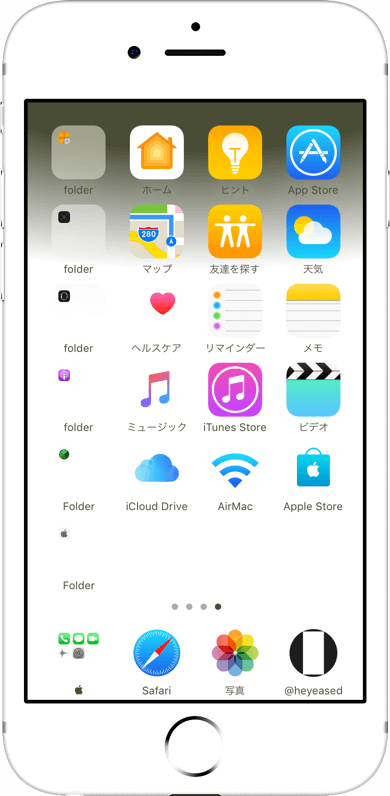
iOS 11.0–12.4
2017年9月 – 2019年9月
カラバリも作りました。

iOS 13.2–13.7
2019年10月 – 2020年9月
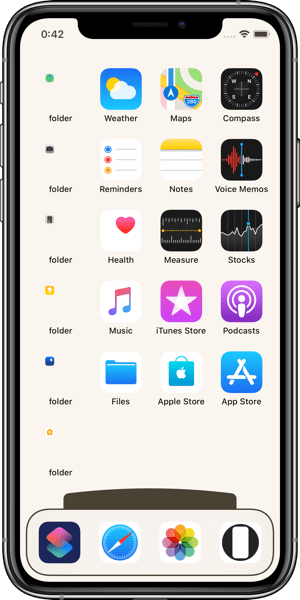
ドックの上のドット(昔は検索ボタンはありませんでした)を隠したりもしましたが、

iOS 18.0–18.7
2024年9月 – 2025年9月
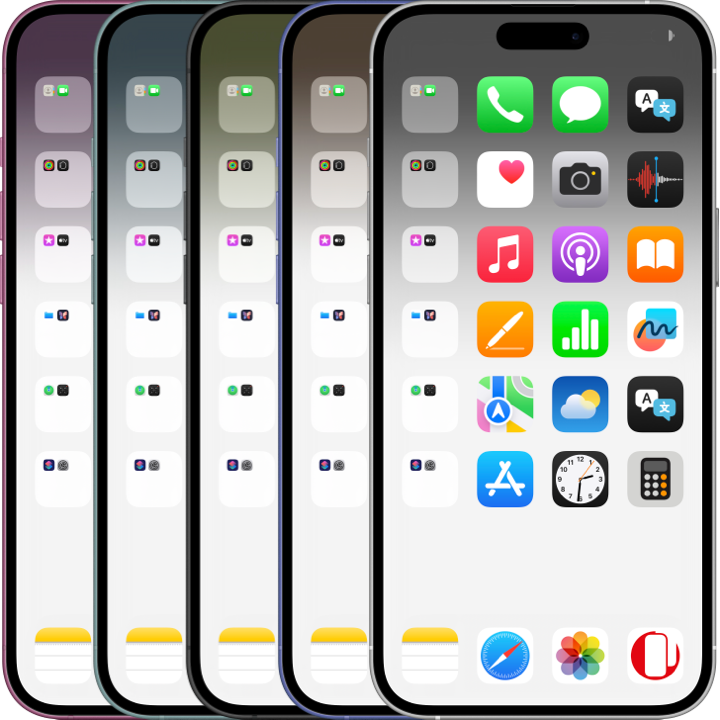
再びステータスを隠したのは、ホーム画面のカスタマイズでアプリ名を非表示にする機能が出てきたから。
大きくなったアイコンと、そのまま残されるステータスと検索ボタンの文字に違和感。どうもなんか、デザインが練られていない。
検索ボタンは設定と2ページめ以降を非表示にすることで隠せますが、ステータスを隠せるのは不思議なiPhone壁紙だけ。
大きくなったアイコンと、そのまま残されるステータスと検索ボタンの文字に違和感。どうもなんか、デザインが練られていない。
検索ボタンは設定と2ページめ以降を非表示にすることで隠せますが、ステータスを隠せるのは不思議なiPhone壁紙だけ。
iOS 26.4 (14.0)–
2026年3月 –
iOS 26.0ではドックを隠す明るい方の色がだいぶ暗くなりました。アイコン天国のような作り方では白文字になってしまいます。
しかしステータスを隠すのは今までと同じ色。これをどう料理したものか。
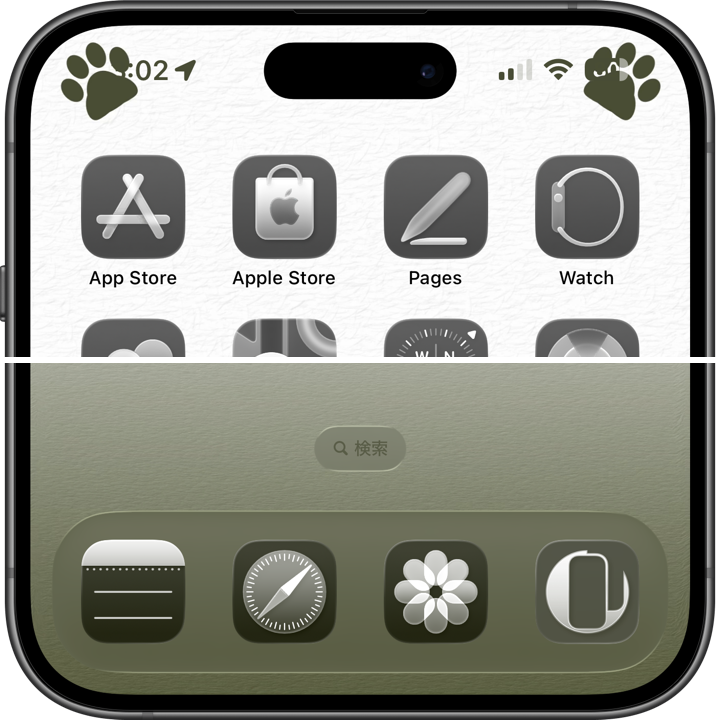
そこでドックを隠す機能は持たせず、ステータスも全部は隠さないシリーズを作りました。これならいくらでも背景を明るくできます。
しかしステータスを隠すのは今までと同じ色。これをどう料理したものか。
そこでドックを隠す機能は持たせず、ステータスも全部は隠さないシリーズを作りました。これならいくらでも背景を明るくできます。
➜ ネコハラ壁紙
26年3月に『邪魔する壁紙』を新設。このコンセプトではネーミングも大事。半分以上名前次第だと思っています。
対応OSはiOS 14以降。ピンチインしても変形されず、iOS 18までは明るい壁紙が暗くされるバージョンもありません。
26年3月に『邪魔する壁紙』を新設。このコンセプトではネーミングも大事。半分以上名前次第だと思っています。
対応OSはiOS 14以降。ピンチインしても変形されず、iOS 18までは明るい壁紙が暗くされるバージョンもありません。
These wallpapers playfully hide parts of the status display.
The text color itself remained unchanged from iOS 7 through iOS 18. At one point, I even measured the color used on white wallpapers and used it for website icons and similar elements. In monochrome, the color code is #4d4d4d.
Incidentally, in iOS 26 the text became slightly darker. At the same time, bright wallpapers on the Home Screen are dimmed. The result is surprisingly clever: the text once again disappears using essentially the same color as before iOS 18.
Explained in four steps.
① To hide the status display, the Home Screen text first needs to become black. With white text, shadows are added to the letters, and any white areas in the wallpaper are darkened to light gray, preventing a proper match.
② The text only turns black when the wallpaper is quite bright. If you applied wallpapers darkening in equal steps from white to black, the text would switch to white sooner than you might expect. Colors make it even more likely to become white text, which is why most wallpapers use white text.
③ I say “black text,” but it is not actually pure black. The color subtly shifts to match the overall background tone of the wallpaper. The trick works by making the area behind the status display exactly the same color.
④ Only the hue changes. Brightness and saturation stay fixed. Until then, I had always adjusted things individually based on the background itself, so it was not until iOS 18 that I confirmed the wallpaper’s light and dark areas actually do not matter.
★
- For versions up to iOS 18, the supported OS refers to compatibility as either “Hide Dock Wallpapers” or “Custom Lock Wallpapers.”
- This category was created during the iOS 26 era, but technically works on iOS 14 and later.
- This page was compiled in May 2026.
iOS 10.2–10.3
December 2016 – September 2017
The roots go back to wallpapers I made during the iOS 10 era that hid both the Dock and the status display.
iOS 11.0–12.4
September 2017 – September 2019
I also made color variations.
➜ Magic Status 2
Still, simply hiding the status display felt questionable on its own, so I stopped making them for a while afterward.
Still, simply hiding the status display felt questionable on its own, so I stopped making them for a while afterward.
iOS 13.2–13.7
October 2019 – September 2020
I also experimented with hiding the dots above the Dock back then (there was no Search button yet).
➜ Hide Dots 2
These were paired with wallpapers that customized the Lock Screen’s padlock icon and buttons using matching colors.
These were paired with wallpapers that customized the Lock Screen’s padlock icon and buttons using matching colors.
➜ Retro Big Icons
The logic is the same, since those elements use the same colors as the status display and label text.
The logic is the same, since those elements use the same colors as the status display and label text.
iOS 18.0–18.7
September 2024 – September 2025
The reason I returned to hiding the status display was the arrival of the Home Screen customization feature that hides app names.
The enlarged icons looked strange alongside the unchanged status display and Search button text. Somehow, the design felt underdeveloped.
The Search button can be hidden through Settings and by removing any additional Home Screen pages, but only Mysterious iPhone Wallpaper can hide the status display itself.
The enlarged icons looked strange alongside the unchanged status display and Search button text. Somehow, the design felt underdeveloped.
The Search button can be hidden through Settings and by removing any additional Home Screen pages, but only Mysterious iPhone Wallpaper can hide the status display itself.
iOS 26.4 (14.0)–
March 2026 –
In iOS 26.0, the brighter color used to hide the Dock became much darker. Methods like the one used in Icon Paradise would now trigger white text.
However, the color used to hide the status display remained unchanged. The question became how to make use of that.
So instead of hiding the Dock, I created a series that only partially hides the status display. This approach allows the background to become as bright as desired.
However, the color used to hide the status display remained unchanged. The question became how to make use of that.
So instead of hiding the Dock, I created a series that only partially hides the status display. This approach allows the background to become as bright as desired.
➜ #Nekohara
In March 2026, the “Jammer Wallpapers” category was introduced. Naming is especially important for this concept. I think more than half of it depends on the name itself.
Supported on iOS 14 and later. The wallpaper does not deform when pinched, and up through iOS 18 there are no versions where bright wallpapers are darkened either.
In March 2026, the “Jammer Wallpapers” category was introduced. Naming is especially important for this concept. I think more than half of it depends on the name itself.
Supported on iOS 14 and later. The wallpaper does not deform when pinched, and up through iOS 18 there are no versions where bright wallpapers are darkened either.
