ベゼルを遊ぶ物語
The Playing Bezel Story
隙間を狙います。
Aiming for the gaps.
Aiming for the gaps.
➜ English
ベゼルを遊ぶ壁紙は黒いパーツを端に配置してベゼルを変形させたように見せかけます。設定で壁紙が暗くなっても黒は影響を受けません。
★
- ドックを隠すタイプの説明は省略しています。
- 代表的なトリックにスクショとリンクを添えて歴史をまとめています。
- 原則としてメジャーアップデート後の旧バージョンのマイナーアップデートは追跡していません。
- 対応OSのリリース期間を目安として表記しています。壁紙の公開とは必ずしも一致しません。
- このページは2026年5月にまとめました。
iOS 11.0 (7.0)–11.4
2017年9月 – 2018年9月
始まりはiPhone X発売。巷はノッチの話題で持ちきり。
ホームボタンiPhoneにも強引にノッチを付けたように見せかける壁紙を作りました。複合カーブも真似ています。ちょっとだけ両肩も丸くしました。しかしとにかく狭かった。
ホームボタンiPhoneにも強引にノッチを付けたように見せかける壁紙を作りました。複合カーブも真似ています。ちょっとだけ両肩も丸くしました。しかしとにかく狭かった。


iOS 12.0–13.1
2018年9月 – 2019年9月
iOS 13.2–13.7
2019年10月 – 2020年9月
iOS 13.2で表示位置が上下中央寄りになりました。
ベゼルを直線にするプロテクタータイプも追加。
ベゼルを直線にするプロテクタータイプも追加。

iOS 14.0–15.7
2020年9月 – 2022年9月
表示位置が右に1ピクセル動きました(液晶画面の廉価版iPhoneでは変更なし)。
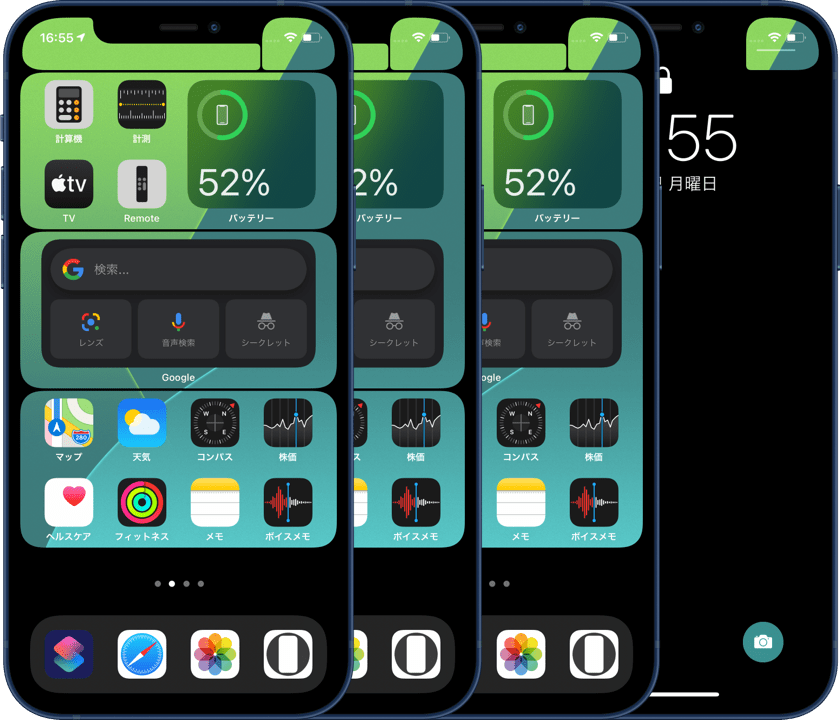
棚壁紙はウィジェットに対応した2段または4段ぶち抜きの3バリエーションタイプに。
棚壁紙はウィジェットに対応した2段または4段ぶち抜きの3バリエーションタイプに。
iOS 16.0 (14.0)–17.0
2022年10月 – 2023年10月
視差効果が廃止され、余白や表示位置もなくなります。
設定初期状態の表示位置が全画面だったり、拡大されてまちまちな位置に表示されたりで、設定ではピンチインが必須に。
iOS 16用ですが、ピンチしても変形しないiOS 14以降なら設定方法に従って使えます。
設定初期状態の表示位置が全画面だったり、拡大されてまちまちな位置に表示されたりで、設定ではピンチインが必須に。
iOS 16用ですが、ピンチしても変形しないiOS 14以降なら設定方法に従って使えます。

iOS 17.1 (14.0)–
2023年10月 –
iOS 17.1では上にスワイプしてキャンセルするぼかし回避も防がれました。画面サイズの壁紙では、たまたま全画面表示にならない限り上がぼかされるように。
ですが画面の縦横比よりも縦長の画像を上にスワイプすれば防げます。
棚壁紙の更新はストップ。カテゴリー名も『ベゼルを遊ぶ壁紙』に変更。どの機種でも使えるユニバーサルタイプの制作を開始。
設定で上にスワイプするので必ず下ゾロエになります。制作時に全機種分のデータを等幅にして下を100分の1ピクセルまで合わせれば、全ての機種を重ねた状態が正確に見られます。
全機種に共通する隙間を狙います。
ですが画面の縦横比よりも縦長の画像を上にスワイプすれば防げます。
棚壁紙の更新はストップ。カテゴリー名も『ベゼルを遊ぶ壁紙』に変更。どの機種でも使えるユニバーサルタイプの制作を開始。
設定で上にスワイプするので必ず下ゾロエになります。制作時に全機種分のデータを等幅にして下を100分の1ピクセルまで合わせれば、全ての機種を重ねた状態が正確に見られます。
全機種に共通する隙間を狙います。
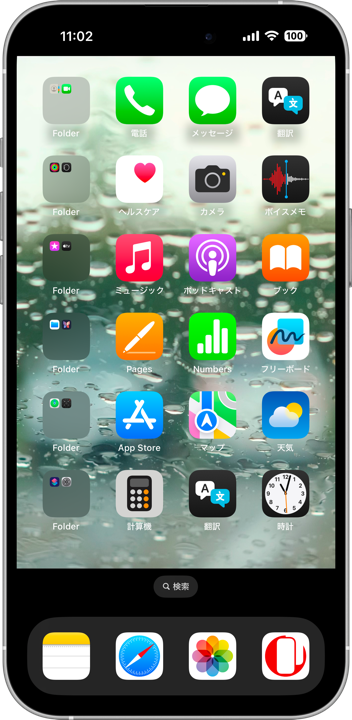
The wallpapers in the playing bezel category place black elements along the edges to make the bezel appear reshaped. Even if the wallpaper is darkened by settings, pure black remains unaffected.
★
- Descriptions for Dock-hiding types are omitted.
- This is a historical overview of the major tricks, accompanied by screenshots and links.
- As a rule, minor updates for older versions after major OS updates are not tracked.
- Supported OS versions are listed based on their release periods and do not necessarily match the wallpaper release dates.
- This page was compiled in May 2026.
iOS 11.0 (7.0)–11.4
September 2017 – September 2018
It all started with the release of iPhone X. Everyone was talking about the notch.
I made wallpapers that forced a fake notch onto the Home button iPhone. Even the compound curves were imitated. I slightly rounded the shoulders too. But the space was impossibly tight.
I made wallpapers that forced a fake notch onto the Home button iPhone. Even the compound curves were imitated. I slightly rounded the shoulders too. But the space was impossibly tight.
➜ Joke X
But that was just for fun. Next came an X-exclusive wallpaper that applied the technique from the “Border Wallpapers” series to surround the screen with lace-like edges.
But that was just for fun. Next came an X-exclusive wallpaper that applied the technique from the “Border Wallpapers” series to surround the screen with lace-like edges.
➜ Lacy Bezel
The category became “Expand Bezel Wallpapers,” and I also created the shelf wallpaper. It was available for Home button iPhones as well.
The category became “Expand Bezel Wallpapers,” and I also created the shelf wallpaper. It was available for Home button iPhones as well.
iOS 12.0–13.1
September 2018 – September 2019
iOS 13.2–13.7
October 2019 – September 2020
In iOS 13.2, the display position shifted closer to the vertical center.
A protector-style version that straightened the bezel was also added.
A protector-style version that straightened the bezel was also added.
iOS 14.0–15.7
September 2020 – September 2022
The display position moved 1 pixel to the right (no changes on budget iPhone with LCD displays).
Shelf wallpapers evolved into three variations with 2-row or 4-row cutouts to support widgets.
Shelf wallpapers evolved into three variations with 2-row or 4-row cutouts to support widgets.
iOS 16.0 (14.0)–17.0
October 2022 – October 2023
The Parallax Effect was removed, along with margins and display offsets.
Wallpapers either filled the screen entirely or appeared zoomed and randomly positioned, making pinch-in adjustment mandatory during setup.
Although designed for iOS 16, these wallpapers can also be used on iOS 14 and later because wallpapers do not deform during pinch gestures on those versions, provided the setup instructions are followed.
Wallpapers either filled the screen entirely or appeared zoomed and randomly positioned, making pinch-in adjustment mandatory during setup.
Although designed for iOS 16, these wallpapers can also be used on iOS 14 and later because wallpapers do not deform during pinch gestures on those versions, provided the setup instructions are followed.
➜ Lace Bezel (Lacy Bezel 5)
In iOS 17, pinching during setup began blurring the upper part of the screen. However, it could still be avoided by pinching inward first and then swiping the image upward.
In iOS 17, pinching during setup began blurring the upper part of the screen. However, it could still be avoided by pinching inward first and then swiping the image upward.
iOS 17.1 (14.0)–
October 2023 –
In iOS 17.1, even the blur workaround using an upward swipe was blocked. With screen-sized wallpapers, the top area became blurred unless the wallpaper happened to display full screen by chance.
However, this can still be prevented by swiping upward with an image taller than the screen’s aspect ratio.
Updates for shelf wallpapers stopped. The category name was also changed to “Playing Bezel Wallpapers.” Development then shifted toward universal versions compatible with every model.
Since setup always involves swiping upward, alignment naturally becomes bottom-aligned. By standardizing all device data to the same width during production and matching the bottom edge down to one-hundredth of a pixel, it became possible to accurately preview every model overlaid together.
I aim for the gaps shared by all models.
However, this can still be prevented by swiping upward with an image taller than the screen’s aspect ratio.
Updates for shelf wallpapers stopped. The category name was also changed to “Playing Bezel Wallpapers.” Development then shifted toward universal versions compatible with every model.
Since setup always involves swiping upward, alignment naturally becomes bottom-aligned. By standardizing all device data to the same width during production and matching the bottom edge down to one-hundredth of a pixel, it became possible to accurately preview every model overlaid together.
I aim for the gaps shared by all models.
➜ Retro Bezel
There are no Air versions for the lace or protector types. With too many screen sizes to manage, updates for individual device versions are currently paused.
There are no Air versions for the lace or protector types. With too many screen sizes to manage, updates for individual device versions are currently paused.
