Mysterious iPhone Wallpaper
  • New
  • Notes
  • iOS
  • Help
  • About This Site
  • Privacy Policy

Notes

October 24th, 2025

10/24/2025

0 コメント


デザインとアートの境界で
On the Border Between Design and Art


復刻
私はよく過去の素材を再利用しますが、デザイン的にただ手間を省いているわけではありません。ええ、省いてはいますとも。
しかしその時のテンションでしか作る気になれない物ってあるのです。それはただのトリックとは違う財産なのです。
I often reuse materials from the past — not just to save effort from a design standpoint. Well, yes, I am saving effort.
But there are things I can only bring myself to create in a certain moment, with a certain feeling. Those aren’t mere tricks — they’re a kind of treasure.

0 コメント

October 23rd, 2025

10/23/2025

0 コメント


iOS 26新機能の続き
iOS 26 Feature Follow-Up


iOS 26のwebapp
➜ English
​実はもっと問題だったかも? すみませんWebアプリでも画像保存できました。正確には時間を置いたらできるようになってました。

機種もバージョンも変わっていないので一時的なバグだったと思います。逆にSafariなどのブラウザでも起こるかもしれないということです。

というわけで訂正。もしも画像保存ができなかった時は、Appスイッチャーから(SEではホームボタン二度押し)アプリを上にスワイプして強制終了後、再起動してみてください。

Maybe It Was a Bigger Issue After All?
Sorry — it turns out image saving works in the web app too. To be precise, it started working again after waiting for a while.

Since neither the device nor the version changed, it was probably just a temporary bug. This also means it could potentially happen in browsers like Safari as well.
​
So here’s a correction: if you can’t save an image, try force-quitting the app from the App Switcher (or double-press the Home button on SE models), then restart it

0 コメント

October 22nd, 2025

10/22/2025

0 コメント


iOS 26に壁紙の保存ができなくなる新機能
New iOS 26 Feature That Disables Wallpaper Saving


iOS 26のwebapp
➜ English
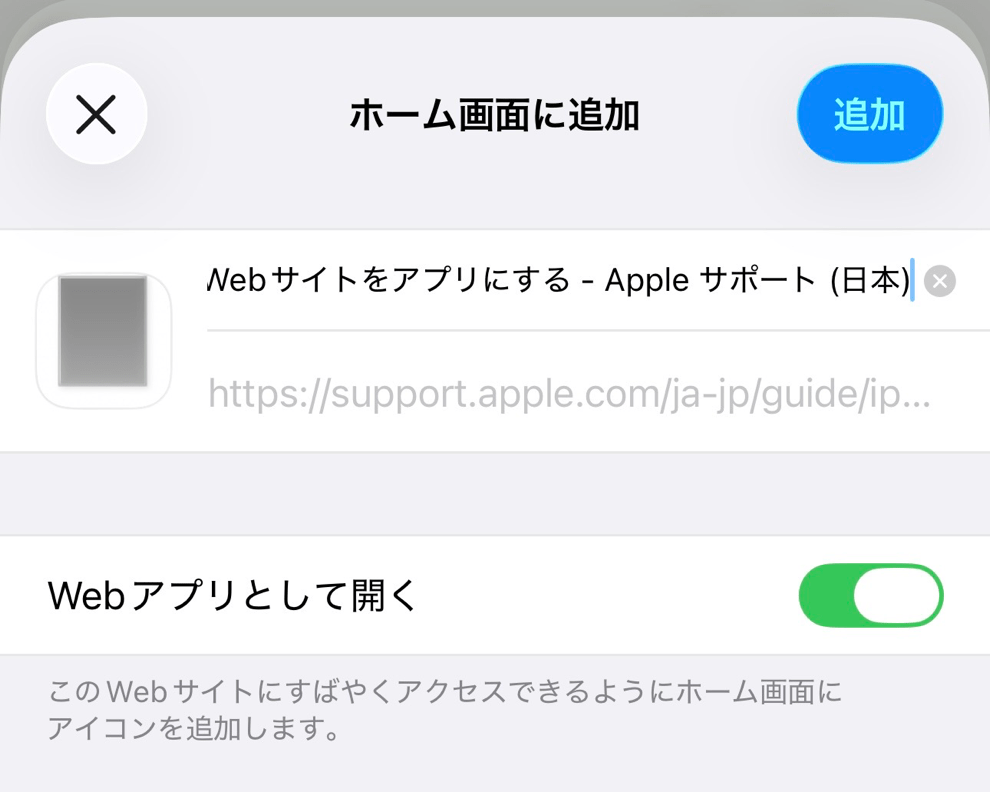
​iOS 26ではWebサイトをWebアプリとしてホーム画面に追加できるようになりました。
というか、ホーム画面に追加するとデフォルトではWebアプリになります。今までどおりブックマーク代わりにするならトグルをオフにしないといけません。

ところがこのWebアプリには落とし穴がありました。ブラウザなら当たり前にできる画像保存機能がない(バグでした)のです。そこから他のサイトに行ってもできません。その仮装アプリから出るわけではないからです。

というわけで壁紙の取得はSafariなどのブラウザでお願いします。

In iOS 26, websites can now be added to the Home Screen as web apps.
In fact, when you add one, it becomes a web app by default.
If you want to use it as a simple bookmark like before, you’ll need to turn off the toggle.

However, there’s a catch. Web apps don’t allow image saving (It was a bug.)—a function that’s completely normal in a browser.
Even if you navigate to another site from within the web app, you still can’t save images, since you never actually leave that virtual app environment.

So please use Safari or another browser to download wallpapers.

0 コメント

October 14th, 2025

10/14/2025

1 コメント


実験が山積み
Experiments Piling Up


‽
​現在2つほど、新しいジャンルを準備中です。既存のカテゴリーも並行して制作中。どれも試すことが多くてなかなか形にならずにお待たせしてすみません。ああ、どれから仕上げよう……
I’m currently working on two new genres, while also continuing to develop the existing categories. There’s so much to test in each one that it’s taking time to take shape—sorry to keep you waiting. Now… which one should I finish first?

1 コメント

October 12th, 2025

10/12/2025

0 コメント


縁取る壁紙の裏技
A Border Wallpapers Secret


iOS 26.1で無効化されました。
It was disabled in iOS 26.1.
縁取る壁紙(左)とカラーUIの壁紙(右)。
Border Wallpaper (left) and Color UI Wallpaper
 (right).
縁取る壁紙の裏技
➜ English
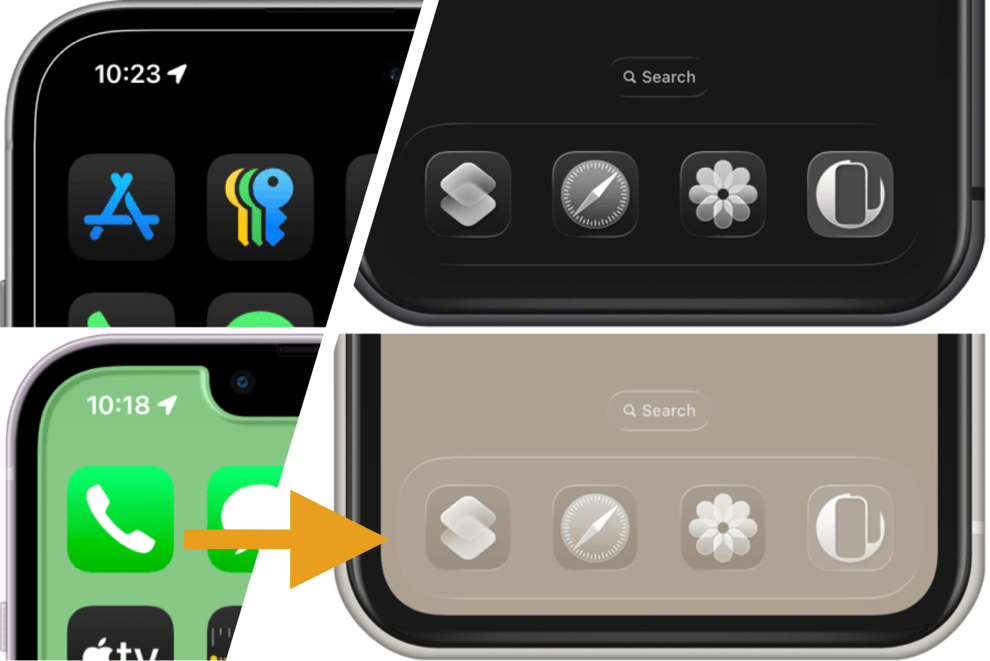
​実は縁取る壁紙もiOS 26で透明度を下げるをオンにするとドックとフォルダがカラーになります。
ただし複数の色があると薄くなって、レインボーだとほとんどグレーです。
​
これが私が透明度を下げる設定でドックが周囲の色を拾うことに気がついたキッカケ。色を強化・ユニバーサル化したのがiOS 26用カラーUIの壁紙なのです。


​​➜ 縁取る壁紙
➜ カラーUIの壁紙

➜ 透明度を下げるマップ

Actually,  in iOS 26, Border Wallpapers also makes the Dock and folders colored when Reduce Transparency is turned on.
However, if there are multiple colors, the effect becomes faint — and with rainbow tones, it’s almost gray.

That’s how I discovered that the Dock picks up surrounding colors when Reduce Transparency is enabled.
The iOS 26 Color UI Wallpapers were created by strengthening that effect and making it universal.

➜ Border Wallpapers
➜ Color UI Wallpapers
➜ Reduce Transparency Map

0 コメント

October 11th, 2025

10/11/2025

0 コメント


汎用か専用か
Universal or Device-Specific


専用壁紙の代表格縁取る壁紙とユニバーサル壁紙の代表格ドックを隠す壁紙。
The signature device-specific Border Wallpapers and the signature universal Hide-the-Dock Wallpapers.
汎用か専用か
➜ English
​既に全iPhone対応ユニバーサル壁紙の時代です。
もちろん当サイトはそれぞれのiPhoneを計算しています。しかし作るのは(なるべく)一つ。
各機種専用壁紙については、追加・更新の予定はありません。
今の時点でiOS 26に対応した画面の形は15種類。単純作業に15倍、3日で終わる作業なら45日。もはや現実的ではありません。AIは雑で私の再現はできそうにないですし。
専用壁紙はいわば製造中止。今ある物が貴重なすべてになります。
Air専用壁紙を追加するだけならそこまでの負担はありませんが、それでも結構な期間が必要で他のユーザーさんは置いてけぼり。この影響は機種が増えるにつれて大きくなり続けてきました。今ではざっくり1/15:14/15。しかもアップデート対応が必要になったらそこまでです。
今後はできるだけみんなが使えるユニバーサル壁紙のアイデアにフォーカスしていく予定です。

We’re already in the age of universal wallpapers that work across all iPhones.
Of course, I calculate for each iPhone. But I make (mostly) one.
About per-device wallpapers, there are no plans to add or update them.
As of iOS 26, there are 15 different screen shapes. That means 15× the manual work — what once took 3 days now takes 45. It’s simply no longer realistic. AI tends to be sloppy and probably couldn’t replicate my work anyway.
Device-specific wallpapers are, so to speak, discontinued. What’s available now is all there is — and it’s precious
As for iPhone Air–specific wallpapers, adding one to each existing series wouldn’t be too bad, but it would still take time, leaving everyone else behind. The impact grows as models multiply — roughly a 1/15 vs. 14/15 situation now.
And if future updates required compatibility changes, that would be the end of it.
From here on, I’ll focus on universal wallpaper ideas that as many people as possible can use.

0 コメント

October 10th, 2025

10/10/2025

0 コメント

 
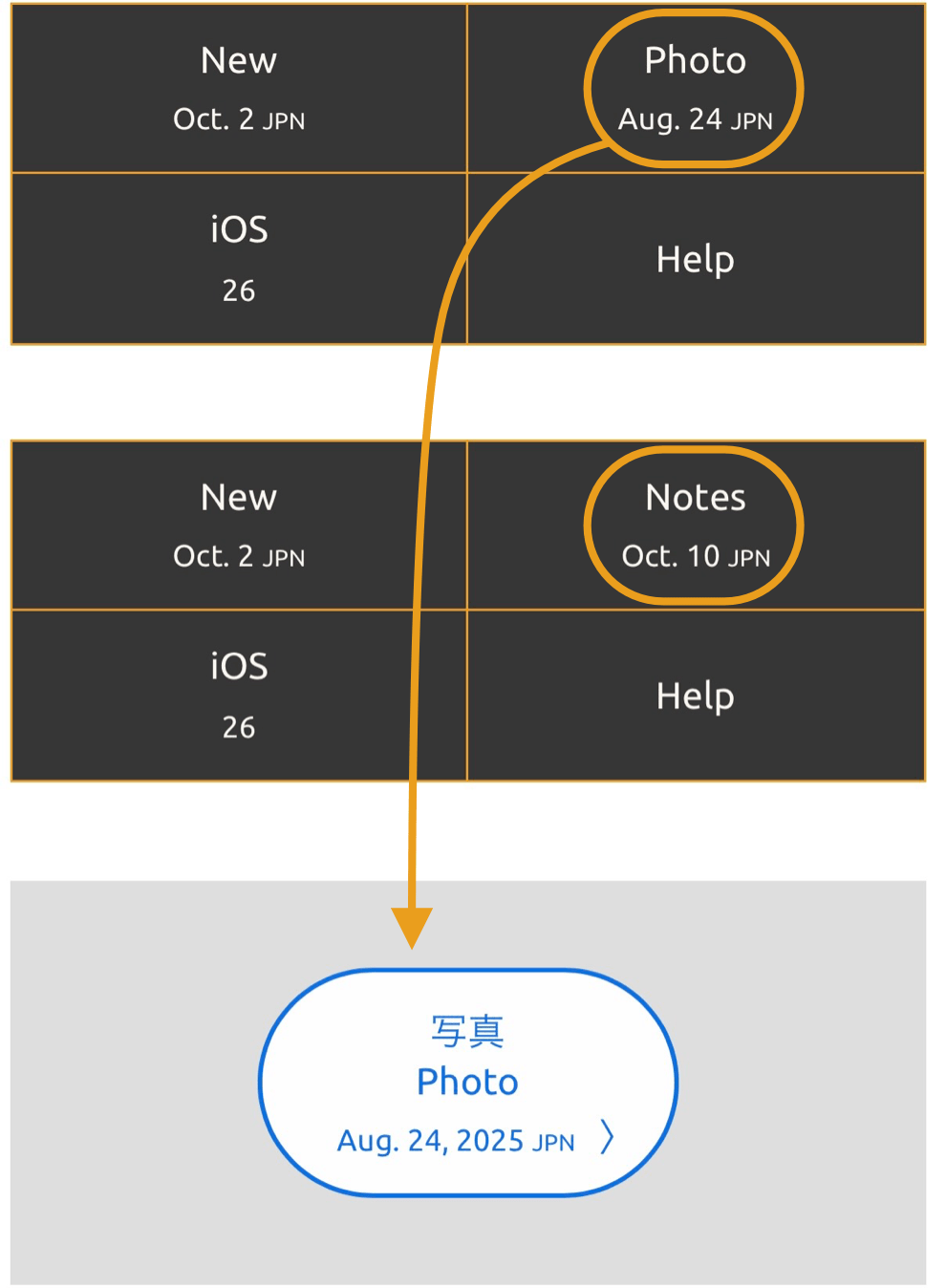
ここNotesページを新設しました。
フリーノートです。今まで新作情報と一緒に掲載していた、アップデートやサイトの変更などの色々なお知らせ、気が向いたら壁紙についての豆知識や雑感なども書くかもしれません。
Newページは新作だけにフォーカスします。
Photoページはホームの下の方、Extraコーナーに移動。更新日はボタンに表示しています。

A new Notes page has been added.
It’s a free notebook for various thoughts. Updates, site changes, and other announcements that used to appear with new releases will now go here. I may also post bits of wallpaper trivia or personal reflections when I feel like it.
The New page now focuses only on new releases.
The Photo page has moved to the lower part of the Home section, under Extra. The update date is shown on its button.
Notes追加

0 コメント


    Archives

    7月 2026
    6月 2026
    4月 2026
    3月 2026
    2月 2026
    1月 2026
    12月 2025
    11月 2025
    10月 2025

    heyeasedのXへのリンク heyeasedのThreadsへのリンク heyeasedのBlueskyへのリンク notes-rss-feed
   About This Site   
     
 Privacy   Policy 

​​​Nakatani Hideaki @heyeased
​​​​CC BY-NC-SA 4.0
Powered by Weebly
​
不思議なiPhone壁紙ロゴ トップページへのリンク The logo as link to home page
  • New
  • Notes
  • iOS
  • Help
  • About This Site
  • Privacy Policy