Mysterious iPhone Wallpaper
  • New
  • Notes
  • iOS
  • Help
  • About This Site
  • Privacy Policy

Notes

Files Since iOS 11

4/21/2026

0 コメント


壁紙を保存に追加
iOS 26.4/18.7.7以降の壁紙をダウンロードしようとした時に出るポップアップが出なくなることがあります。実は私は、私のサイトではこのポップアップが出せなくなっています。
もし出なくてもサムネイルの長押しからダウンロードが選択可能なので壁紙を保存に追記しています。おそらくこの操作方法はファイルアプリが追加されたiOS 11からあったものです(iOS 15では確認済み)。
The popup introduced in iOS 26.4 / 18.7.7 may stop appearing — on my site, I’m no longer able to get it to show up.
If it doesn’t appear for you either, the download option is still accessible by long-pressing a thumbnail, so I’ve added this to the Saving Wallpaper. This method has likely been available since iOS 11 when the Files app was introduced (confirmed on iOS 15).​​​​​​​​​​​​​​​​

0 コメント

Add to Help

4/15/2026

0 コメント


写真アイコン ファイルアイコン ​
Helpに壁紙の保存方法を追加しました。ダウンロードの使い道を研究してまとめています。知らずに使っているとストレージを圧迫することに。
Added a wallpaper saving guide to Help. A breakdown of when and how to use the Download option.​​​​​​​​​​​​​​​​ Using it unknowingly will quietly eat into your storage.​​​​​​​​​​​​​​​​
➜ 壁紙を保存|Saving Wallpaper
iOS 26.4/18.7.7–

0 コメント

iOS 26.4 & 18.7.7

4/6/2026

0 コメント


先日iOS 18.7.7が来ました。リリース直後に検証エラーが発生して情報が錯綜していたので公式を待って記事にしています。
iOS 18.7.7 arrived the other day. Since validation errors cropped up right after release and information was all over the place, I waited for the official word before writing this up.​​​​​​​​​​​​​​​​
➜ English

iOS 26.4とダウンロードダイアログ


iOS 26.4(iOS 18.7.7もでした)で画像をダウンロードする時に表示されるようになったダイアログ(表示されないこともある?)、「表示」なら今までどおり、「ダウンロード」を選ぶと分かりにくさと階層の深さで面倒なことになります。
ダウンロードダイアログ
なので保存方法の所は表示という書き方に変えました。初めての人よりも慣れている人の方がダウンロードの罠に迷いそうなので改めて注意喚起。
​

また例外的に、最新iOSでは使えないレガシー壁紙のダウンロードという表記も全て表示に変更しました。意味は旧OSでも通じます。レガシー壁紙は下手なUIも間違った英語も、できるだけ当時のまま保存する方針なのですが、iOS 26のダウンロードUIだけはいけません。あれはユーザーの目的達成を阻む為に作られてると言っても言い過ぎじゃない。レガシー壁紙も意外と楽しんでいただけているのです。

もう一つ最近気が付いたのですが、サイトにダウンロードという単語が多過ぎると、よからぬ広告を招きやすい可能性がないこともないかもしれません。なので全部書き換えるかちょっと迷っていたので背中を押してもらった形です。
​

iOS 18.7.7と特設ページ


結論としては当初の情報通り、まだiOS 26に上げていないiOS 18の全てのiPhoneが iOS 18.7.7にできるようです。

これはナイス!
iOS 18ユーザーには容量不足で上げられない人もいると思ったのです
iOS 26は容量食うので先日12mini64GBを正式版にしようとしたら全ての写真とほぼ全てのアプリを完全に削除してシステムデータ減らさないといけませんでした https://t.co/hO75cJAaC4

— 不思議なiPhone壁紙|Mysterious iPhone Wallpaper (@heyeased) April 2, 2026
これによってiOS 26にアップデート可能なiOS 18ユーザーに長らくセキュリティアップデートが提供されていなかった問題に一応の決着がついた形になります。
​
最初はXS/X世代がアップデートできず、11以降の機種はiOS 26からダウングレードできた人もいたらしいですが、すぐにそれもできなくなり、ようやく落ち着いたよう。


なぜ今になってAppleが方針を変更したかは分かりませんが、 対応機種でiOS 26に上げたくてもできない人の声が届いたのかもしれませんね(最近のAppleにしては不自然に親切と思うなら?)。

肝心のアップデート中のストレージのスクリーンショットを間違えて消してしまったのですが、ポストにも書いた通り64GBのiPhone 12 miniをベータから正式版のiOS 26にしようとしたところ、ストレージが足りずにアップデートできなかったのです。システムデータが全データの半分くらいを占めていて、一時的にアプリを取り除く機能では足りませんでした。

iOS 26はiOS 18のざっくり(機種やバージョンによって違います)倍近くあるみたい!

私の12 miniはテスト用なので全ての写真とほぼ全てのアプリの削除でなんとかなりましたが、これがメイン機なら諦める人も多いかもしれません。

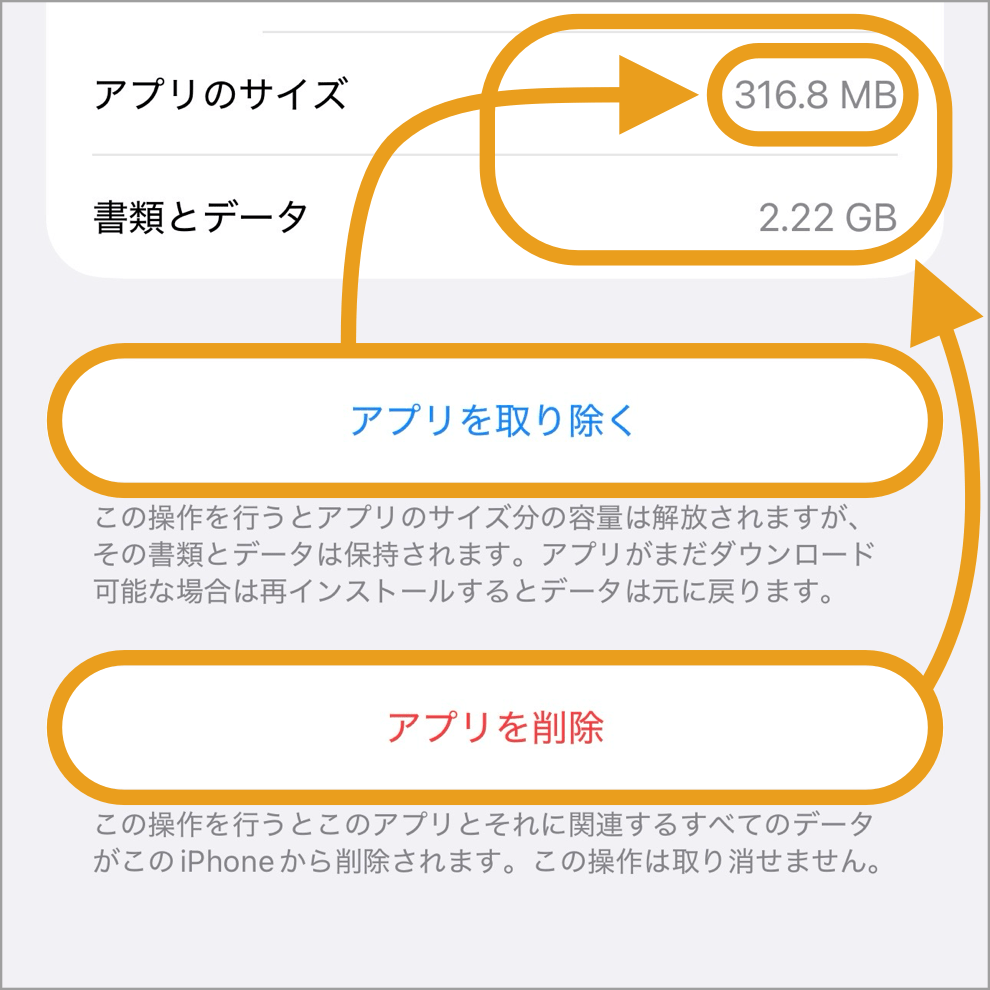
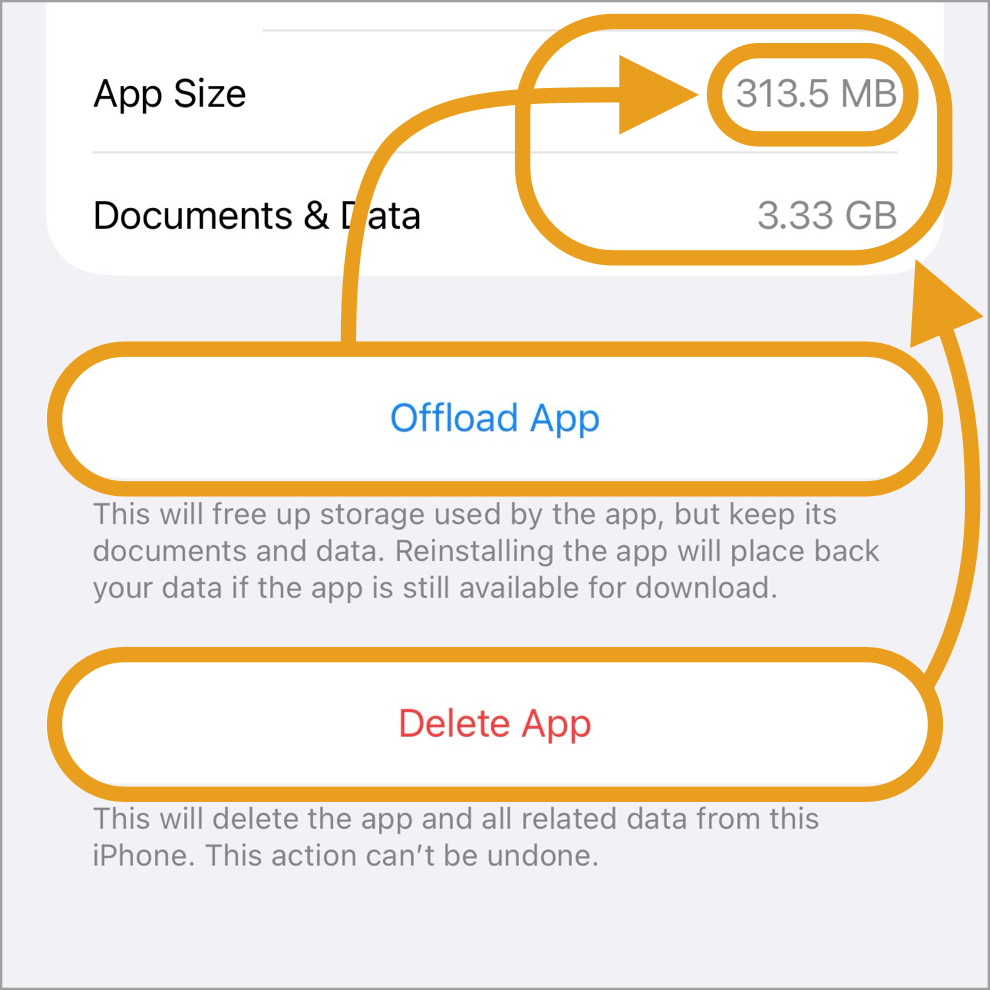
対策としては、アプリを一時的に取り除くのではなく、一度削除してしまうことが有効なようです。意外とアプリよりもそのデータ(システムデータに含まれます)の方がはるかに大きなものが多い。
これもシステムデータ
YouTubeやInstagramのようなクラウドベースのアプリなら、ログインさえできればデータがなくなっても困りません。
とはいえ大量のアプリを消してしまうと、元に戻すのはバックアップからの復元などヘビーな作業になります。

iOS 27が軽ければ、対応している機種のユーザーが一気にアップデートするかもしれないし、そうでなければ何年もそのままかもしれないのです。それによってiOS 18用特設ページの需要も変わってくるでしょう。

​iOS 26.4 and the Download Dialog


A dialog now appears (though it may not always show up?) when saving images in iOS 26.4 (iOS 18.7.7 as well). Choosing View works exactly as before; choosing Download leads to a confusing, deeply nested mess.
download dialog
So the saving instructions across the site have been updated to say view. Experienced users are probably more likely to fall into the Download trap than first-timers, so consider this a heads-up.

As an exception, legacy wallpapers — which aren’t compatible with the latest iOS — have also had their Download labels changed to view. The wording still makes sense on older OS versions too. The general policy for legacy wallpapers is to preserve the original UI and wording, typos and awkward English included, as much as possible. But the iOS 26 Download UI is a different story. It’s not an exaggeration to say it seems designed to stop users from achieving their goal. Legacy wallpapers still get a surprising amount of love.

One more thing I noticed recently: having the word “download” appear too frequently on the site may attract unwanted ads. That had me on the fence about rewriting everything — so this situation gave me the push I needed.​​​​​​​​​​​​​​​​
​

iOS 18.7.7 and the Special Page


As originally reported, it appears that all iPhones still on iOS 18 — meaning those not yet upgraded to iOS 26 — can now update to iOS 18.7.7.

Nice! I figured some iOS 18 users might be stuck unable to update due to storage. iOS 26 is a real space hog — when I tried moving my 12 mini 64GB to the official release the other day, I had to wipe every single photo and nearly every app just to claw back enough system storage. https://t.co/agIborkY2u

— 不思議なiPhone壁紙|Mysterious iPhone Wallpaper (@heyeased) April 2, 2026
​
This brings a tentative resolution to the long-standing issue of iOS 18 users eligible for iOS 26 being left without security updates.

​Initially, XS/X-generation devices couldn’t update at all, and some users on newer models apparently managed to downgrade from iOS 26 for a time — though that option quickly disappeared. Things seem to have finally settled.


Why Apple changed course now isn’t clear, but perhaps feedback from users who wanted to upgrade to iOS 26 on supported devices but couldn’t finally got through. (If that feels unusually considerate for Apple these days?​​​​​​​​​​​​​​​​)

I accidentally deleted the screenshots taken during the update — but as mentioned in the post, when I tried to update a 64GB iPhone 12 mini from the iOS 26 beta to the official release, there wasn’t enough storage. System Data was taking up roughly half of the total, and the option to offload apps temporarily wasn’t enough.

iOS 26 appears to be nearly double the size of iOS 18 — though this varies by device and version.

My 12 mini is a test device, so deleting all photos and nearly all apps did the trick. But for anyone using it as their main device, many would probably give up.

One effective workaround is to fully delete apps rather than just offloading them. App data — which counts toward System Data — is often far larger than the app itself.
This is also system data
For cloud-based apps like YouTube or Instagram, losing local data isn’t a problem as long as you can log back in. That said, deleting a large number of apps means restoring from backup or similar heavy lifting to get back to normal.

If iOS 27 is lighter, users on supported devices may upgrade en masse — otherwise, many could stay put for years. That will likely affect how much demand there is for the iOS 18 special page.​​​​​​​​​​​​​​​​​

0 コメント

Cat Notice!​

3/27/2026

0 コメント


ネコハラ壁紙に注意事項を追加しました。
Added notes to #Nekohara.
​
★
  • iOS 18以前ではロック画面の文字色は厳密には合いません。iOS 26のロック画面では、通知が少ないと(またはリキッドグラスを色合い調整に切り替えると)壁紙が明るくなって文字が見えま
  • On iOS 18 and earlier, the Lock Screen text color won’t match exactly. On iOS 26, when notifications are few (or when you switch Liquid Glass to Tinted), the wallpaper brightens and the text becomes visible.
ロック画面の背景明るさ変化
​見えますと言うのが許されるほど見えませんが、見えないと言うのが許されるほど見えなくはない。
ところでロック画面の時計の色はスクショと実機で違います。iOS 26はそういうのが沢山あります。
It’s not visible enough to call it visible, yet not invisible enough to call it invisible.
By the way, the Lock Screen clock color differs between screenshots and the actual device. iOS 26 has a lot of that going on.

0 コメント

Black Ninja: Setup Fix!

3/2/2026

0 コメント


ブラックニンジャドック壁紙 ​2とブラックブラックニンジャ壁紙 ​2の設定画像に間違いがありました。
There was an error in the configuration image for Black Ninja Dock 2 and Black Black Ninja 2.
ブラックニンジャ2設定画像26.3の訂正箇所
ホーム画面カスタマイズで「背景明るく」としていたのに画像のアイコンは暗くなっていました。お詫びして訂正します。さっき気がついて慌てました。
I specified "Brighter background" in Home Screen customization, but the image icons ended up darker. I apologize and have corrected it. I just noticed this and panicked.

0 コメント

Hide Dock in iOS 26.3

2/12/2026

0 コメント


➜ English
​iOS 26.3でもドックを隠す壁紙の設定条件に変更があります。

基本的に、ライト系ではホーム画面カスタマイズのデフォルトとライトモードの組み合わせのみ。ダーク系はそれ以外のすべてで使えるようになりました。
hidedock 26.3
ただし例外が一つ。ホーム画面カスタマイズでダークを選択しても、自動・ライトモードの組み合わせにするとデフォルトのライトモードと何もかも同じになります。

また、SEではリキッドグラスエフェクトの固定に伴いドックの上に常に線が見えるようになりました。一瞬消えていたというのは変化していたということで、13以前の機種はリキッドグラスが動かないことと矛盾していたので妥当な変更でしょう。
photo_24

​iOS 26.3 also brings changes to the configuration conditions for wallpapers that hide the Dock.

Basically, for light variants, it’s only available with the combination of Default and Light Mode in Home Screen customization. For dark variants, it’s now available in all other combinations.
hidedock 26.3
However, there’s one exception. Even if you select Dark in Home Screen customization, when combined with Auto and Light Mode, everything becomes identical to the Default Light Mode.

Additionally, on the SE, with the Liquid Glass effect now fixed in place, a line is now always visible above the Dock. The fact that it momentarily disappeared meant it was moving, which contradicted the fact that the Liquid Glass doesn’t move on models from the 13 and earlier, so this is a reasonable change.
photo_24

0 コメント

January 28th, 2026

1/28/2026

0 コメント


iOS 18の状況をよく知らない人にも分かりやすく書き直しました。少し前から言われていたので、ついはしょってしまいすみません。
I've rewritten this to be easier for those unfamiliar with iOS 18. I'm sorry I ended up skipping over it since the news had been out for a while.
➜ 18 or 26?

0 コメント

With Ears

1/26/2026

0 コメント


ぼっち写真は耳で撮る
Solitary Photos Are Shot with Ears


photo_24
➜ English
​写真ページ雑談。私が撮るとどうしてもぼっち写真になるので、いっそぼっち写真を極めようとしています。始めたばかりでロケーションから手探りですけど。

ただ、行けばどっちに歩けばいいかは分かります。大体一応は人がいる所から始めるのですが、耳を澄ませて数キロ圏内で一番静かな方向へ行きたくなるのです。

Photo page chat. Whatever I shoot turns out solitary anyway, so I’m trying to master solitary photography. Just started, still feeling out the locations.

But once I’m there, I know which way to go. Usually I’ll begin somewhere with a few people around, then listen. I follow the quietest direction—wherever feels most silent within a few kilometers.

0 コメント

18 or 26?

1/23/2026

0 コメント


あるいは、私のiOS 18専用ページはiOS 18を成仏させる一助になるでしょうか?
Or perhaps, could my dedicated iOS 18 page help the OS rest in peace?
➜ ​iOS 18用特設ページ|Special Page for iOS 18
➜ English
​​​ iOS 18.7.3(18.7.4)が提供されていないのなら、iOS 18にはWebサイトを閲覧するだけで乗っ取られかねない脆弱性があります。

XSシリーズまでのiPhoneにはiOS 18.7.3(18.7.4)が提供されますが、11以降のiPhoneは当初提供される予定だった(ベータ版はあったのに塞がれました)のがなくなりました。iOS 26.2(26.2.1)だけです。誰もが思うことを忖度マイナス無限大で言うのなら、iOS 26が不評なのでユーザーの安全を人質にとってアップデートを強制しているように見えて仕方ない。みんなが知ってるとは限らないのに。​
​​
そこまでやっても今回のアップデート率は遅いらしいです。iOS 18ユーザーは帝国軍にデモを行なっているかのよう。(iOS 18.7.4でも対応機種は変わらず)

Appleの夜明け?
  • ​AppleのUI責任者アラン・ダイ氏がMetaへ移籍 社内は“歓迎ムード”に - t0nAr1sm
  • Appleの次期CEO有力候補、ジョン・ターナス氏ってどんな人? | ギズモード・ジャパン

iOS 26.2が最も安全なのは確かです。しかし少々使いにくいのも確か。見た目の好みと、動作の重さは問題なかったとしても、UIは微に入り細に入り改悪されています。
​
​iOS 18用特設ページでは、ボタンの色からiOS 26で使えなくなるカテゴリーが分かります。ドックを隠す壁紙はiOS 26用が別にありますが、それと青ボタンがそのまま使えます。
せめて壁紙については心の準備ができるかもしれません。

Technically, without iOS 18.7.3 (18.7.4), iOS 18 is vulnerable—simply browsing a website could lead to a full takeover.

While the iPhone XS series still gets iOS 18.7.3 (18.7.4), the update for iPhone 11 and later—which existed in beta—was suddenly scrapped, leaving iOS 26.2 (26.2.1) as the only option. To say what everyone is thinking with absolutely no filter: it feels like they’re holding user security hostage to force an upgrade to the unpopular iOS 26, despite the fact that not everyone is aware of what's happening.
​
Even after all that effort to force it, the update rate is reportedly still slow. iOS 18 users are like they're staging a protest against the Imperial Army. ​(Compatible models remain unchanged for iOS 18.7.4.)​

​The Rise Of Apple?
  • Daring Fireball: Bad Dye Job
  • Yeah, This Guy's Looking Like the Frontrunner for New CEO of Apple

Sure, iOS 26.2 is the safest. But it’s a bit of a pain to use. Even if you ignore the aesthetics and the lag, the UI has been degraded in every tiny detail.

On the iOS 18 page, you can see which categories will vanish in iOS 26 by looking at the button colors. While Hide Dock Wallpapers are handled on a separate page for iOS 26, they and the other items with blue buttons remain compatible.
Perhaps, at the very least, you can prepare your heart—starting with your wallpaper.

0 コメント

January 4th, 2026

1/4/2026

0 コメント


昨日のReason for REASON FOR UNIVERSEに若干加筆修正しました。理論と事実をちょっと補足したらドラマチックになった?
​Slightly revised yesterday “Reason for REASON FOR UNIVERSE” with some additions. Did 
Supplementing a bit of theory and facts make it more dramatic?​
➜ Reason for REASON FOR UNIVERSE

0 コメント
<<前へ


    Archives

    4月 2026
    3月 2026
    2月 2026
    1月 2026
    12月 2025
    11月 2025
    10月 2025

    heyeasedのXへのリンク heyeasedのThreadsへのリンク heyeasedのBlueskyへのリンク notes-rss-feed
   About This Site   
     
 Privacy   Policy 
​Nakatani Hideaki @heyeased
​​​​CC BY-NC-SA 4.0
​Powered by ​Weebly
トップページへのリンク link to home page

  • New
  • Notes
  • iOS
  • Help
  • About This Site
  • Privacy Policy