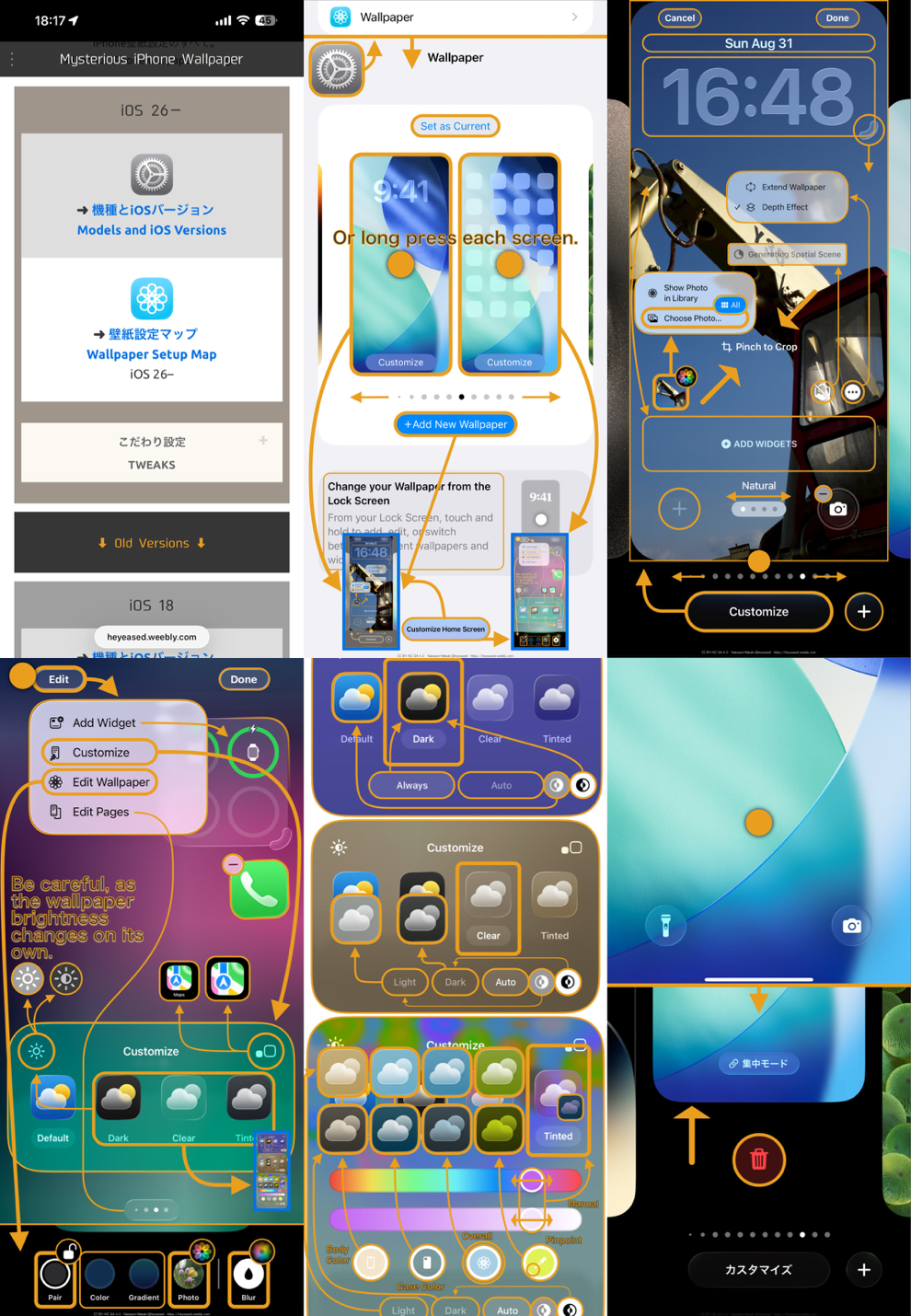
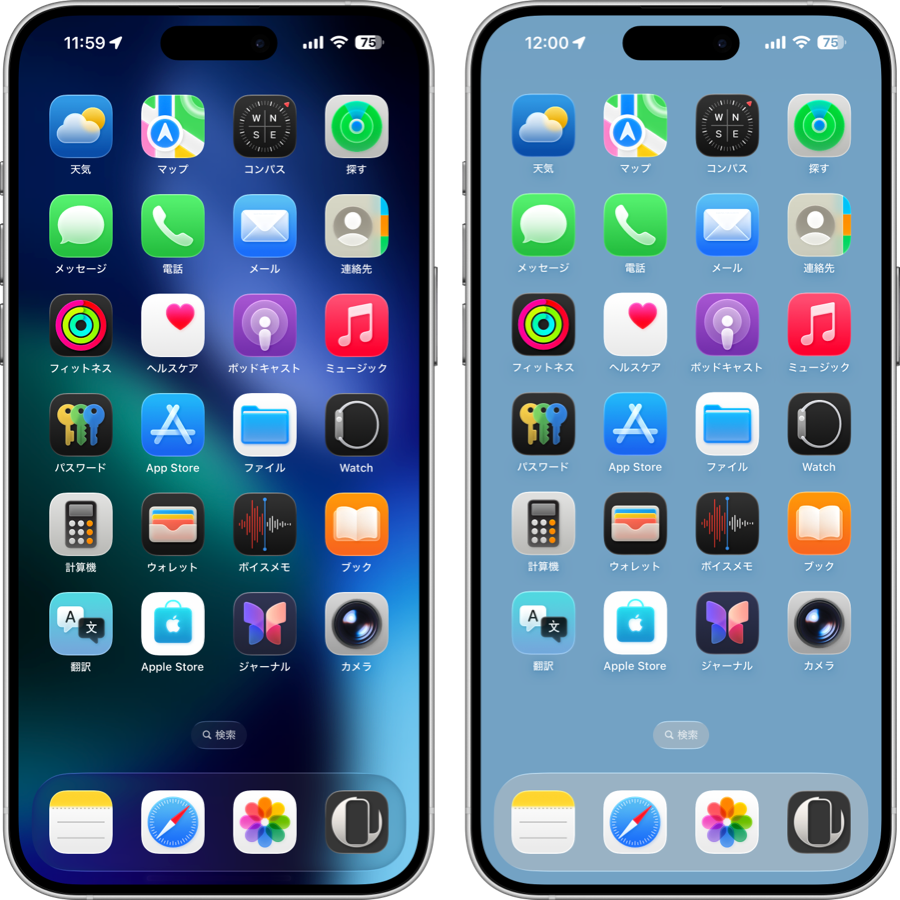
無限宇宙の壁紙の袋とじステートメント((( 宇宙の理由 )))の方程式はどこから来たのかという少し長いお話。
A somewhat long story about where the sealed statement equation ((( REASON FOR UNIVERSE ))) in the Infinite Universe came from.
A somewhat long story about where the sealed statement equation ((( REASON FOR UNIVERSE ))) in the Infinite Universe came from.
➜ English
それは昔の私。大学3年生から社会人2年生頃まで自分達で作った地方のアマチュア劇団にいて、私はまったくの素人でしたが主役をやったり端役をやったり詩を書いたり作詞をしたり舞台監督をやったり代役をやったり小道具を描いたり、劇団の解散後も他県に帰って続けていた昔の仲間に向けて脚本を書いたり舞台背景を描いたりしていました。
できる人がいない仕事は、私もできないけど私がやるからみんなできる。
ちょうどその頃、個人的に無から有が生まれる?のが気になって気になって、相対論とか量子力学とか超ひも理論とか熱力学とか老子とかカバラとかクロウリーとか数論とか不完全性定理とか……どうやら第一原因は不可知にして誰も知らない。追い詰められて、操作も条件も必要ない(=で始まり、x > 0などの条件も付かずにただ真とだけ出てくる)無限回帰の方程式を書いていました。無限と無って均一性では区別がつきませんよね?
(0 = 0/0 = ∀でもいいけど何でもあり過ぎて意味がない。あるいはその解すべてが∞? いや総和と考えたら負の概念で必ず0。対消滅? しかし正負も相対的? xの他にyがあってもいいと考えるのも無理がある。何を基準に区別する? 「何か」以外の単位の基準は作為的。一つの「何か」が一次元のプランク長*で光速**で、それが基準になる……)
できる人がいない仕事は、私もできないけど私がやる…… だから何だ?
あんなもん使い所はありません。長い間頭の隅に残ったまま、ホーキング博士やマンデルブロやプリゴジンや創発や計算する宇宙や共鳴やらなにやらをチェックしているうちに、永久インフレーション理論あたりからじわじわと、また詩になってきたわけです。
そしていまは壁紙にこじつければ何でもありじゃありませんか。
AIも必要不可欠でした。英語版はGeminiとPerplexityの力を借りています。ChatGPTは割と早めに利用制限がかかるようになっているみたいですけど、Geminiの高速モードなら今のところほぼ無制限です。ただの質問にはGoogle検索のAIモードも使います。
詩的な内容は解釈もデリケート。ニュアンスを確認してオーダーし直して、自分でも書き直して間違えてないか、意味は通じるか、物理学的に正しいか、Geminiのスレッドで方向性がずれ始めたらPerplexityにそれまで作ったものを丸ごと持って行って二刀流で進めました。片方でいいと思ったフレーズはもう片方にも提案してまとめていきます。
AIから出てくる文章はそのままだと大体過剰に説明的です。単語を一つ一つチェックして、これは必要か? これは必要か? thatは無い方がすっきりしない? そんな言い回しがあるなら先に言ってよ……とやってるうちに原文に逆輸入したり、曖昧な部分も気になってどんどん変わります。
とにかくエントロピー増大は物理世界のラスボス。自己組織化って逆にエントロピー増大効率化のためじゃない? 細胞内物質の複雑さも人の脳が必要以上に賢くなったのも複雑さそのものが物理的な要請だからじゃない? なんて閃いたつもりでいたら、既にエントロピー生成最大化原理というのが提唱されていたり、かと思えばエントロピー生成最小原理というのもあったり、それも一時的なエントロピー減少の表現だよねと咀嚼して……書き直すたびに英訳で余計な単語が入ってくるので、また一つ一つチェックして……気付いたら2週間ほとんどそれしかしていませんでした。
ぶっちゃけ、言葉の響きは英文の方が圧倒的に良さそう。日本語も「ほど」と「なるほど」で韻を踏んで頑張ってはみましたが。
あの内容は、翻訳家に頼んでも厳しそう。やり直しやり直しで人間ならもういい加減キレるよねと何十回思ったことか。生成AIの忍耐力無しにはまたお蔵入りになっていたでしょう。
出来上がったのは無→宇宙→人、直結の最短表現と自負しています。
ここまで考えたら私の脳もAIのサーバーもそれなりのエントロピーを熱として放出したはず。電力使ってごめんなさい。だって宇宙の要請なんです。
……肝心の壁紙はあれを書きながら二、三日で仕上がっていました。
*プランク長はそれより小さくなると一般相対論も量子力学も通じなくなる極限のスケール。宇宙の最小単位と言われることもある。
**全ての素粒子は光速で運動していて、ジグザグ運動などで直進できないと質量を持つ=遅くなると考えられている。
できる人がいない仕事は、私もできないけど私がやるからみんなできる。
ちょうどその頃、個人的に無から有が生まれる?のが気になって気になって、相対論とか量子力学とか超ひも理論とか熱力学とか老子とかカバラとかクロウリーとか数論とか不完全性定理とか……どうやら第一原因は不可知にして誰も知らない。追い詰められて、操作も条件も必要ない(=で始まり、x > 0などの条件も付かずにただ真とだけ出てくる)無限回帰の方程式を書いていました。無限と無って均一性では区別がつきませんよね?
(0 = 0/0 = ∀でもいいけど何でもあり過ぎて意味がない。あるいはその解すべてが∞? いや総和と考えたら負の概念で必ず0。対消滅? しかし正負も相対的? xの他にyがあってもいいと考えるのも無理がある。何を基準に区別する? 「何か」以外の単位の基準は作為的。一つの「何か」が一次元のプランク長*で光速**で、それが基準になる……)
できる人がいない仕事は、私もできないけど私がやる…… だから何だ?
あんなもん使い所はありません。長い間頭の隅に残ったまま、ホーキング博士やマンデルブロやプリゴジンや創発や計算する宇宙や共鳴やらなにやらをチェックしているうちに、永久インフレーション理論あたりからじわじわと、また詩になってきたわけです。
そしていまは壁紙にこじつければ何でもありじゃありませんか。
AIも必要不可欠でした。英語版はGeminiとPerplexityの力を借りています。ChatGPTは割と早めに利用制限がかかるようになっているみたいですけど、Geminiの高速モードなら今のところほぼ無制限です。ただの質問にはGoogle検索のAIモードも使います。
詩的な内容は解釈もデリケート。ニュアンスを確認してオーダーし直して、自分でも書き直して間違えてないか、意味は通じるか、物理学的に正しいか、Geminiのスレッドで方向性がずれ始めたらPerplexityにそれまで作ったものを丸ごと持って行って二刀流で進めました。片方でいいと思ったフレーズはもう片方にも提案してまとめていきます。
AIから出てくる文章はそのままだと大体過剰に説明的です。単語を一つ一つチェックして、これは必要か? これは必要か? thatは無い方がすっきりしない? そんな言い回しがあるなら先に言ってよ……とやってるうちに原文に逆輸入したり、曖昧な部分も気になってどんどん変わります。
とにかくエントロピー増大は物理世界のラスボス。自己組織化って逆にエントロピー増大効率化のためじゃない? 細胞内物質の複雑さも人の脳が必要以上に賢くなったのも複雑さそのものが物理的な要請だからじゃない? なんて閃いたつもりでいたら、既にエントロピー生成最大化原理というのが提唱されていたり、かと思えばエントロピー生成最小原理というのもあったり、それも一時的なエントロピー減少の表現だよねと咀嚼して……書き直すたびに英訳で余計な単語が入ってくるので、また一つ一つチェックして……気付いたら2週間ほとんどそれしかしていませんでした。
ぶっちゃけ、言葉の響きは英文の方が圧倒的に良さそう。日本語も「ほど」と「なるほど」で韻を踏んで頑張ってはみましたが。
あの内容は、翻訳家に頼んでも厳しそう。やり直しやり直しで人間ならもういい加減キレるよねと何十回思ったことか。生成AIの忍耐力無しにはまたお蔵入りになっていたでしょう。
出来上がったのは無→宇宙→人、直結の最短表現と自負しています。
ここまで考えたら私の脳もAIのサーバーもそれなりのエントロピーを熱として放出したはず。電力使ってごめんなさい。だって宇宙の要請なんです。
……肝心の壁紙はあれを書きながら二、三日で仕上がっていました。
*プランク長はそれより小さくなると一般相対論も量子力学も通じなくなる極限のスケール。宇宙の最小単位と言われることもある。
**全ての素粒子は光速で運動していて、ジグザグ運動などで直進できないと質量を持つ=遅くなると考えられている。
That's the old me. From my junior year in college to my second year working, I was in a local amateur theater group we started ourselves. Total amateur, but I handled everything—lead roles, bit parts, poetry, lyrics, stage direction, understudy, props. Even after disbanding, I wrote scripts and painted backdrops for members who'd moved away.
If no one else can do the job, I can't either—but I'll do it so we can all manage.
Around then, I was obsessed with how something comes from nothing. Relativity, quantum mechanics, superstring theory, thermodynamics, Laozi, Kabbalah, Crowley, number theory, Gödel... The first cause seemed unknowable. Cornered, I wrote infinite regression equations needing no operations or conditions (= starting right off, no x > 0, just truth emerging). Infinity and nothingness look identical in uniformity, right?
(0 = 0/0 = ∀ works too, but so anything-goes it's meaningless. Or all solutions ∞? As summation, negative concepts return to zero. Pair annihilation? Yet positive/negative is relative? Forcing y alongside x feels contrived. What standard are we even using to tell them apart? Any standard beyond "something" is artificial. One “something” One-dimensional Planck length* and light speed** becomes the standard.…)
If no one else can do it, I'll do it... but so what?
No practical use for that. It lingered for a long time in a corner of my mind while I tracked Hawking, Mandelbrot, Prigogine, emergence, computational universes, resonance theory, and so on—until eternal inflation theory slowly brought poetry bubbling back up.
Now tying it to wallpapers, anything goes.
AI was essential. English leaned on Gemini and Perplexity's power. ChatGPT limits quickly; Gemini fast mode is near-unlimited. Google AI for simple queries.
Poetic nuance is delicate. I'd confirm, reorder, rewrite, verify physics—switching to Perplexity "two-sword style" when Gemini drifted. Good phrases synthesized across both.
AI text over-explains. I'd trim word-by-word: Needed? Cleaner without "that"? During this, I'd refine the Japanese original too.
Anyway, entropy increase is physics’ final boss. I thought I’d flashed on it: If there’s a force wanting more entropy, doesn’t self-organization—locally decreasing it then expelling even more outside—actually optimize entropy growth? Doesn’t the complexity of substances inside cells, or human brains getting smarter than needed, come from complexity itself being a physical demand? Turns out the Maximum Entropy Production Principle already existed… then there’s the Minimum too, which is just another way of saying temporary local decreases. Chewing that over… Each rewrite brought extra words in English translation, so I’d check one by one… Before I knew it, two weeks vanished into nothing else.
English rings better. Japanese rhymed "naruhodo" with "hodo," but still. Human translators would snap. Without AI's infinite patience, it'd be shelved.
What emerged is the shortest expression directly connecting nothing → universe → human, I’m proud to say.
My brain and AI servers dumped entropy as heat. Sorry for the power—but it's the universe's request.
...Wallpaper? Done in two-three days while writing this.
*The Planck length is the extreme scale at which both general relativity and quantum mechanics cease to apply if anything becomes smaller than it. It is sometimes called the universe's minimal unit.
**All elementary particles are considered to move at light speed, acquiring mass because they cannot travel straight due to zigzag motions—effectively slowing down.
If no one else can do the job, I can't either—but I'll do it so we can all manage.
Around then, I was obsessed with how something comes from nothing. Relativity, quantum mechanics, superstring theory, thermodynamics, Laozi, Kabbalah, Crowley, number theory, Gödel... The first cause seemed unknowable. Cornered, I wrote infinite regression equations needing no operations or conditions (= starting right off, no x > 0, just truth emerging). Infinity and nothingness look identical in uniformity, right?
(0 = 0/0 = ∀ works too, but so anything-goes it's meaningless. Or all solutions ∞? As summation, negative concepts return to zero. Pair annihilation? Yet positive/negative is relative? Forcing y alongside x feels contrived. What standard are we even using to tell them apart? Any standard beyond "something" is artificial. One “something” One-dimensional Planck length* and light speed** becomes the standard.…)
If no one else can do it, I'll do it... but so what?
No practical use for that. It lingered for a long time in a corner of my mind while I tracked Hawking, Mandelbrot, Prigogine, emergence, computational universes, resonance theory, and so on—until eternal inflation theory slowly brought poetry bubbling back up.
Now tying it to wallpapers, anything goes.
AI was essential. English leaned on Gemini and Perplexity's power. ChatGPT limits quickly; Gemini fast mode is near-unlimited. Google AI for simple queries.
Poetic nuance is delicate. I'd confirm, reorder, rewrite, verify physics—switching to Perplexity "two-sword style" when Gemini drifted. Good phrases synthesized across both.
AI text over-explains. I'd trim word-by-word: Needed? Cleaner without "that"? During this, I'd refine the Japanese original too.
Anyway, entropy increase is physics’ final boss. I thought I’d flashed on it: If there’s a force wanting more entropy, doesn’t self-organization—locally decreasing it then expelling even more outside—actually optimize entropy growth? Doesn’t the complexity of substances inside cells, or human brains getting smarter than needed, come from complexity itself being a physical demand? Turns out the Maximum Entropy Production Principle already existed… then there’s the Minimum too, which is just another way of saying temporary local decreases. Chewing that over… Each rewrite brought extra words in English translation, so I’d check one by one… Before I knew it, two weeks vanished into nothing else.
English rings better. Japanese rhymed "naruhodo" with "hodo," but still. Human translators would snap. Without AI's infinite patience, it'd be shelved.
What emerged is the shortest expression directly connecting nothing → universe → human, I’m proud to say.
My brain and AI servers dumped entropy as heat. Sorry for the power—but it's the universe's request.
...Wallpaper? Done in two-three days while writing this.
*The Planck length is the extreme scale at which both general relativity and quantum mechanics cease to apply if anything becomes smaller than it. It is sometimes called the universe's minimal unit.
**All elementary particles are considered to move at light speed, acquiring mass because they cannot travel straight due to zigzag motions—effectively slowing down.