超ぼかし物語
The Ultra Blur Story
いい感じにしてくれます。
It just works out nicely.
It just works out nicely.
➜ English
Apple製品の壁紙は多少小さくても大丈夫です。ある程度なら引き伸ばされてもOSが補完してなめらかな描写にしてくれます。
現在の普通の壁紙は4桁ピクセル、iPhoneなら3桁ピクセル後半でもなんとか補完してくれます。それより小さくなるとさすがに粗くなりますが、では思い切って1桁ピクセルまで小さくするとどうでしょう?
1桁ピクセルの画像は情報が少な過ぎて「不純物」がないので、OSがいい感じにしてくれます。独特の綺麗なぼかしになるのです。
少なくともiOS 6では少しでも小さな画像だと壁紙が無理矢理伸ばされて粗くなっていました。パソコンでも何でも画面サイズ以上の画像を使うのが当たり前だったのです。
推測ですがおそらくiOS 7で視差効果が導入された時からです。視差効果はiOS 16になって廃止されましたが、iPhoneの傾きに合わせて壁紙が上下左右に動く擬似3D機能でした。
視差効果では四辺に余白を作るために壁紙が拡大されることになります。
当時多くのiPhone用の壁紙は画面サイズに合わせて作られていました。画質の補完をしていなかったらiOS 7は壁紙が粗くなると言われていたはず。
Adobeのスーパー解像度と似たような機能です。
視差効果がなくてもこの技術が継承されていることは、逆に綺麗にならないケースからも読み取れます。
通常サイズで広範囲のグラデーションを持つ壁紙を使っていれば、よく見ると縞々が出ているかもしれません。グラデーションを埋める色が足りずに段差ができてしまうことがあります。
これが写真アプリではなめらかでも、設定すると出ていることもあるのです。壁紙にする時に何らかの加工をしていなければ同じ画面で違いは出ないはず。
★
通常サイズで広範囲のグラデーションを持つ壁紙を使っていれば、よく見ると縞々が出ているかもしれません。グラデーションを埋める色が足りずに段差ができてしまうことがあります。
これが写真アプリではなめらかでも、設定すると出ていることもあるのです。壁紙にする時に何らかの加工をしていなければ同じ画面で違いは出ないはず。
★
- 一部マイクロサイズの壁紙には最新iOSで長押し保存できないものがあります。
- 代表的なトリックにスクショとリンクを添えて歴史をまとめています。
- 細かい閾値の変更は省略しています。実際にはもっと多くのバージョンがありました。
- 原則としてメジャーアップデート後の旧バージョンのマイナーアップデートは追跡していません。
- 対応OSのリリース期間を目安として表記しています。壁紙の公開とは必ずしも一致しません。
- このページは2026年5月にまとめました。
iOS 9.3–10.3
2016年3月 – 2017年3月
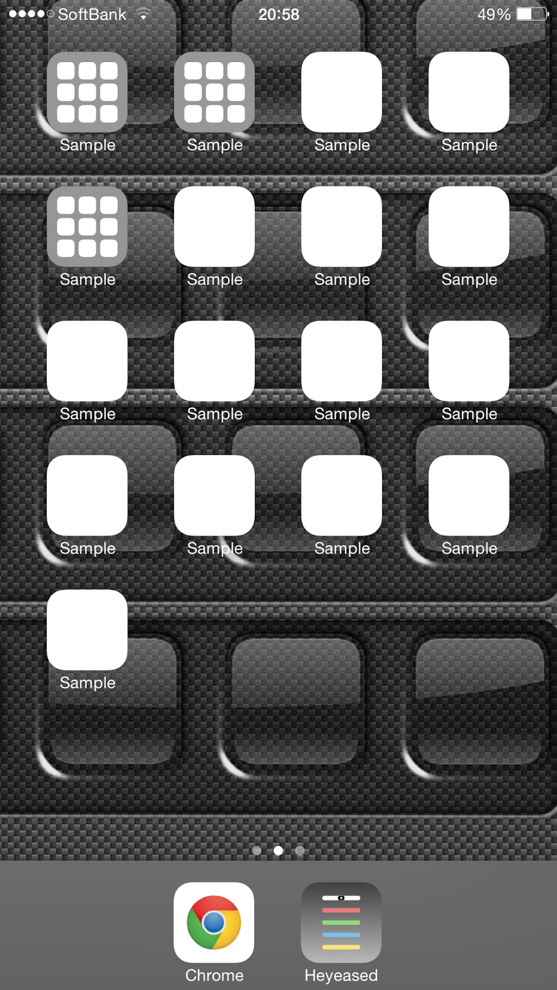
iOS 9.3ベータの使用中、9.2まで問題なく使えていたカラーUIの壁紙に異変。小さすぎるサイズの画像でドックとフォルダをカラーにする壁紙だったのですが、なんとそのフォルダがところどころ丸くされてしまいました。
これでは私の壁紙でバグが出たみたいじゃないですか。信用問題です。すぐAppleに報告しました。ほらほら小さな壁紙で丸くなってますよー。
しかしその後のベータでも直る気配はありません。まさかこのまま行くつもりでしょうか。
それなら然るべき準備が必要です。フォルダはすべて丸くなるわけではなく、場所によって機種によって壁紙のサイズによってまちまちでした。最も丸くなるフォルダが多そうなサイズを特定しておいて……
やっぱりそのまま正式版になってしまいました。
さあ皆さん!フォルダを丸くする壁紙ですよー!
これでは私の壁紙でバグが出たみたいじゃないですか。信用問題です。すぐAppleに報告しました。ほらほら小さな壁紙で丸くなってますよー。
しかしその後のベータでも直る気配はありません。まさかこのまま行くつもりでしょうか。
それなら然るべき準備が必要です。フォルダはすべて丸くなるわけではなく、場所によって機種によって壁紙のサイズによってまちまちでした。最も丸くなるフォルダが多そうなサイズを特定しておいて……
やっぱりそのまま正式版になってしまいました。
さあ皆さん!フォルダを丸くする壁紙ですよー!

➜ フォルダが丸くなる壁紙
そりゃ話題になりますよね。これで海外からも訪問されるようになって日英併記のサイトになったのです。
この時期にマイクロサイズの画像を大量に作り、小さな壁紙が引き伸ばされるとどんな描写になるのかを学びました。
そりゃ話題になりますよね。これで海外からも訪問されるようになって日英併記のサイトになったのです。
この時期にマイクロサイズの画像を大量に作り、小さな壁紙が引き伸ばされるとどんな描写になるのかを学びました。
iOS 11.0–11.4
2017年9月 – 2018年9月
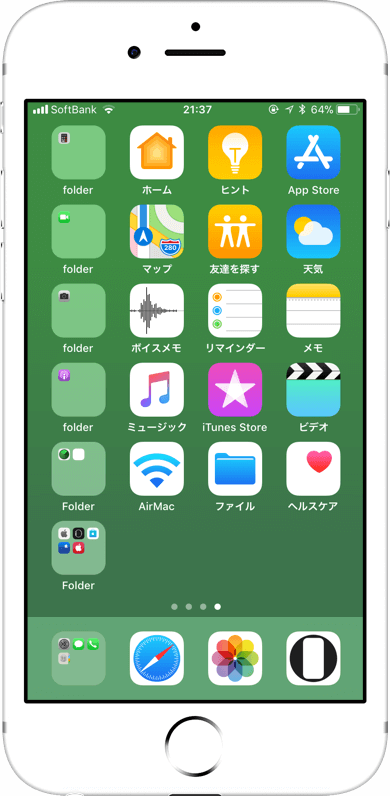
小さな壁紙がドックやフォルダに与える影響はなくなり、1桁ピクセルではキャンセルされて設定さえできません。
ですが2桁ピクセル程度あれば綺麗なグラデーションにはなっていました。
ですが2桁ピクセル程度あれば綺麗なグラデーションにはなっていました。
iOS 16.0–
2022年9月 –
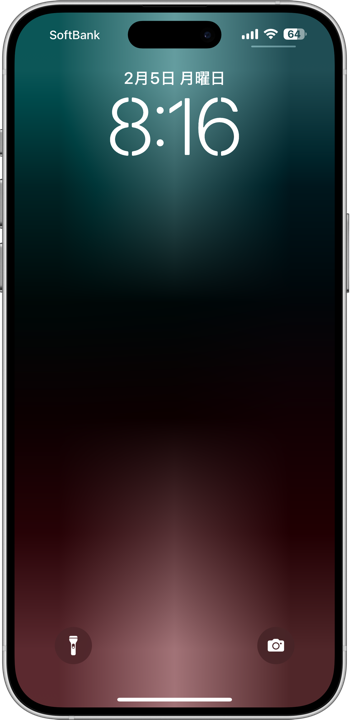
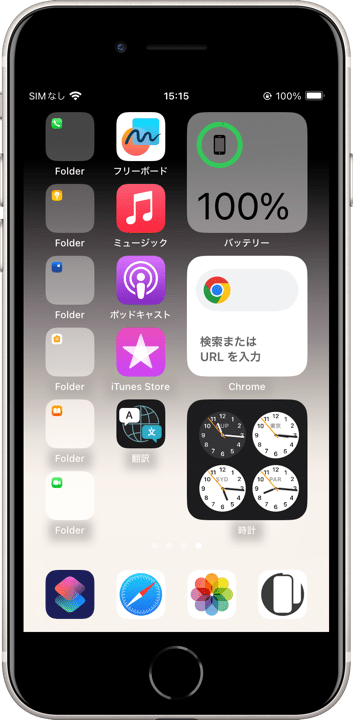
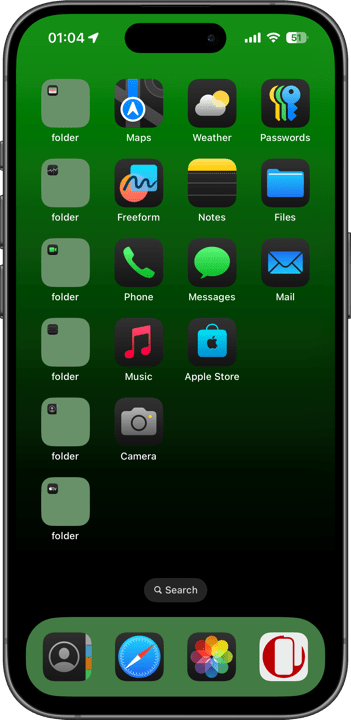
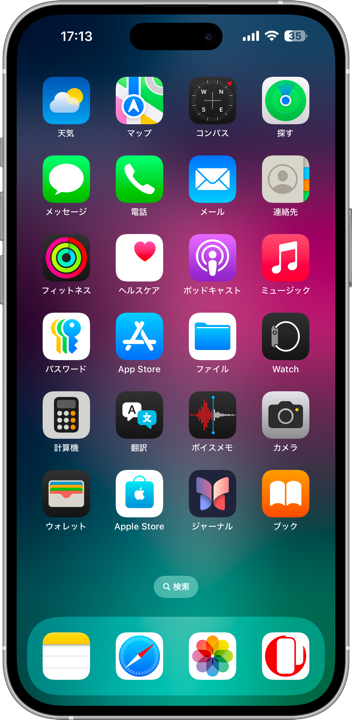
iOS 16で小さな壁紙が綺麗なグラデーションになる仕様が復活していました。久しぶりに腕の見せどころです。
気がついたのは2024年の2月、iOS17の時でした。最初はiOS 17からと思いましたが、後でiOS 15までしか上げられなかったiPod touch 7とiOS 16までしか上げられなかったiPhone 8で確認。
以前よりも絵作りが難しくなっていて、iPhone 11世代以前ではサイズ次第で下半分の色が変わることもありますが十分です。
最初に復活させたのは『ロックをカスタムする壁紙』のグラデーションライト。
気がついたのは2024年の2月、iOS17の時でした。最初はiOS 17からと思いましたが、後でiOS 15までしか上げられなかったiPod touch 7とiOS 16までしか上げられなかったiPhone 8で確認。
以前よりも絵作りが難しくなっていて、iPhone 11世代以前ではサイズ次第で下半分の色が変わることもありますが十分です。
最初に復活させたのは『ロックをカスタムする壁紙』のグラデーションライト。
iOS 16.0–
iPadOS 16.0–
macOS 15.0–
2022年9月 –
iOS 26でのカテゴリー再編の一環として、『その他の壁紙』から小さな壁紙を独立。iPhone、iPad、Macで共用できる小さなユニバーサルサイズも制作。
無限に作れるので最初はページを増やしていく構成に。
無限に作れるので最初はページを増やしていく構成に。

Apple devices can still render wallpapers smoothly even when the source image is fairly small. Within limits, the OS stretches and reconstructs them into clean-looking images automatically.
Modern wallpapers are normally measured in four-digit pixel resolutions. On iPhone, even high three-digit resolutions can still be reconstructed reasonably well. Below that, the image finally starts becoming rough — but what happens if you go all the way down to single-digit pixels?
Single-digit pixel images contain so little information that they have almost no “impurities.” The OS does something surprisingly beautiful with them, producing a uniquely clean blur.
At least in iOS 6, even slightly undersized images were simply stretched aggressively and became visibly rough. On computers and everything else, using images larger than the display resolution was considered normal.
My guess is that this changed around iOS 7, when the Parallax Effect was introduced. Although removed in iOS 16, parallax was the pseudo-3D feature where wallpapers moved according to the tilt of the iPhone.
Parallax required wallpapers to be enlarged so extra margins existed outside the visible area.
At the time, many iPhone wallpapers were created exactly at screen resolution. If iOS 7 had not included image reconstruction, people probably would have complained that wallpapers looked blurry after the update.
It resembles something like Adobe’s Super Resolution.
The fact that this technology still exists even after the removal of parallax can actually be inferred from situations where it fails.
If you use a normally sized wallpaper containing large smooth gradients, you may notice subtle banding when viewed closely. There are not enough intermediate colors to fully reproduce the gradient, causing visible steps.
Sometimes the gradient looks smooth inside the Photos app but becomes banded only after being set as wallpaper. If no processing occurred during wallpaper setup, the same display should not produce different results.
★
If you use a normally sized wallpaper containing large smooth gradients, you may notice subtle banding when viewed closely. There are not enough intermediate colors to fully reproduce the gradient, causing visible steps.
Sometimes the gradient looks smooth inside the Photos app but becomes banded only after being set as wallpaper. If no processing occurred during wallpaper setup, the same display should not produce different results.
★
- Some micro-sized wallpapers can no longer be saved by long-pressing on the latest iOS versions.
- This is a historical overview of the major tricks, accompanied by screenshots and links.
- Minor threshold adjustments are omitted. In reality, there were even more variations.
- As a rule, I do not track minor updates for older iOS versions after a major update is released.
- Supported OS versions are listed based on their release periods and do not necessarily match the wallpaper release dates.
- This page was compiled in May 2026.
iOS 9.3–10.3
March 2016 – March 2017
While testing the iOS 9.3 beta, I noticed something strange happening to Color UI wallpapers that had worked perfectly in iOS 9.2. These wallpapers used extremely tiny image sizes to color the Dock and folders.
Suddenly, some folders started becoming rounded in random places.
This made it look as though my wallpapers themselves were bugged. A credibility issue. I immediately reported it to Apple. Look, look, tiny wallpapers are making the folders round!
But through later beta versions, there was no sign of a fix.
Were they really going to ship it like this?
If so, proper preparations were necessary.
Not every folder became rounded. The behavior varied depending on position, device, and wallpaper size. So I identified the wallpaper sizes most likely to maximize the effect…
And yes, it shipped exactly like that in the final release.
Alright everyone — wallpapers that round your folders, now available!
Suddenly, some folders started becoming rounded in random places.
This made it look as though my wallpapers themselves were bugged. A credibility issue. I immediately reported it to Apple. Look, look, tiny wallpapers are making the folders round!
But through later beta versions, there was no sign of a fix.
Were they really going to ship it like this?
If so, proper preparations were necessary.
Not every folder became rounded. The behavior varied depending on position, device, and wallpaper size. So I identified the wallpaper sizes most likely to maximize the effect…
And yes, it shipped exactly like that in the final release.
Alright everyone — wallpapers that round your folders, now available!
➜ Round Folders Wallpapers
Of course it became a topic online. This was also when visitors from overseas began arriving, turning the site into a bilingual Japanese-English website.
During this period, I created huge numbers of micro-sized images and learned exactly how tiny wallpapers behaved when stretched by the OS.
Of course it became a topic online. This was also when visitors from overseas began arriving, turning the site into a bilingual Japanese-English website.
During this period, I created huge numbers of micro-sized images and learned exactly how tiny wallpapers behaved when stretched by the OS.
iOS 11.0–11.4
September 2017 – September 2018
Tiny wallpapers no longer affected the Dock or folders, and single-digit pixel wallpapers were rejected outright and could not even be applied.
However, images around double-digit pixel sizes still produced beautiful gradients.
However, images around double-digit pixel sizes still produced beautiful gradients.
➜ Average 3
In iOS 12.0, even those sizes became unusable, and for a while the entire genre of tiny wallpapers effectively disappeared.
In iOS 12.0, even those sizes became unusable, and for a while the entire genre of tiny wallpapers effectively disappeared.
iOS 16.0–
September 2022 –
In iOS 16, the beautiful-gradient behavior of tiny wallpapers unexpectedly returned. Finally, a chance to show my skills again.
I first noticed it in February 2024 during iOS 17. At first I assumed it was introduced in iOS 17, but later verified it on an iPod touch (7th generation) limited to iOS 15 and an iPhone 8 limited to iOS 16.
Compared to the older behavior, image design had become more difficult. On devices older than the iPhone 11 generation, the lower half of the wallpaper could shift colors depending on image size.
But it was more than enough.
The first thing I brought back was the gradient light used in “Custom Lock Wallpapers.”
I first noticed it in February 2024 during iOS 17. At first I assumed it was introduced in iOS 17, but later verified it on an iPod touch (7th generation) limited to iOS 15 and an iPhone 8 limited to iOS 16.
Compared to the older behavior, image design had become more difficult. On devices older than the iPhone 11 generation, the lower half of the wallpaper could shift colors depending on image size.
But it was more than enough.
The first thing I brought back was the gradient light used in “Custom Lock Wallpapers.”
➜ Micro Light
It later expanded into gradient expressions for “Hide Dock Wallpapers”and “Color UI Wallpapers.”
It later expanded into gradient expressions for “Hide Dock Wallpapers”and “Color UI Wallpapers.”
➜ Hide Top & Bottom ➜ Add Color
Wallpapers that showcased the rendering of tiny images themselves were placed under “Uncategorized Wallpapers.”
Wallpapers that showcased the rendering of tiny images themselves were placed under “Uncategorized Wallpapers.”
iOS 16.0–
iPadOS 16.0–
macOS 15.0–
September 2022 –
As part of the category restructuring during iOS 26, I separated tiny wallpapers from the old “Uncategorized Wallpapers” section.
I also created universal tiny wallpaper sizes that could work across iPhone, iPad, and Mac.
Since these could theoretically be created endlessly, the original plan was to continue expanding the category page by page.
I also created universal tiny wallpaper sizes that could work across iPhone, iPad, and Mac.
Since these could theoretically be created endlessly, the original plan was to continue expanding the category page by page.
➜ Universal 9×9
The category was named “Ultra Blur Wallpapers.”
Another advantage of small wallpapers is that they take up almost no storage. They can be thousands of times smaller than ordinary images.
The category was named “Ultra Blur Wallpapers.”
Another advantage of small wallpapers is that they take up almost no storage. They can be thousands of times smaller than ordinary images.
