💾
Legacy
Legacy
ブラックブラックニンジャ壁紙
Black Black Ninja
iOS 26.0–26.1
➜ iOS 26.2–
iPhone Air/17 Pro Max/17 Pro/17/
16 Pro Max/16 Pro/16 Plus/16/16e/
15 Pro Max/15 Pro/15 Plus/15/
14 Pro Max/14 Pro/14 Plus/14/
13 Pro Max/13 Pro/13/13 mini/
12 Pro Max/12 Pro/12/12 mini/
11 Pro Max/11 Pro/11/SE 3/SE 2
・▲・ iPhone=?iOS=? ・▼・
➜ iOS 26.2–
iPhone Air/17 Pro Max/17 Pro/17/
16 Pro Max/16 Pro/16 Plus/16/16e/
15 Pro Max/15 Pro/15 Plus/15/
14 Pro Max/14 Pro/14 Plus/14/
13 Pro Max/13 Pro/13/13 mini/
12 Pro Max/12 Pro/12/12 mini/
11 Pro Max/11 Pro/11/SE 3/SE 2
・▲・ iPhone=?iOS=? ・▼・
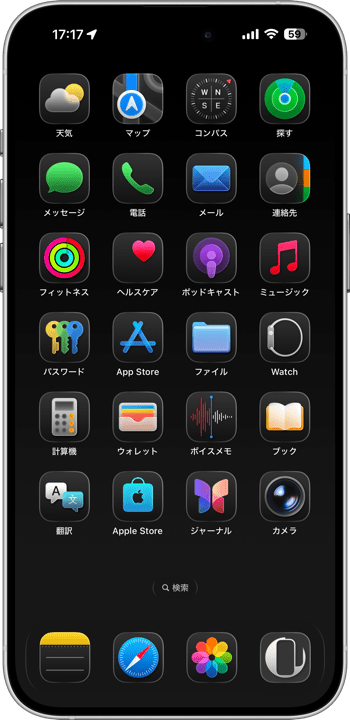
Face ID iPhoneのダイナミックアイランドやノッチも黒いグラデーションで隠します。iPhone 14以降では傾きでドックが見え隠れ、iPhone 13以前では部分的にドックを隠し、SEではロック解除とアプリを閉じた時にドックが見えなくなり傾けると見えます。
It also hides the Dynamic Island or notch on Face ID iPhone with a black gradient. On iPhone 14 and later, the Dock appears and disappears with tilt. On iPhone 13 and earlier, it’s partially hidden. On SE, the Dock disappears when unlocking or closing an app, and reappears when tilted.
It also hides the Dynamic Island or notch on Face ID iPhone with a black gradient. On iPhone 14 and later, the Dock appears and disappears with tilt. On iPhone 13 and earlier, it’s partially hidden. On SE, the Dock disappears when unlocking or closing an app, and reappears when tilted.
How to Set
・▲・
・▲・

日本語
ピンチインして上に・自然光
ホーム画面:ぼかしオフ
ホーム画面:ぼかしオフ

english
Pinch in then swipe up; Natural
Home: Blur off
Home: Blur off
Home Screen Customization:
Tap & hold Home Screen > Edit > Customize
Default/Dark → Dark Mode
Clear/Tinted → Either way
Darker background
透明度を下げる: オン
設定 > アクセシビリティ >
画面表示とテキストサイズ > 透明度を下げる
ダークモード・背景明るく
ピンチインして上に・ぼかしオフ
「自然光」
───────────────
Reduce Transparency: On
Settings > Accessibility >
Display & Text Size > Reduce Transparency
Dark Mode & Light Background
Pinch in then swipe up and Blur off.
Natural
───────────────
⚙︎ Help ⚙︎
設定 > アクセシビリティ >
画面表示とテキストサイズ > 透明度を下げる
ダークモード・背景明るく
ピンチインして上に・ぼかしオフ
「自然光」
───────────────
Reduce Transparency: On
Settings > Accessibility >
Display & Text Size > Reduce Transparency
Dark Mode & Light Background
Pinch in then swipe up and Blur off.
Natural
───────────────
⚙︎ Help ⚙︎
・▼・
タップ → 表示 → 長押し保存
Tap → View → Hold to save
タップ → 表示 → 長押し保存
Tap → View → Hold to save

★
- 壁紙のぼかしがオンになっていると背景の明るさが変わります。ホーム画面長押し > 壁紙を編集 > 💧アイコンを暗く
- 壁紙を設定後にホーム画面をカスタマイズするとドックの色が変わることがありますが、画面を切り替えると戻ります。
- コントラストを上げるがオンになっているとドックに白い縁が付きます。設定アプリ > アクセシビリティ > 画面表示とテキストサイズ > コントラストを上げる:オフ
- 視差効果を減らすがオンになっているとリキッドグラスの傾きエフェクトがドックに働かないためiPhone 14以降でも消えて見えることはありません。設定 > アクセシビリティ > 動作 > 視差効果を減らす:オフ
- 低電力モードがオンになっているとリキッドグラスの傾きエフェクトがドックに働かないためiPhone 14以降でも消えて見えることはありません。
- スマート反転など、その他の視覚アクセシビリティ機能(Appleサポート)をオンにしてもドックの色が変わることがあります。
- 画像形式をWebPにして高品質軽量化を図っています。iOS 14以降で表示できます。
- When wallpaper blur is on, the background brightness changes. Home Screen long-press > Edit Wallpaper > turn the 💧 icon dark.
- After setting a wallpaper, customizing the Home Screen may change the Dock’s color, but it reverts when switching screens.
- When Increase Contrast is on, the Dock gets a white edge. Settings app > Accessibility > Display & Text Size > Increase Contrast: Off
- When Reduce Motion is on, the Liquid Glass tilt effect does not apply to the Dock, so it never appears to disappear, even on iPhone 14 and later. Settings > Accessibility > Motion > Reduce Motion: Off
- When Low Power Mode is on, the Liquid Glass tilt effect does not apply to the Dock, so it never appears to disappear, even on iPhone 14 and later.
- When features like Smart Invert or other visual accessibility options (Apple Support) are on, the Dock color may also change.
- The image format is WebP to make it high quality and lightweight. iOS 14 or later can display it.
iPhoneでは背景が一定以上の明るさの時にドックはそれより暗く、一定以下の明るさではそれより明るくなり、その中間では同じ色になります。
この壁紙はダークモードで透明度を下げるをオンにしたドックと検索ボタンに合わせました。
iPhone 14 以降では、デバイスの傾きを検知してリキッドグラスエフェクトが変化するので、ドックの境界線が見えたり隠れたりします。
さらに画面上部からの黒いグラデーションでダイナミックアイランドやノッチを自然に隠します。ただし「透明度を下げる」のUIは画面周囲の色を重点的に拾います。そのため黒の影響を受けるドック部分はソリッドカラーバージョンよりも僅かに暗く、色の精度も若干落ちています。
iOSでは設定する時に壁紙を動かすと上部がぼかされることがあります。これをより確実にキャンセルするために、画面サイズ以上の縦長アスペクト画像を上にスワイプするフォーマットにしています。
On iPhone, when the background is above a certain brightness, the Dock becomes darker than the background, and when it's below a certain brightness, the Dock becomes lighter. In between, they are the same color.
This wallpaper is designed to match the Dock and Search button with Dark Mode and Reduce Transparency turned on.
On iPhone 14 and later, the device detects tilt and the Liquid Glass effect shifts, causing the Dock’s border to appear and disappear.
It also uses a black gradient from the top to naturally hide the Dynamic Island or notch. However, the Reduce Transparency UI picks up colors mainly from the screen’s edges. As a result, the Dock area, which is affected by black, appears slightly darker and less color-accurate than in the solid-color version.
In iOS, moving a wallpaper while setting it can sometimes blur the top area. To more reliably cancel this, the format uses vertically longer images than the screen size, swiped upward.
この壁紙はダークモードで透明度を下げるをオンにしたドックと検索ボタンに合わせました。
iPhone 14 以降では、デバイスの傾きを検知してリキッドグラスエフェクトが変化するので、ドックの境界線が見えたり隠れたりします。
さらに画面上部からの黒いグラデーションでダイナミックアイランドやノッチを自然に隠します。ただし「透明度を下げる」のUIは画面周囲の色を重点的に拾います。そのため黒の影響を受けるドック部分はソリッドカラーバージョンよりも僅かに暗く、色の精度も若干落ちています。
iOSでは設定する時に壁紙を動かすと上部がぼかされることがあります。これをより確実にキャンセルするために、画面サイズ以上の縦長アスペクト画像を上にスワイプするフォーマットにしています。
On iPhone, when the background is above a certain brightness, the Dock becomes darker than the background, and when it's below a certain brightness, the Dock becomes lighter. In between, they are the same color.
This wallpaper is designed to match the Dock and Search button with Dark Mode and Reduce Transparency turned on.
On iPhone 14 and later, the device detects tilt and the Liquid Glass effect shifts, causing the Dock’s border to appear and disappear.
It also uses a black gradient from the top to naturally hide the Dynamic Island or notch. However, the Reduce Transparency UI picks up colors mainly from the screen’s edges. As a result, the Dock area, which is affected by black, appears slightly darker and less color-accurate than in the solid-color version.
In iOS, moving a wallpaper while setting it can sometimes blur the top area. To more reliably cancel this, the format uses vertically longer images than the screen size, swiped upward.