➜ English
ホーム画面とロック画面についての変更点は3つ。設定によるドックの色、リキッドグラスの調整が追加、透明度を下げるのUIカラーです。
ドックの色
iOS 26.0ではシステム全体のライト・ダークモードで決まっていましたが、これにホーム画面のカスタマイズが絡んできます。
ドックが明るくなるのは次の1か2のどちらか。
ドックが明るくなるのは次の1か2のどちらか。
- デフォルト+ライトモード
- ダーク+ライトモード
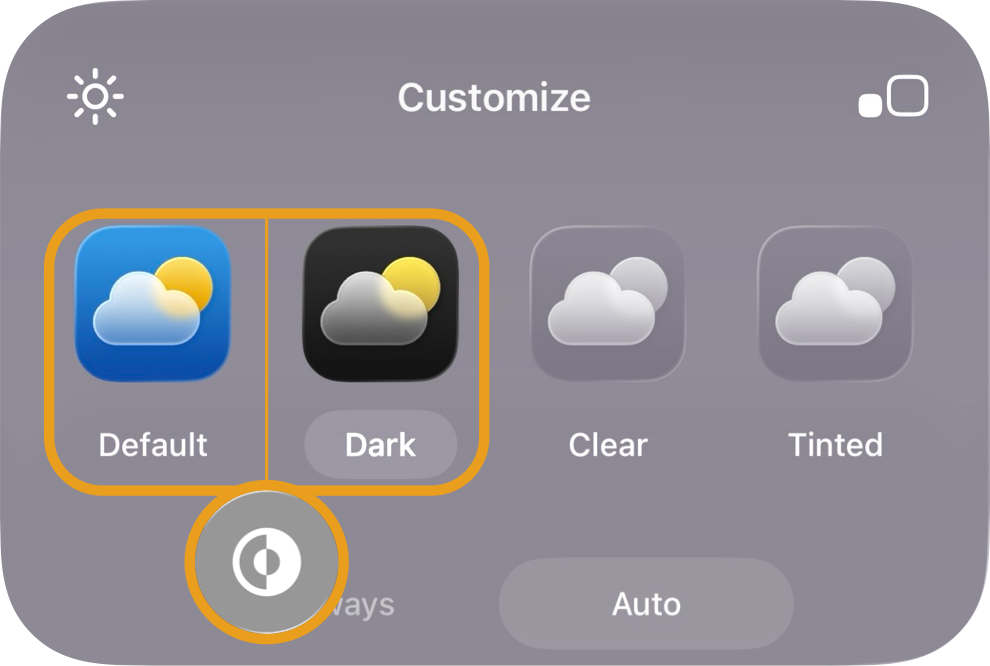
それ以外の全ての組み合わせでドックは暗くなります。
また、透明度を下げたときのドックの色が若干暗くなりました。
ドックを隠す壁紙をご使用中の方は設定の変更が必要なことがあります。変更方法をまとめたこちらをご覧ください。
➜ iOS 26用ドックを隠す壁紙のご使用中にiOS 26.1にアップデートされた方へ
また、透明度を下げたときのドックの色が若干暗くなりました。
ドックを隠す壁紙をご使用中の方は設定の変更が必要なことがあります。変更方法をまとめたこちらをご覧ください。
➜ iOS 26用ドックを隠す壁紙のご使用中にiOS 26.1にアップデートされた方へ
リキッドグラスの調節
リキッドグラスUIの一部の透明度を下げて、若干透ける白や黒にできます。
ホーム画面には影響しません。
例えばロック画面の通知カードはライトモードだと白、ダークモードでは黒。それに伴い通知が出ている間も壁紙は暗くなりません。
ホーム画面には影響しません。
例えばロック画面の通知カードはライトモードだと白、ダークモードでは黒。それに伴い通知が出ている間も壁紙は暗くなりません。
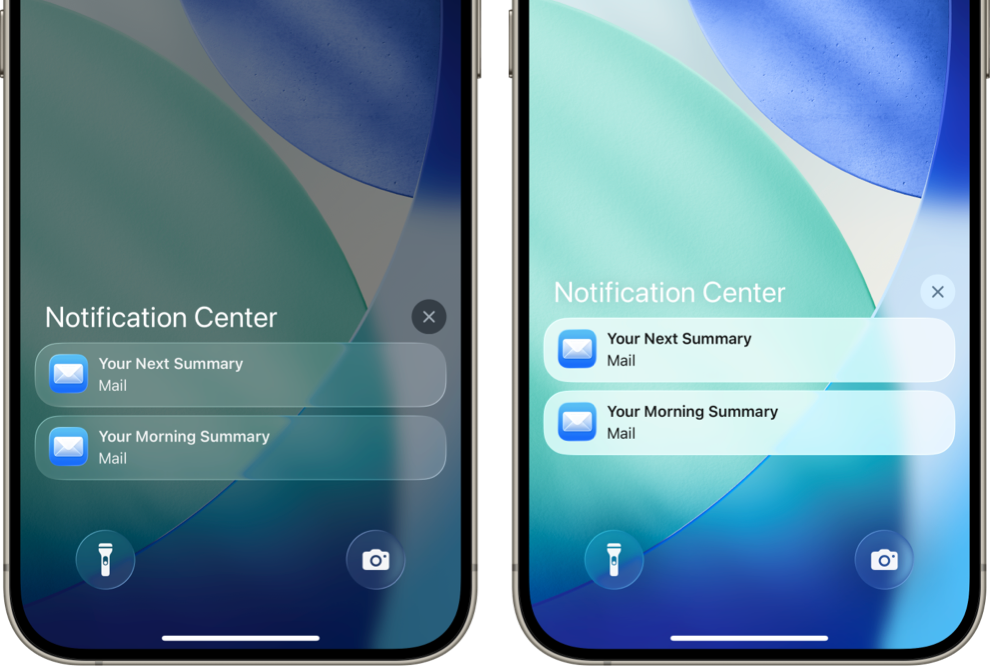
透明度を下げるのUIカラー
ホーム画面のドックやフォルダ、ロック画面の通知やボタンなどの色の拾い方が変わりました。背景全体でも特定の場所でもなく、直接の背景の色をうっすらと拾います。像は不透明なままですが、色は半透明になりました。

Home and Lock Screen changes include three updates: Dock color behavior, Liquid Glass adjustment, and the new UI color with Reduce Transparency.
Dock Color
In iOS 26.1, Dock color now depends not only on system mode but also on Home Screen customization.
It becomes lighter only in these two cases:
It becomes lighter only in these two cases:
- Default + Light Mode
- Dark + Light Mode
All other combinations make it darker.
The Dock also appears slightly dimmer when Reduce Transparency is on.
If you’re using Hide Dock Wallpapers, check your settings:
➜ For users who updated to iOS 26.1 with Hide Dock Wallpapers
The Dock also appears slightly dimmer when Reduce Transparency is on.
If you’re using Hide Dock Wallpapers, check your settings:
➜ For users who updated to iOS 26.1 with Hide Dock Wallpapers
Liquid Glass Adjustment
The transparency of certain parts of the Liquid Glass UI can now be lowered for a soft white or black frosted look.
It doesn’t affect the Home Screen.
For example, on the Lock Screen, notification cards turn white in Light Mode and black in Dark Mode, while keeping the wallpaper bright beneath them.
It doesn’t affect the Home Screen.
For example, on the Lock Screen, notification cards turn white in Light Mode and black in Dark Mode, while keeping the wallpaper bright beneath them.
When Reduce Transparency or Increase Contrast is on, you can’t switch modes—but the effect remains active once applied.
For details on how to change the setting, see the separate note.
➜ Liquid Glass Adjustment
For details on how to change the setting, see the separate note.
➜ Liquid Glass Adjustment
Reduce Transparency UI Color
Dock, folders, and Lock Screen elements now pick up color faintly from their immediate background.
Shapes stay opaque, but colors have become semi-transparent.
Shapes stay opaque, but colors have become semi-transparent.


